

Welcome to AI Fyndings!
With AI, every decision is a trade-off: speed or quality, scale or control, creativity or consistency. AI Fyndings discusses what those choices mean for business, product, and design.
In Business, Motion turns execution into a scheduling problem. It records meetings, captures action items, and continuously replans tasks against real calendars so commitments stop living in limbo.
In Product, Trickle makes tool building feel lighter. It turns prompts into working interfaces, and gives you a canvas where pages, data, assets, and rules stay connected as you iterate.
In Design, Topview treats short-form ads as a repeatable format. Instead of designing every video from scratch, it uses proven ad structures and platform patterns to generate usable creatives fast.

AI in Business
Motion: Turning Plans Into Scheduled Work
TL;DR
Motion is an AI-powered work planning tool that turns tasks, meetings, and deadlines into a continuously updated schedule. It helps individuals and teams follow through on commitments by planning work against real calendar availability.
Basic details
Pricing: 7-day free trial. Paid plans starting at $49/mo for individuals and at $29/per seat/mo for teams.
Best for: Can be used by individuals and teams alike
Use cases: Task scheduling, deadline management, meeting follow-ups, execution planning
Most teams don’t struggle with knowing what needs to be done. They struggle with fitting that work into the time they actually have.
Tasks live in one place. Meetings fill up calendars elsewhere. Deadlines sit somewhere in between. When priorities change (which they always do), planning becomes manual and reactive. Work still gets tracked, but there’s no reliable system translating it into actual time. Important tasks don’t get dropped because they’re forgotten. They get dropped because they’re not actively re-planned.
That gap is what Motion is trying to solve.
It brings tasks, projects, meetings, and availability into one system and uses AI to schedule work directly onto your calendar. Instead of asking users to decide what to work on next, Motion makes that decision based on deadlines, priorities, and real capacity.
And when your plans change, for example a meeting gets rescheduled or a new urgent task is assigned, Motion adjusts the schedule rather than leaving it on you to reshuffle everything yourself. Tasks are treated as time-bound commitments, not static checklist items.
When I first set it up, I connected my calendar right away and started using it for personal planning. It immediately picked up my existing schedule and gave me an option to add tasks. There was very little friction in getting started. It didn’t feel like I was configuring a complex workflow or teaching the tool how I work. It was adapting to the constraints that already existed.
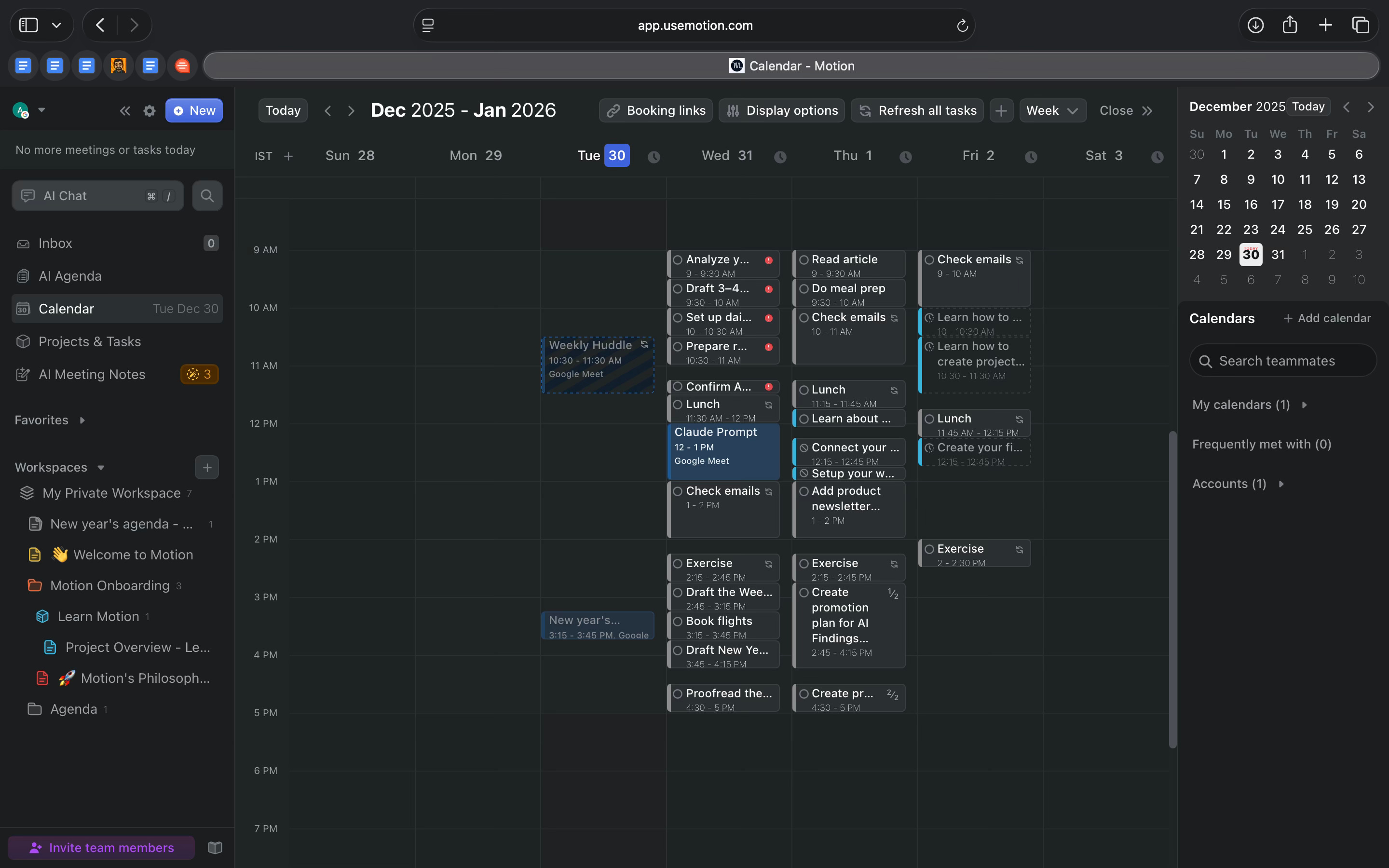
Within the first day, it felt like this approach could actually hold up in practice. The interface is simple to navigate. Your work doesn’t just get organized. It gets realistically planned and scheduled.
From a business perspective, Motion uses AI for execution discipline. It doesn’t generate ideas or content. Its value lies in continuously translating work into time and making trade-offs visible before deadlines are missed.
What’s interesting
What stood out to me about Motion was how much ownership it took after a meeting ended.
I ran a mock meeting (which quickly escalated into a real one) where I asked my manager to assign me tasks. After the meeting ended, Motion sent a detailed MOM email to all attendees. Inside the tool, the full meeting recording was available, along with structured notes.
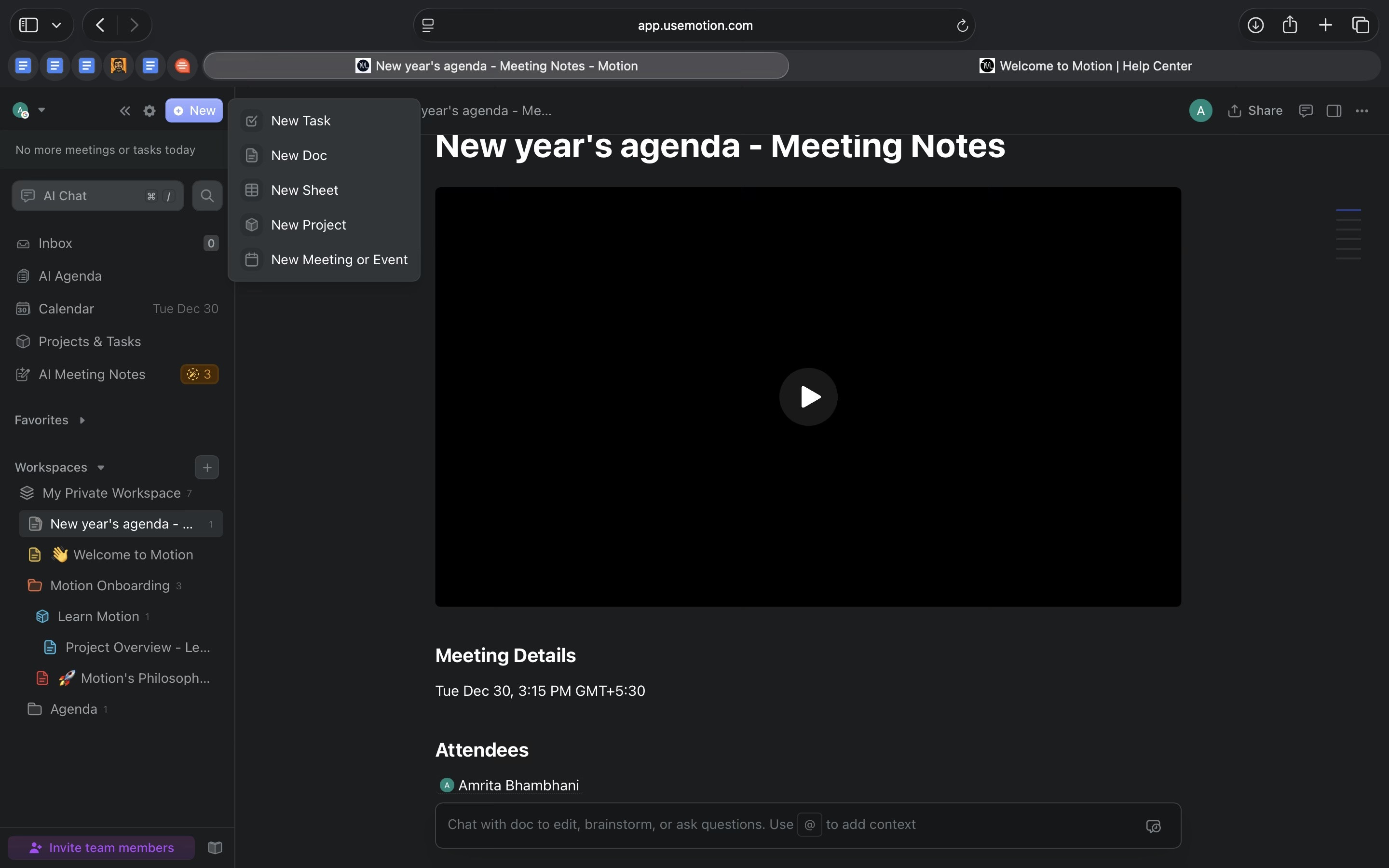
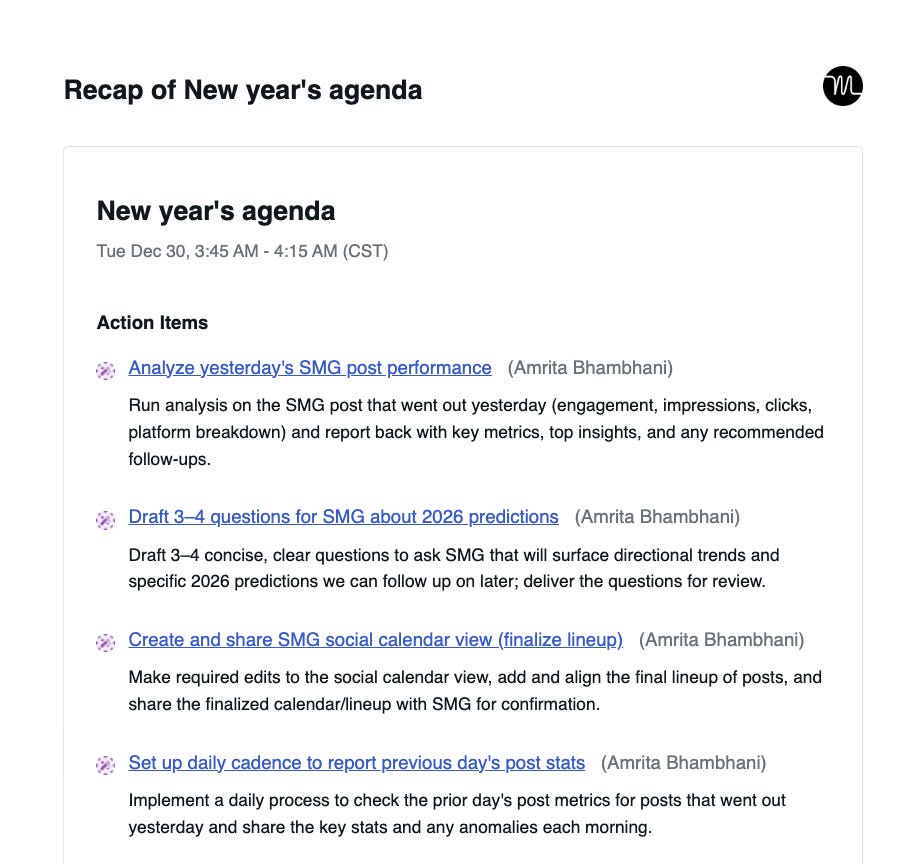
More importantly, the tool had already picked up on what was assigned to whom. The tasks discussed in the meeting were converted into action items, assigned to the right people, and scheduled directly into calendars based on deadlines and availability.
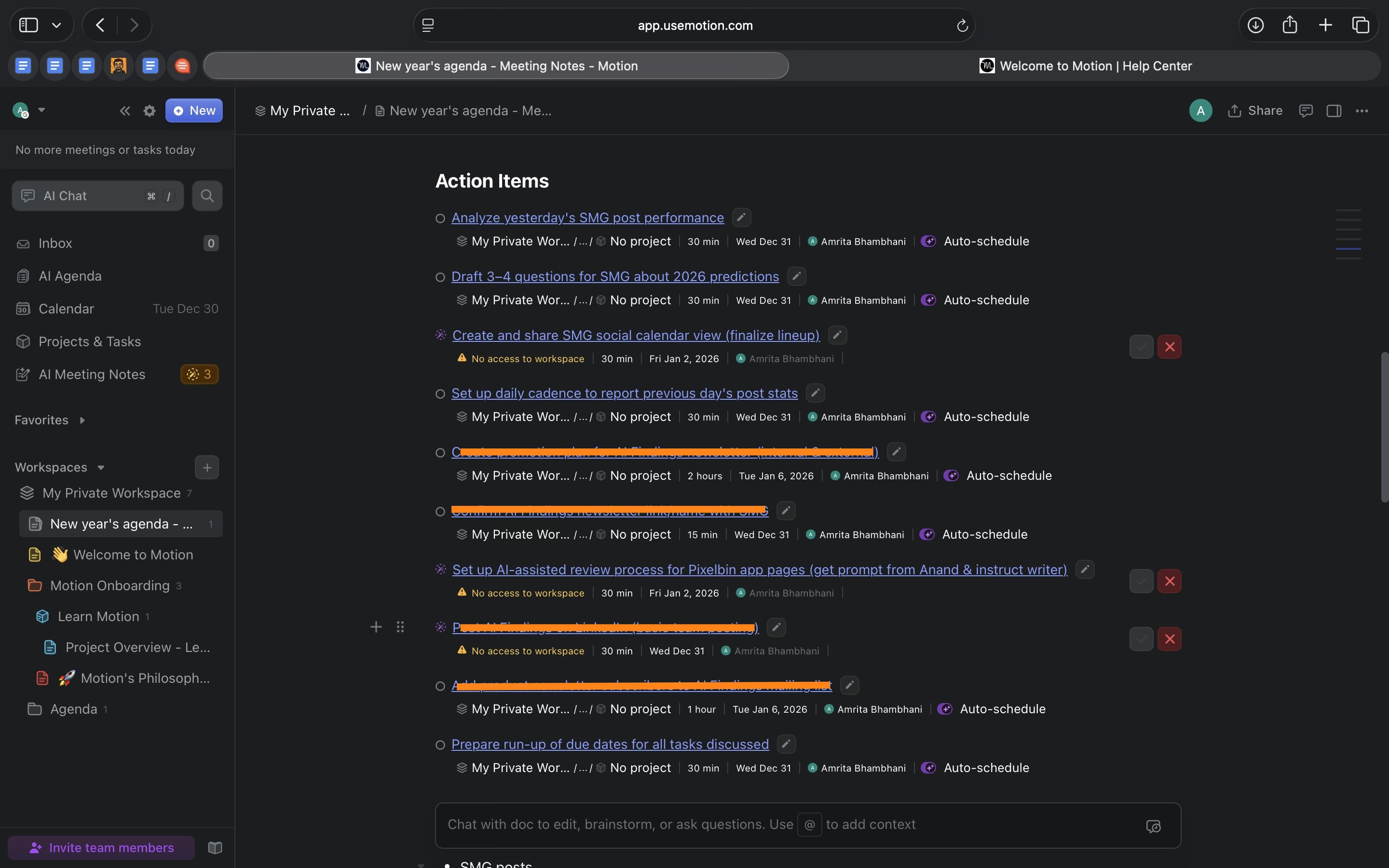
I didn’t have to write notes, extract tasks, or decide when the work should happen. There was a brief moment of hesitation when I saw tasks placed at times I wouldn’t have chosen instinctively. But the logic was clear. The schedule was grounded in real calendar constraints, not arbitrary guesses.
What made this compelling wasn’t the meeting recording itself. It was how accurately Motion understood the conversation. It picked up proper nouns, responsibilities, and timelines without prompting, and turned them into planned commitments.
Being able to ask the system what I should work on next and get a concrete, time-aware answer reinforced what Motion is optimised for. It’s not about capturing meetings. It’s about closing the gap between discussion and execution.
Where it works well
From my experience, Motion works best as a personal execution system for project-driven work.
I found it most natural for managing project tasks where deadlines exist and work needs to be planned across a busy calendar. When tasks are clear and time-bound, Motion does a good job of turning them into a realistic plan without requiring constant manual reprioritisation.
Even in personal use, the structure makes it clear how Motion would scale to team contexts. It plans tasks against real calendars and visible availability, which is especially useful when tasks have dependencies or when multiple people are working toward the same outcome. In setups like shared projects or team-managed deliverables, this kind of time-aware planning can reduce coordination overhead.
Another area where Motion works well is consolidation. Tasks, meetings, notes, and docs all live in one place. This doesn’t dramatically change how you think about work, but it reduces friction. There’s less context-switching and less reliance on memory to connect planning, documentation, and execution.
Motion also suits roles that sit somewhere between ideation and execution. For people who spend time thinking, planning, and then handing work off or following through on it, the tool helps bridge that gap by making execution explicit. It’s equally relevant for individuals managing their own projects and for those responsible for keeping teams aligned on shared work.
Overall, Motion works well for people and teams who already know what needs to be done and want a system that helps them deliver it consistently.
Where it falls short
Motion’s main limitation shows up when its assumptions don’t line up with reality.
There were moments when the timelines Motion proposed felt unrealistic. Tasks were scheduled in ways that technically fit the calendar but didn’t always reflect how work actually unfolds. In those cases, I had to step in and make adjustments manually.
This isn’t a major flaw, but it highlights an important boundary. Motion relies on the inputs it’s given. When task durations or constraints are imperfect, the resulting plan can feel overly optimistic. It is good at working within time, but it can’t fully account for nuances like energy levels or task complexity. In those cases, you still need to step in and adjust things manually.
The mobile experience is more limited than the desktop version. It works well for checking your schedule or reviewing tasks, but it is not ideal for making detailed changes on the go.
Beyond that, I didn’t run into significant friction. Even simple, everyday tasks fit comfortably into the system, and it handled a mix of work without feeling restrictive or heavy.
Overall, Motion’s limitations are less about missing features and more about calibration. It works best when timelines are realistic and expectations are clear. When those inputs drift, the schedule needs human correction.
What makes it different
Motion sits in a crowded ecosystem of work tools, and its value only became clear to me once I stopped thinking about what it competes with and started looking at what it actually takes ownership of.
Before using it, I instinctively compared Motion to tools like Jira or meeting note-takers like Granola. After spending time with it, that comparison stopped making sense.
Jira is designed to track work across teams. It’s good at workflows, visibility, and progress, especially for delivery-focused teams. But tasks largely live in an abstract state. They move through statuses, not through actual time on a calendar. From my experience, Jira tells you what exists, not when it will realistically happen.
Granola operates much earlier in the flow. It’s built around meetings. It helps capture discussions, decisions, and context so nothing gets lost. That’s useful, but it stops at understanding. It doesn’t deal with execution.
Motion, in contrast, assumes decisions are already made and focuses almost entirely on what happens next.
What felt different in practice was how opinionated Motion is about execution. Tasks aren’t just listed. They are placed into time alongside meetings, based on deadlines and availability. When there isn’t enough time, that constraint becomes visible immediately instead of being hidden in a backlog.
Unlike meeting tools, Motion doesn’t help you think through ideas or make sense of conversations. It helps you follow through. It takes outcomes from discussions and turns them into scheduled commitments that have to fit into real calendars.
The AI is not the headline feature here. What stood out to me is how narrowly it’s applied. It exists to continuously rebalance plans as reality changes, not to generate content or suggestions for their own sake.
Motion doesn’t replace tools like Jira or meeting note-takers. It fills the gap they leave behind. It’s the layer that turns decisions into work that actually gets done.
My take
Motion is best understood as an execution tool, not a general productivity app.
It works well when work is already defined and deadlines matter. If tasks are clear and time-bound, Motion helps by planning them against real calendar availability and keeping that plan updated as things change. This reduces the need for constant manual planning and reshuffling.
A large part of Motion’s value comes from having everything in one place. Tasks, meetings, notes, and schedules live together, which makes execution feel more concrete. The meeting notetaker supports this by ensuring decisions don’t stay abstract, but the real benefit is how consistently those decisions turn into planned work.
Motion does require a certain level of clarity to be effective. Tasks need reasonable durations and deadlines, and calendars need to be kept accurate. When that information is off, the schedule becomes less trustworthy and needs human correction.
The tool is less helpful for work that is still taking shape. It assumes decisions have already been made and struggles when tasks are open-ended or hard to scope. That isn’t a flaw so much as a design choice.
Overall, Motion works best for individuals and teams who care about predictable delivery and follow-through.
AI in Product
Trickle: Turning Prompts Into Product-Shaped Experiments
TL;DR
Trickle helps you turn product ideas into working interfaces using AI. It’s useful for early exploration, internal tools, and proofs of concept where seeing something real matters more than finishing a production build.
Basic details
Pricing: Free plan available, paid plans starting at $20/mo
Best for: Product managers, designers, small teams
Use cases: Early product exploration, proofs of concept, quick experimentation
After Lovable, it’s clear this category isn’t going away. The question is which part of the problem each tool actually solves.
In one of our earlier editions, I spoke about how Bubble represents the control-heavy end of this category, offering deep flexibility at the cost of setup. Lovable sits at the other end, prioritising speed by generating working apps quickly, but treating that output as a starting point rather than a workspace you keep returning to. Both aim to reduce the cost of building products, but they optimise for very different trade-offs.
Trickle sits in that same space, but approaches the problem differently.
Instead of focusing on setup or one-off generation, Trickle is built around a persistent canvas. You describe what you want to build, and Trickle generates a working web interface backed by real code. That output stays live inside the product, where you can preview it, edit it, and keep iterating without starting over.
This changes how early product work feels. You are not wiring things together from scratch, and you are not constantly regenerating disposable versions. You are working on something that already behaves like a product, while it is still easy to adjust and reshape.
That positioning is what makes Trickle worth paying attention to in this category.
What’s interesting
The most interesting thing about Trickle is that it doesn’t treat “prompting” as the product. It treats the canvas as the product.
In Trickle, the unit of work is a Magic Canvas: a visual workspace where pages, assets, rules, data, and notes sit together, and the AI builds inside that context. It’s not just “generate me a page” and hope it remembers. You can literally attach constraints (rules/notes), drop in assets, add business knowledge, and then ask it to expand or refine from there. The canvas becomes the memory.
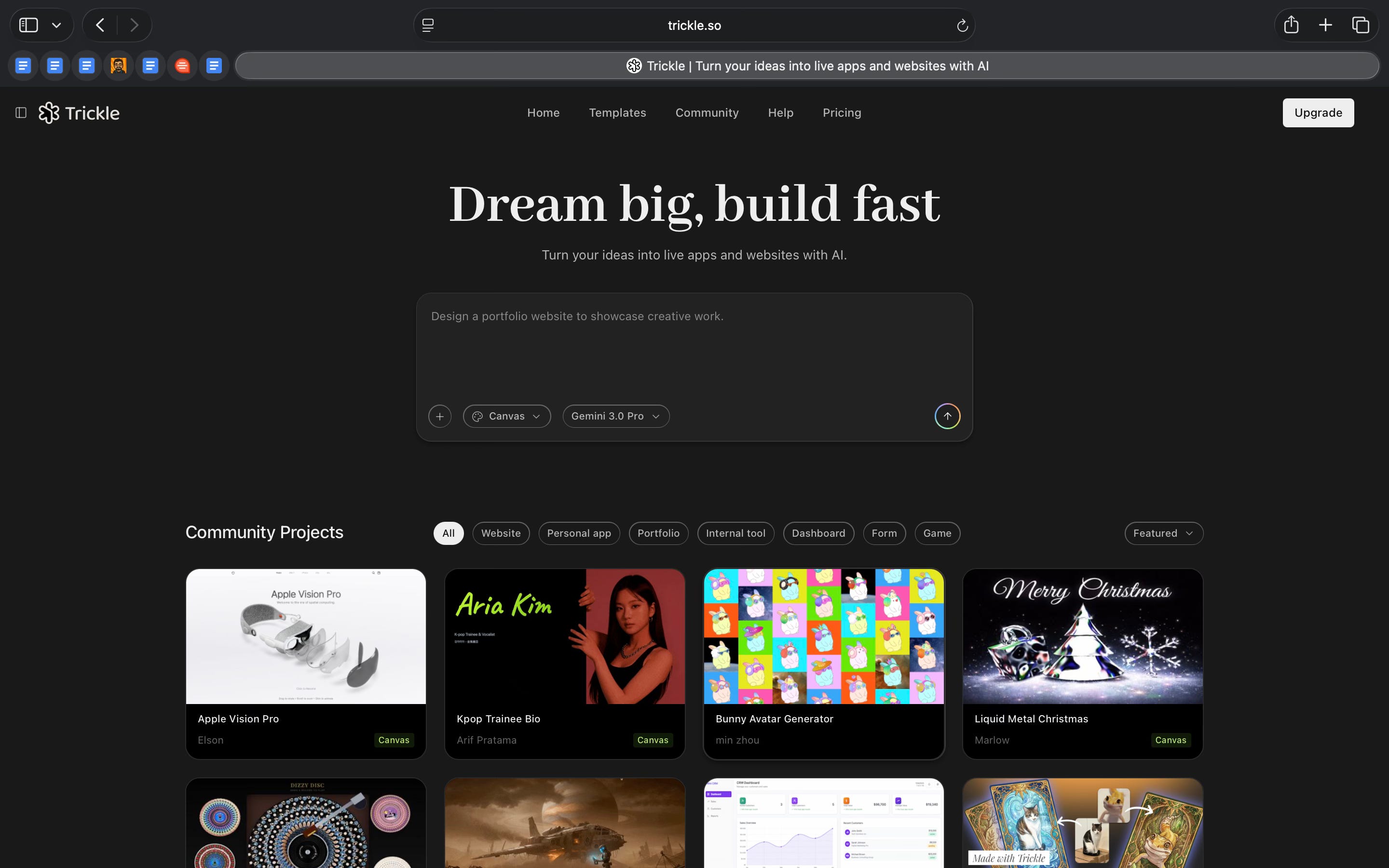
That structure changes how iteration feels. Instead of regenerating from scratch, you keep evolving the same artefact: add a page, tweak layout, change styling, inject docs, roll back a version if it goes sideways. Trickle even supports version history and restore, which makes experimentation less risky.
The other underrated bit: Trickle is clearly trying to be end-to-end, not “a builder + three other tools.” Inside the same workflow, it can:
generate and manage image assets (and save them into a library for reuse)
create a built-in database for dynamic content (AI can set it up, or you can prompt it)
publish live directly from the canvas
And yes, this is where the “coding” angle shows up. Trickle positions the canvas as something that’s continuously translated into production-ready code, and it also lets you download/export code files (with the important caveat that exports don’t include database data and don’t carry over Trickle’s AI functionality).
So what’s interesting about Trickle isn’t that it can generate websites. A lot of tools can do that. It’s that Trickle is trying to make the workspace smart: a single place where intent, context, assets, logic, and pages live together, and the output keeps getting better because the inputs are actually organised.
Where it works well
Trickle works best when you’re trying to understand whether an idea holds up once it becomes real.
In my case, I tried two very different builds inside Trickle: a small tape recorder utility and a basic e-commerce shopping website. Both helped clarify where the product is genuinely useful.
The tape recorder app is a good example of how Trickle handles small, focused tools. Trickle generated a complete interface in one go, with clear controls and a sensible layout. It wasn’t a design mock or a loose concept. It behaved like a simple utility you could actually imagine using. For internal tools or small features, that’s often enough to evaluate whether something is worth taking further.
The e-commerce shopping website showed the same strength at a larger scale. Trickle created a recognisable storefront structure with navigation, product listings, and page hierarchy. Seeing everything together made it easier to reason about the overall flow than looking at isolated screens. This is especially useful early on, when the goal is to understand structure and direction rather than polish.
In both cases, Trickle handled iteration well. Changes could be made without breaking the underlying structure, which made it easier to explore variations without starting over.
Publishing adds another practical layer. Being able to put these outputs on a custom domain makes them easy to share for feedback or internal review. It turns experiments into something people can interact with, not just look at.
In terms of who this is for, Trickle works best for founders, product managers, and designers who want to validate ideas quickly with something tangible. It also suits small teams building internal tools or early proofs of concept. For larger organisations, it fits best for experiments, internal utilities, or side projects rather than core production systems.
Where it falls short
Trickle gets expensive fast if you’re using it heavily.
On the free plan, usage is capped by daily credits (and only up to a monthly cap). Once you’re iterating a lot, you feel the ceiling. Same with the built-in database: the free plan only supports 100 rows, so anything slightly real (like e-commerce data) hits limits quickly.
Publishing also has constraints.
You can publish, but custom domains aren’t available on free, and even paid plans have a defined number of custom domain connections. If you want the output to feel “real” outside Trickle, you end up needing Pro/Premium.
Exporting code is useful, but it’s not a clean handoff.
Trickle lets you download code files, but the export does not include database data and does not include any AI functionality tied to the project. So if you’re thinking “I’ll build here and then move it to a normal dev workflow,” there’s a gap.
Finally, it still demands precision from you.
Trickle’s own guidance is basically: the more specific your prompts are, the better the results. In practice, that means vague prompts don’t hold up. You have to write clearly, iterate patiently, and sometimes steer it like a teammate, not a tool.
What makes it different
To understand where Trickle fits, it helps to look at how similar tools approach building.
Tools like Webflow or Bubble give you a lot of control, but they expect you to build everything step by step. You design layouts, wire logic, and structure pages manually. You get flexibility, but it takes time before anything usable exists.
On the other hand, tools like Durable or Wix’s AI builder are very fast. You get a website or app almost instantly. But once it’s generated, making meaningful changes often means regenerating large parts of it. Iteration feels shallow.
Lovable sits closer to Trickle, but with a different focus. Lovable is strong at quickly generating app structure and behaviour together. It gives you a fast starting point with logic and data flows already implied. You move quickly, but the experience is still centred around generation first, then adjustment.
Trickle takes a different route. It treats the canvas itself as the core product, not just the output. You generate once, then keep building inside the same workspace. Pages, assets, data, prompts, and changes all stay connected. Instead of repeatedly generating new versions, you evolve the same one.
Compared to AI coding tools like Replit AI or Cursor, Trickle hides the code. You don’t need to write or debug anything directly. That makes it easier to use if you’re not a developer, but it also means you’re not working at the same level of control as a full coding environment.
In simple terms:
Trickle is slower than one-click generators, but more flexible once you’re inside
It’s faster than traditional no-code tools at the start, but not as deep in the long run
It’s easier than AI coding tools, but less precise
What makes Trickle different is that it’s designed for building and iterating inside one workspace, rather than jumping between tools or regenerating outputs. That choice shapes both its strengths and its limits.
My take
Trickle is most useful when you want to turn an idea into something tangible without setting up a project or writing code.
The tape recorder app and the e-commerce site made this clear. In both cases, Trickle helped me move past abstract thinking and see how an idea would actually look and feel as a product. That alone changes the quality of decisions you can make early on. It’s easier to spot gaps, unnecessary features, or wrong assumptions when you’re clicking through something real.
Where Trickle fits best for me is early product work. Exploring ideas, building internal tools, testing flows, or aligning with others in direction. It shortens the distance between “we think this could work” and “this is what it would look like if it did.”
I would not use Trickle for building a production system. Once requirements become strict, logic becomes complex, or long-term ownership matters, the trade-offs become obvious.
AI in Design
Topview: Designing Short-Form Ads Without Designing Them
TL;DR
Topview helps turn product assets into short-form video ads that follow proven platform patterns. It’s built for speed, consistency, and repeatability rather than creative exploration.
Basic details
Pricing: Free plan available, paid plans starting at $29/mo with credit-based usage
Best for: Marketers, small teams, e-commerce brands
Use cases: Short-form product ads, performance marketing creatives, TikTok and Instagram Reels, rapid creative testing
Short-form video ads have become the default format for product discovery, but producing them at scale is still messy.
Teams need videos that follow platform conventions, open with a strong hook, reflect brand guidelines, and still feel native enough to not get skipped. Doing this repeatedly means scripting, storyboarding, sourcing footage, editing, adding text and music, and exporting in the right formats. It’s fast work, but it’s rarely simple.
Topview is built to simplify that workflow.
Instead of treating video creation as a single prompt, Topview breaks it into steps that mirror how ads are actually made. You start with product images and a brief. The system extracts the main details, defines a structure, generates a storyboard, and then produces a finished video designed for short-form platforms like Instagram Reels and TikTok.
What makes this interesting is how deliberate the process feels. Topview behaves less like a creative tool and more like an execution layer for ad production. The AI isn’t just generating visuals. It’s making decisions about pacing, structure, and format based on common patterns in high-performing videos.
Topview is clearly optimised for speed and repeatability. It’s not trying to replace high-end video production or creative direction. It’s trying to make producing usable, platform-ready ads much easier to scale.
What’s interesting
Topview stands out for how much creative structure is embedded directly into the product.
The Viral Video Agent is not a one-time generator. It keeps context across iterations, which means you can generate variations or change direction without starting over. This makes iteration feel more controlled and reduces the need to repeat the same inputs again and again.
The agent templates add another layer of structure. Formats like viral hook, POV, shoppable skit, or ASMR are not just labels. Each template follows a different pacing and narrative pattern, and that shows up clearly in the final video. Choosing a template directly shapes how the video opens, how the product is introduced, and how the message flows.
The storyboard view supports this approach. Before the final video is generated, Topview shows a clear sequence of scenes with timing and intent. This makes it easier to review the flow and catch issues early, instead of reacting only after the video is rendered.
Brand consistency is handled through the Brand Kit. You can set logos, end cards, fonts, music, AI voices, and avatars once, and reuse them across videos. These settings carry over, which makes repeat ad creation more consistent without extra setup.
The Ad Library adds useful reference context. You can explore ads by region, industry, engagement, or estimated revenue. This brings inspiration and benchmarking into the same place where videos are created.
What’s interesting about Topview is that many creative decisions are already built into the tool. Instead of starting from a blank page each time, you’re working within a system that guides the structure of the output.
Where it works well
Topview works well when the goal is to produce short-form product videos quickly and repeatedly.
The skincare ad example shows this clearly. Starting with product images and a brief, Topview generated a complete video with a clear hook, product focus, benefit highlights, and a closing frame. The output followed common short-form ad patterns without needing manual editing or sequencing. For performance-driven content, that structure is useful.
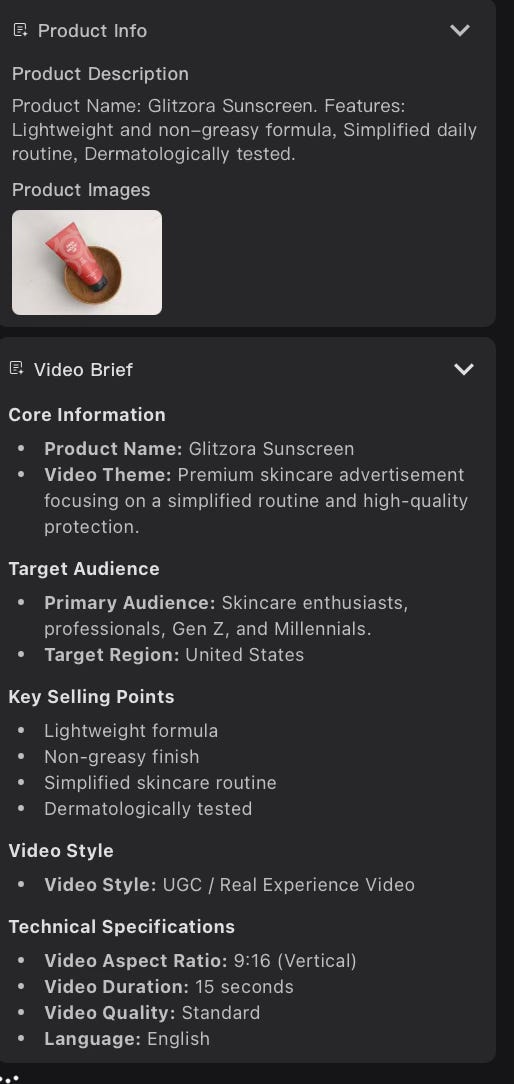
Topview is especially effective for repeatable ad formats. Once a product is set up, generating multiple variations becomes straightforward. You can try different templates, hooks, or styles without rebuilding the video from scratch each time. This works well for testing creatives across platforms like TikTok and Instagram.
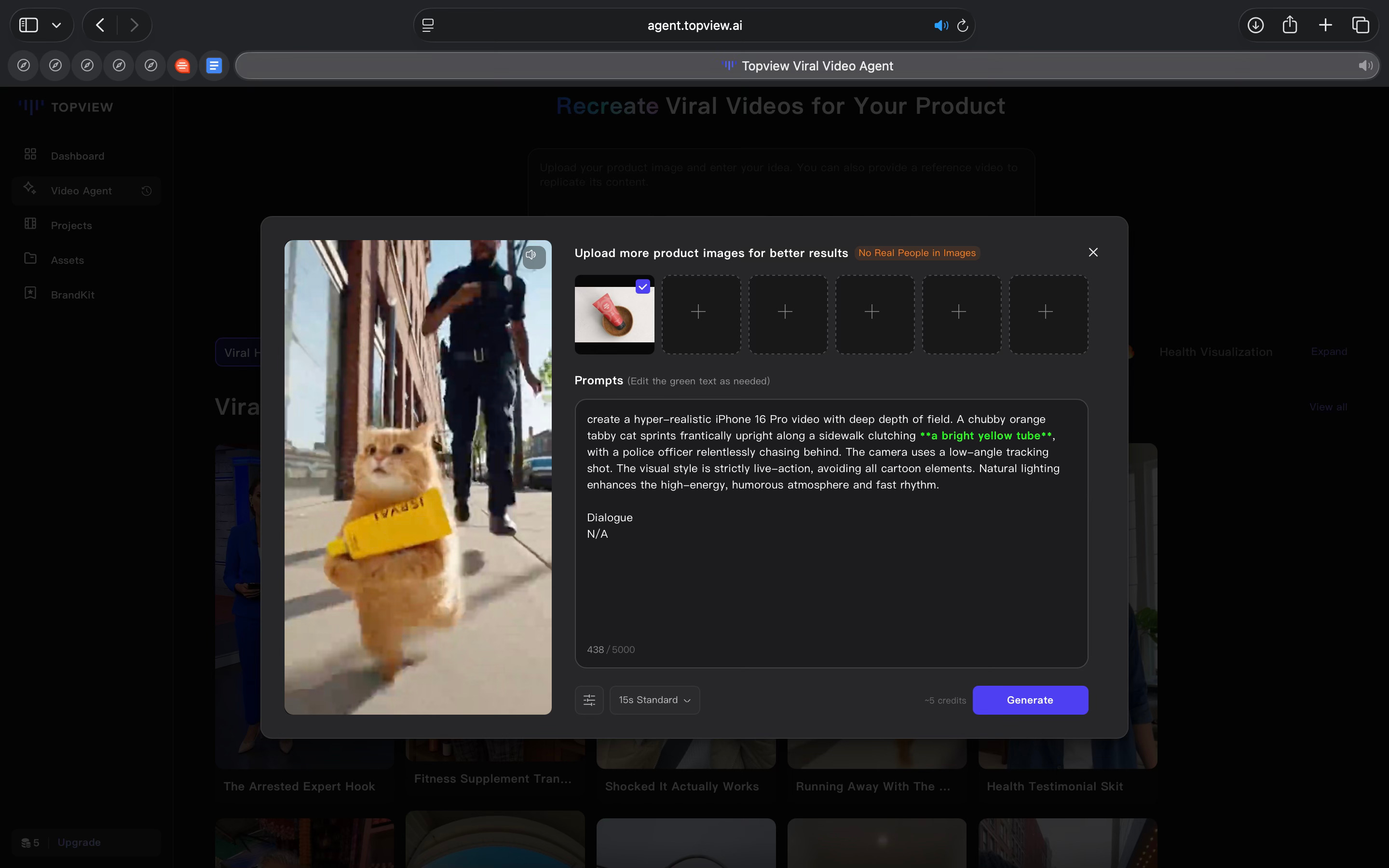
The tool also fits teams that need speed over polish. For small marketing teams or solo founders, producing videos in-house can be time-consuming and expensive. Topview reduces that overhead by handling scripting, pacing, and editing in one place. You don’t need separate tools for storyboarding, editing, and exporting.
For businesses, Topview makes the most sense in performance marketing and e-commerce contexts. It works well for brands running frequent campaigns, launching new products, or refreshing ad creatives regularly. The Brand Kit helps maintain consistency across videos, which matters when ads are produced at scale.
At an individual level, Topview is useful for creators, indie founders, and small sellers who want professional-looking product videos without a production setup. It lowers the skill and time required to produce ads that match platform norms.
Topview is less about creative exploration and more about execution at scale. It works best when the objective is to produce usable, platform-ready ads quickly, rather than crafting highly bespoke or cinematic videos.
Where it falls short
The biggest constraint is that Topview is credit-driven, so heavy iteration adds up quickly. A single Viral Video Agent export costs credits, and Avatar 4 model (where you can create lifelike characters using a photo and script) is charged per second. If you generate a few variations in one sitting, you feel the burn.
Video length is also capped by plan. The Video Agent max length is 15 seconds on Free and Pro, and 25 seconds on Business. That’s fine for many short ads, but limiting if you want slightly longer product explainers.
The free plan is genuinely usable, but it comes with clear restrictions. You get 10 one-time credits, limited access to the TikTok Ad Library, and exports include a watermark. That’s enough to test the workflow, but not enough to run it as a consistent production pipeline.
Even on paid plans, credits have rules. For example, Pro and Business credits are issued yearly and expire annually. So it’s not an “unlimited use” feeling product. You’re still budgeting usage.
Rendering speed is also part of the trade-off. Topview explicitly positions faster rendering as a paid-plan benefit, and Avatar 4 has modes (including scheduled/off-peak behaviour). In practice, this means speed is not always constant across usage choices.
Topview is strong at producing short, platform-shaped ads. The friction shows up when you want to iterate a lot, go longer than short-form, or rely on it daily without thinking about credits and plan limits.
What makes it different
Most AI video tools fall into one of two buckets.
Tools like Canva, CapCut, or InVideo are built around editing. They offer templates and timelines, but you still decide how the video is structured, how the story flows, and how scenes are paced. AI helps with assets and suggestions, but the creative decisions remain manual.
On the other end, tools like Synthesia or HeyGen focus on avatars and narration. They work well for presenter-led videos, explainers, or internal communication. However, the output is usually linear and informational, not shaped like a performance ad.
Topview takes a different approach.
It is built specifically for short-form product ads, not general video creation. The tool assumes you are trying to make something that looks and behaves like a TikTok or Instagram ad, and everything is designed around that goal.
Instead of asking you to design the flow, Topview assembles it for you. The hook, product focus, benefit sequence, and closing are inferred by the system. You are not editing a timeline. You are choosing intent and letting the tool put the video together.
Topview also differs from avatar-first tools. Avatars and voices are available, but they are not the centre of the experience. The focus stays on product visuals, motion, text overlays, and pacing that matches how ads perform on short-form platforms.
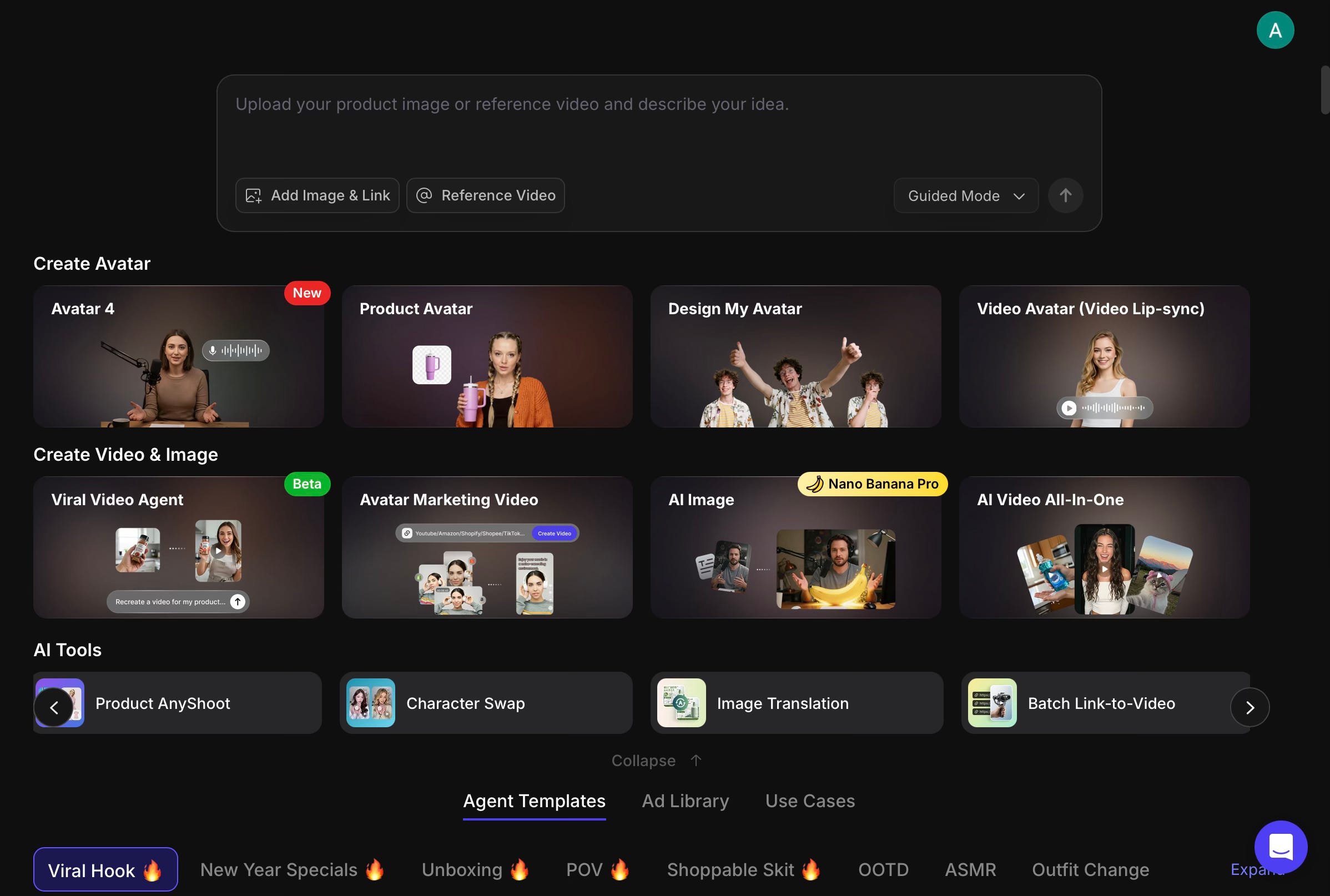
Another distinction is the built-in Ad Library. It is not only a source of inspiration. It shows real ads by region, industry, and engagement, which helps set expectations for what works in practice. This keeps outputs aligned with existing patterns rather than pushing toward experimental formats.
In short, Topview is not trying to help you edit videos or explore creative ideas. It is designed to help you produce ads that already fit platform norms, with fewer decisions along the way. That narrow focus is what makes it different and also defines where it is most useful.
My take
Topview is a tool designed for a very specific job, and it works best when used that way.
It’s effective at turning product assets into short-form ads that already follow familiar platform patterns. The tool removes much of the manual decision-making around structure, pacing, and format, which are often the hardest parts of producing ads consistently. That makes it easier to generate usable output without relying on video editing skills or external help.
For me, Topview fits squarely into the execution layer of design. It’s not a place to explore new visual ideas or experiment with creative direction. It’s a place to produce ads that look and feel correct for platforms like TikTok and Instagram, quickly and repeatedly.
I would use Topview when the priority is speed, consistency, and volume, especially for performance marketing or e-commerce use cases. It makes sense for individuals, small teams, or businesses that need to ship creatives regularly and don’t want the overhead of a full production workflow.
I wouldn’t use it for brand storytelling, long-form video, or highly distinctive visual work. The constraints are deliberate, and they show. But if the problem is producing platform-ready ads without friction, it solves that problem well.
In the Spotlight
Recommended listen: Creative Strategy and How AI Is Changing the Game for Growth Teams - with Reza Khadjavi, Motion CEO
This episode explores how AI is collapsing the gap between strategy and execution. Reza talks about why the most effective leaders are staying hands-on and using AI to compress work, rather than delegating everything away.
What stood out to me is how clearly this maps to what we’re seeing across tools today. Execution is becoming easier to automate. Clarity, taste, and decision-making are not. The advantage is shifting to people who can move between thinking and doing without friction.
“The fear with AI is staying stagnant. The opportunity is massively increasing your leverage.”
– Reza Khadjavi, ~0:22
This Week in AI
A quick roundup of stories shaping how AI and AI agents are evolving across industries
Google introduces A2UI, an open-source protocol that lets AI agents directly interact with user interfaces. Instead of relying only on APIs, agents can now navigate and operate software the way humans do, pointing toward more flexible, cross-tool automation.
YouTube faces a growing AI content saturation problem, with low-quality, auto-generated videos flooding the platform. The piece highlights how generative tools are shifting incentives toward volume over originality, and why platforms may need stronger signals to protect quality.
Meta places a major bet on Manus, a new AI initiative focused on building more capable, end-to-end agents. The move signals Meta’s ambition to compete not just on models, but on full agent systems that can reason, act, and execute across workflows.
AI Out of Office
AI Fynds
A curated mix of AI tools that make work more efficient and creativity more accessible.
AutoDraw → A lightweight AI tool that turns rough sketches into clean icons and illustrations in real time. Useful for quick visual thinking, early concepts, or when you need simple graphics without design overhead.
Huemint → An AI-powered colour palette generator that creates cohesive colour systems based on brand personality and use context. Useful for building UI and brand palettes that work well together without manual trial and error.
AI Text to Image Generator → An AI image generation tool focused on producing clean, usable visuals from text prompts. Practical for generating product images, backgrounds, or visual assets that can plug directly into design or marketing workflows.
Closing Notes
That’s it for this edition of AI Fyndings. With Motion structuring how work gets scheduled and followed through, Trickle turning ideas into product-shaped experiments, and Topview standardising how short-form ads are produced, this week highlighted a clear shift: AI is no longer just assisting work, it’s defining how execution happens.
Thanks for reading! See you next week with more tools, patterns, and ideas that show how AI continues to reshape how we plan, build, and create.
With love,
Elena Gracia
AI Marketer, Fynd