

Welcome to AI Fyndings!
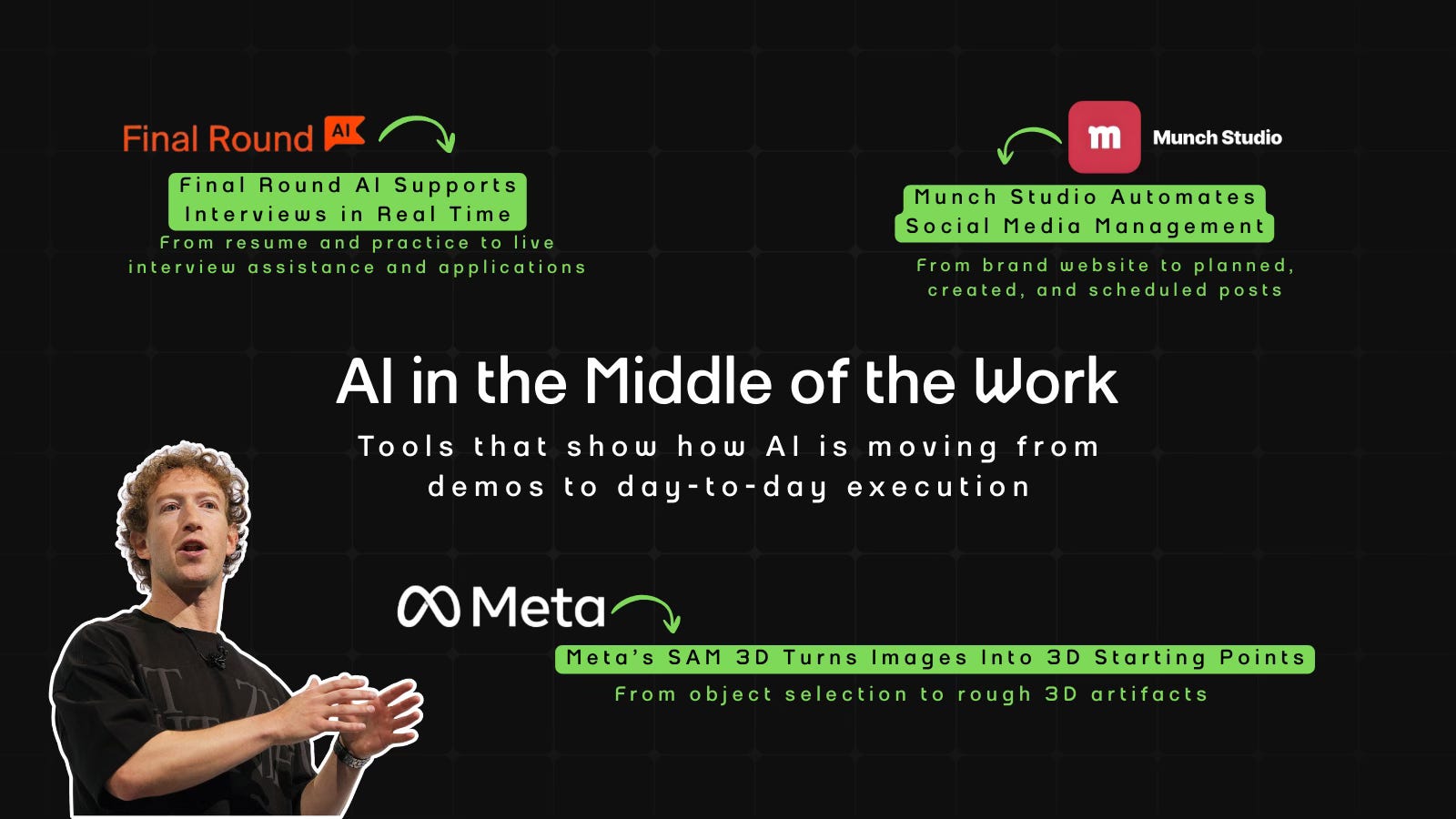
With AI, every decision is a trade-off: speed or quality, scale or control, creativity or consistency. AI Fyndings discusses what those choices mean for business, product, and design.
In Business, Munch Studio shows what happens when social media shifts from a task you manage to a system that runs.
In Product, Final Round AI explores how interview tools move beyond preparation into live support.
In Design, Meta’s SAM 3D examines what changes when selection becomes the starting point for working in 3D.

AI in Business
Munch Studio: Social Media Without Weekly Decisions
TL;DR
Munch Studio is an AI tool that plans, creates, and schedules social media content end to end. Built to keep social media running without needing constant attention, even when no one owns it full-time.
Basic details
Pricing: Paid with pricing starting at $48/month
Availability: Web-based
Best for: Businesses without a dedicated social media manager
Use cases: Social media planning, content creation, scheduling, and publishing
One thing I keep seeing across teams is this: social media is not hard because it’s complex. It’s hard because it’s constant.
There’s always something to decide. What to post. Which platform to focus on. Whether a reel or a carousel makes more sense. How often is “enough.” What’s on brand. What’s trending. What’s working. What’s not.
These decisions keep coming back every week, and most teams don’t have a clear system for making them. So progress depends heavily on whoever is paying attention at that moment.
Munch Studio is built to replace that recurring decision-making with a preset system.
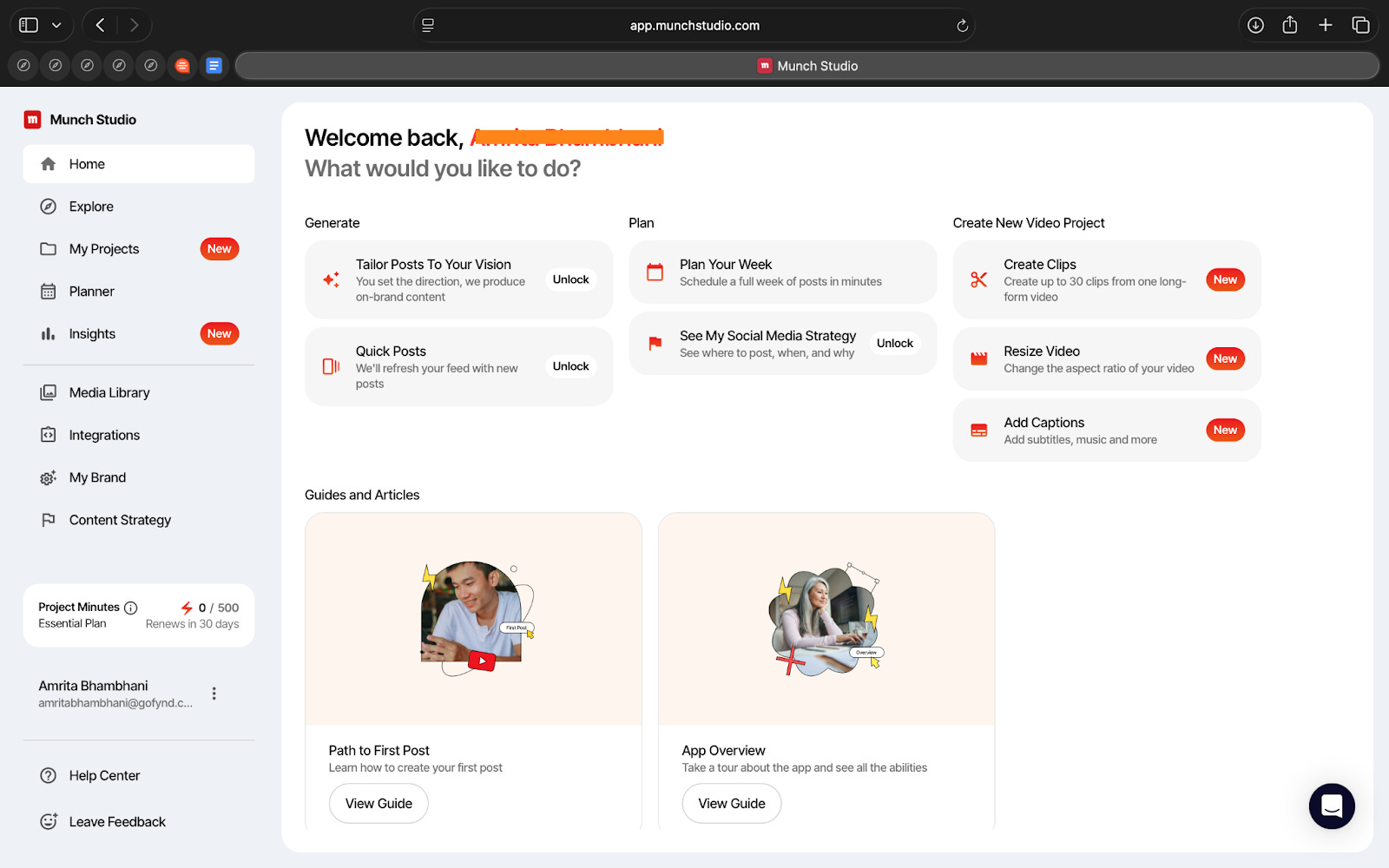
Munch is essentially an AI tool that takes your brand, your website, and your inputs, and then turns that into a full social media setup. It decides the platforms, creates a content strategy, plans the week, generates posts and videos, and schedules them. You can guide it but the default behaviour is that the system keeps moving without waiting for you to decide each step.
It isn’t built as just a creative assistant, but as a system that tries to keep your social media running.
What’s interesting
What stood out to me first is how much Munch does with very little input. A website link and basic brand details are enough for it to put together a full setup. Platforms, themes, posting frequency, and a weekly plan appear quickly, without needing prompts or detailed instructions.
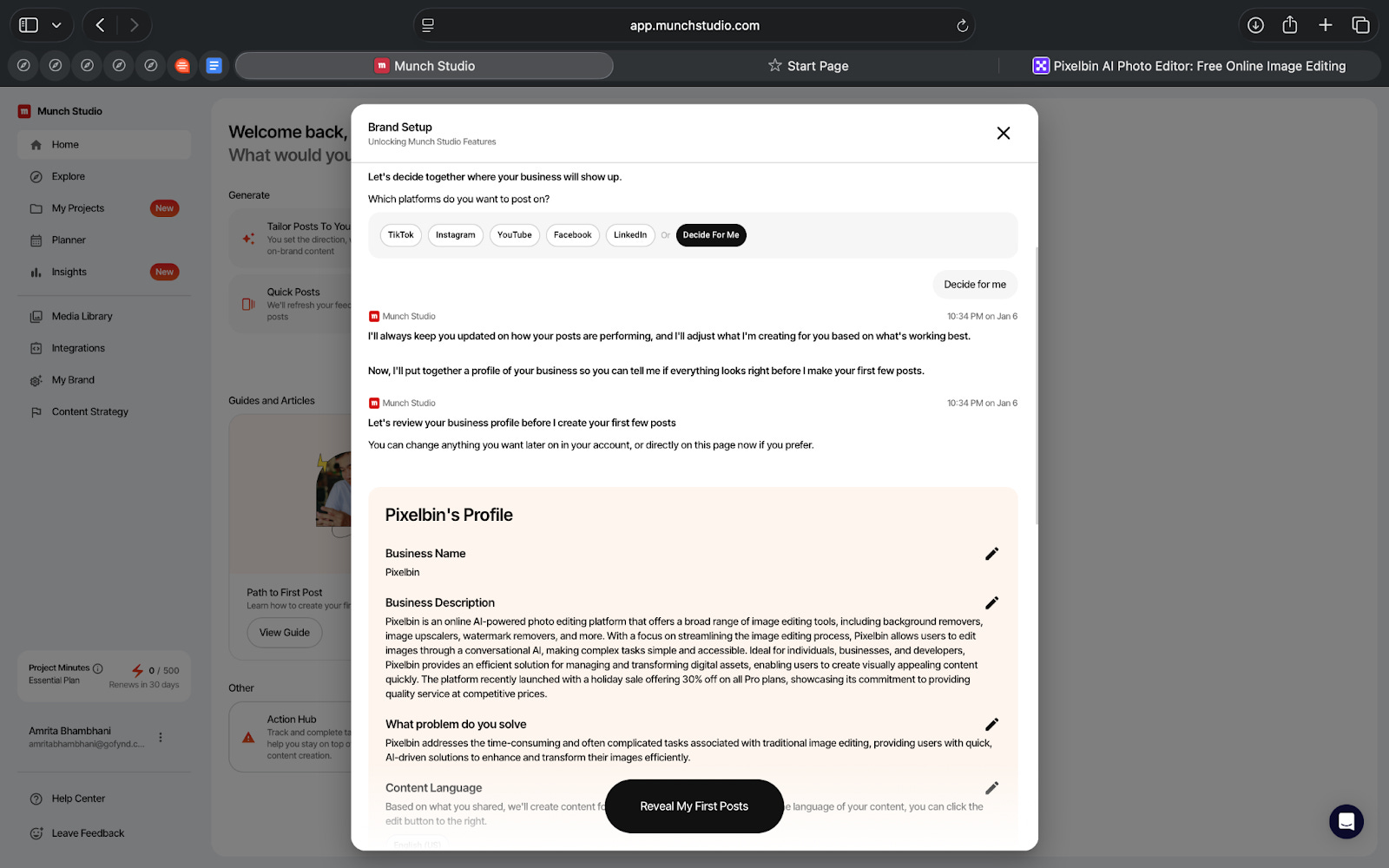
Another interesting part is how clearly it shows its thinking. You can see the goals, the audience it’s targeting, the content pillars, the keywords, and how all of that translates into posts for the week. Nothing feels hidden. Even if you don’t agree with the decisions, you can clearly see what the system is operating on.
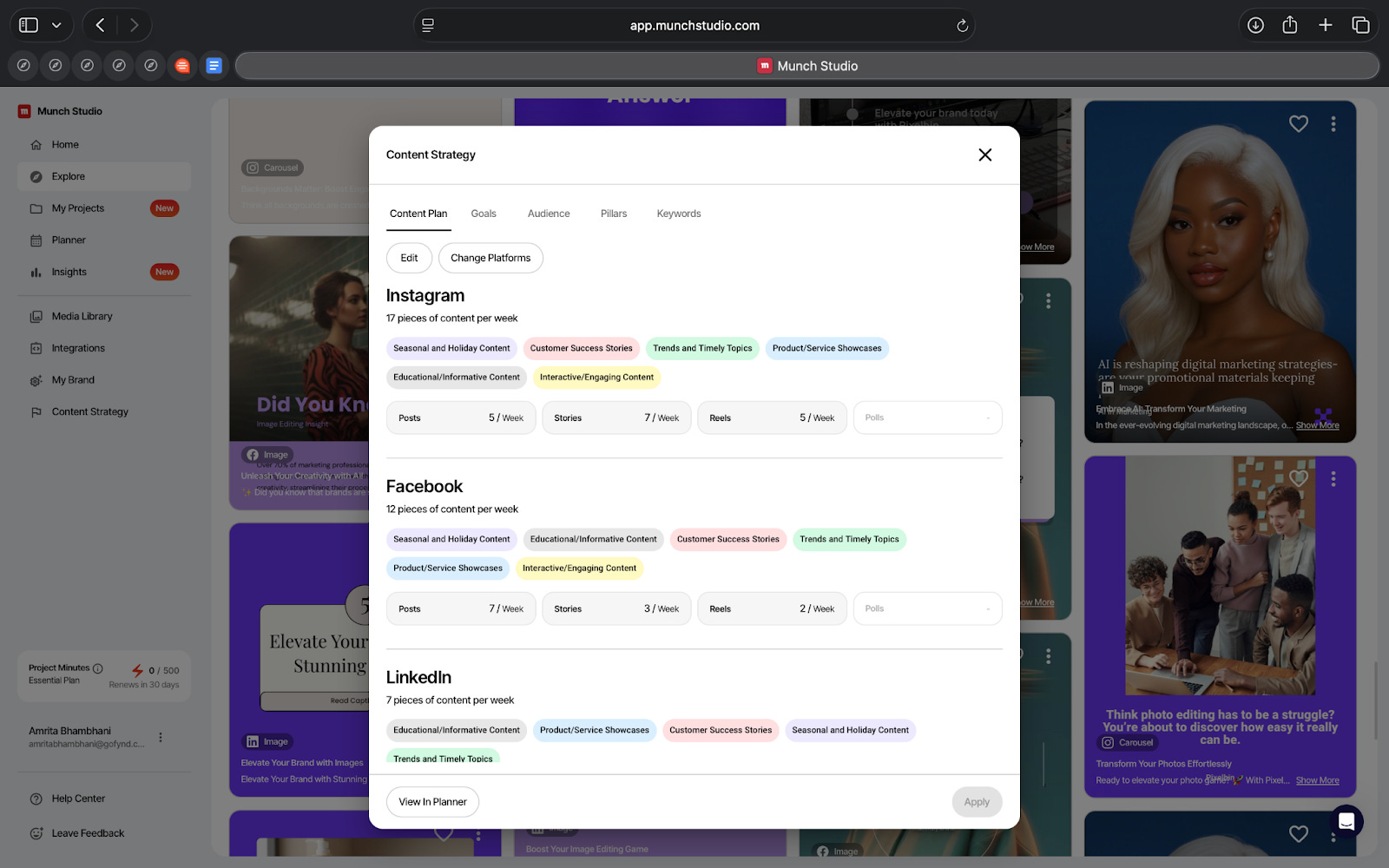
I even liked how the content isn’t generated randomly. It’s organized by platform and format. The posts, stories, reels, carousels, and videos are planned separately, with a defined number of posts per week. It feels less like “make content” and more like “manage output.”
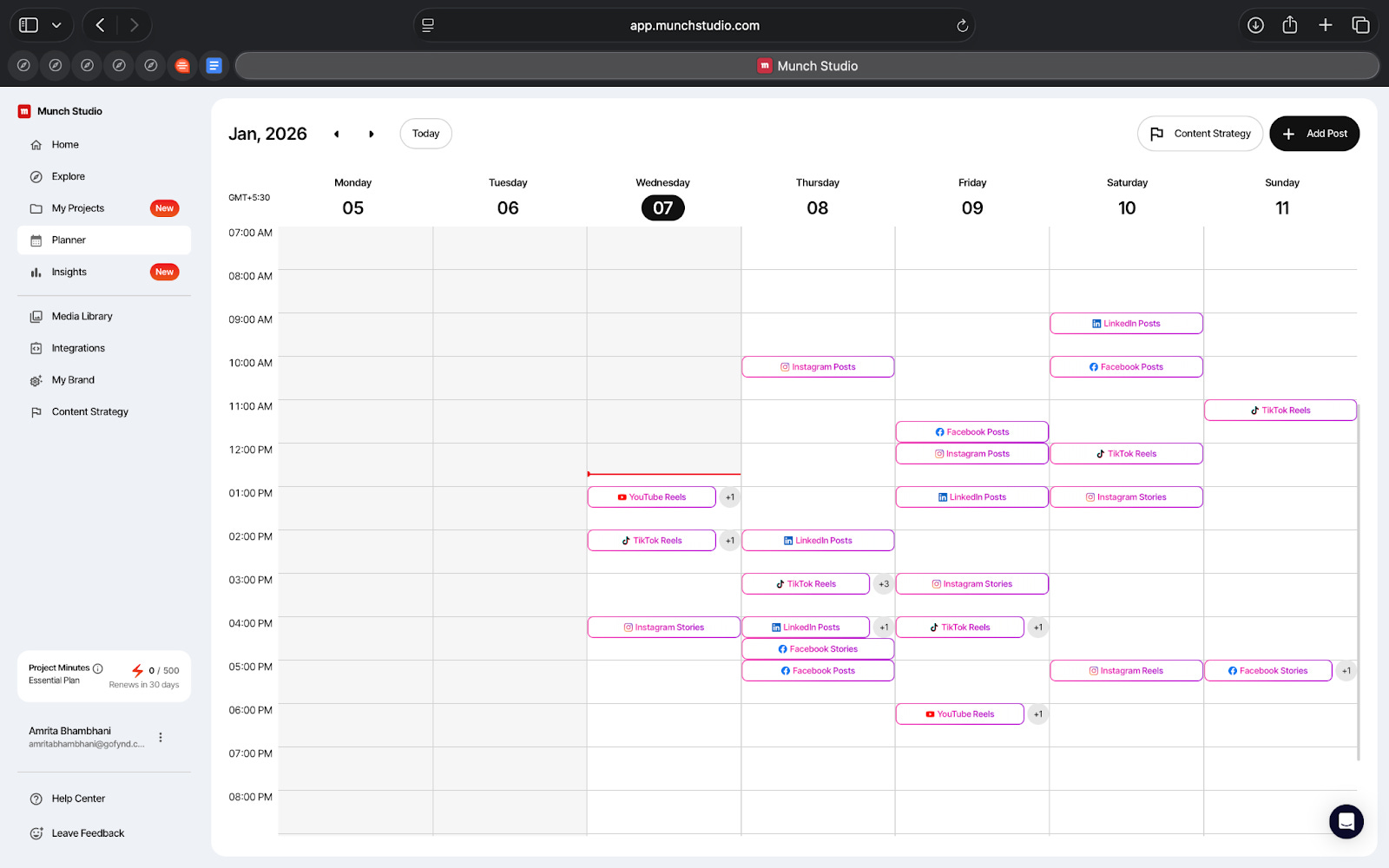
While Munch directly parses your brand using just your website, you can also add your brand guidelines, create a brand kit, upload your own media, and adjust tone. Those inputs are consistently applied once the system is set up.
You can plan, create, schedule, and publish all in one place. You can also connect your Instagram, Facebook, LinkedIn, YouTube, and TikTok, publish directly, and view basic performance metrics.
It’s interesting how everything is connected into one system that keeps running once it’s set up.
Where it works well
Munch works best when social media needs to exist, but shouldn’t take up too much thinking time.
From what I saw, this setup makes sense if the problem isn’t the lack of ideas, but the effort it takes to keep deciding what to do every week. Once it’s set up, Munch removes that loop. Platforms, formats, posting frequency, and schedules are already decided, so the system keeps moving.
I think this works particularly well for small teams. If no one owns social media full-time, this kind of structure helps. Since everything sits in one place, it becomes easier to manage other priorities.
And even if your brand’s social media is inconsistent or inactive, it helps lower the effort needed to start again. You don’t have to make every decision upfront.
Where it falls short
The strategy Munch creates is fine as a base, but it doesn’t go very far. It follows common patterns. If I were looking for a strong point of view or a clear story for a brand, this wouldn’t be enough on its own.
Secondly, the creative quality is inconsistent. Some posts make sense. Some don’t. Captions are okay, but they lack human voice. I wouldn’t be comfortable publishing everything without reviewing it first.
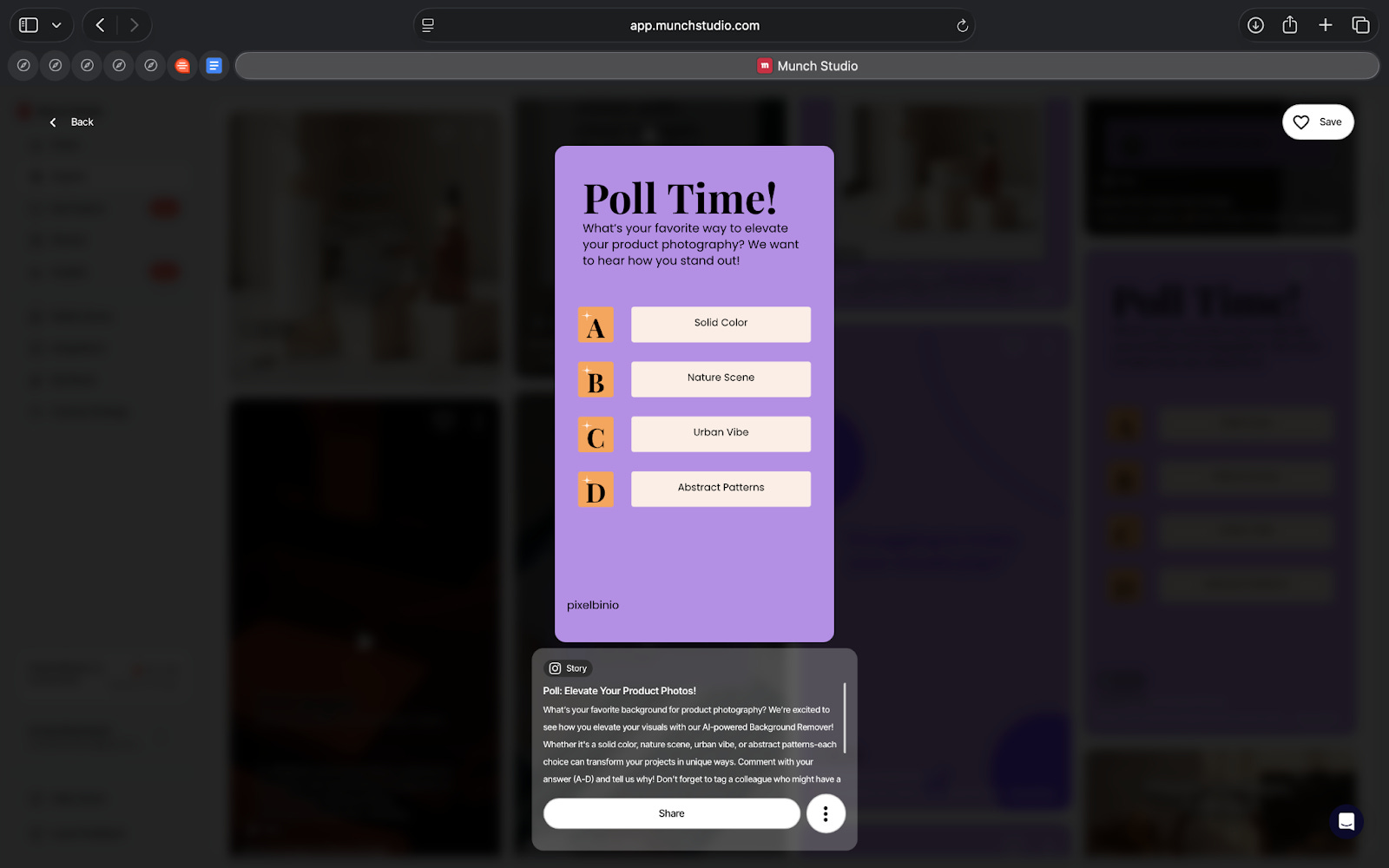
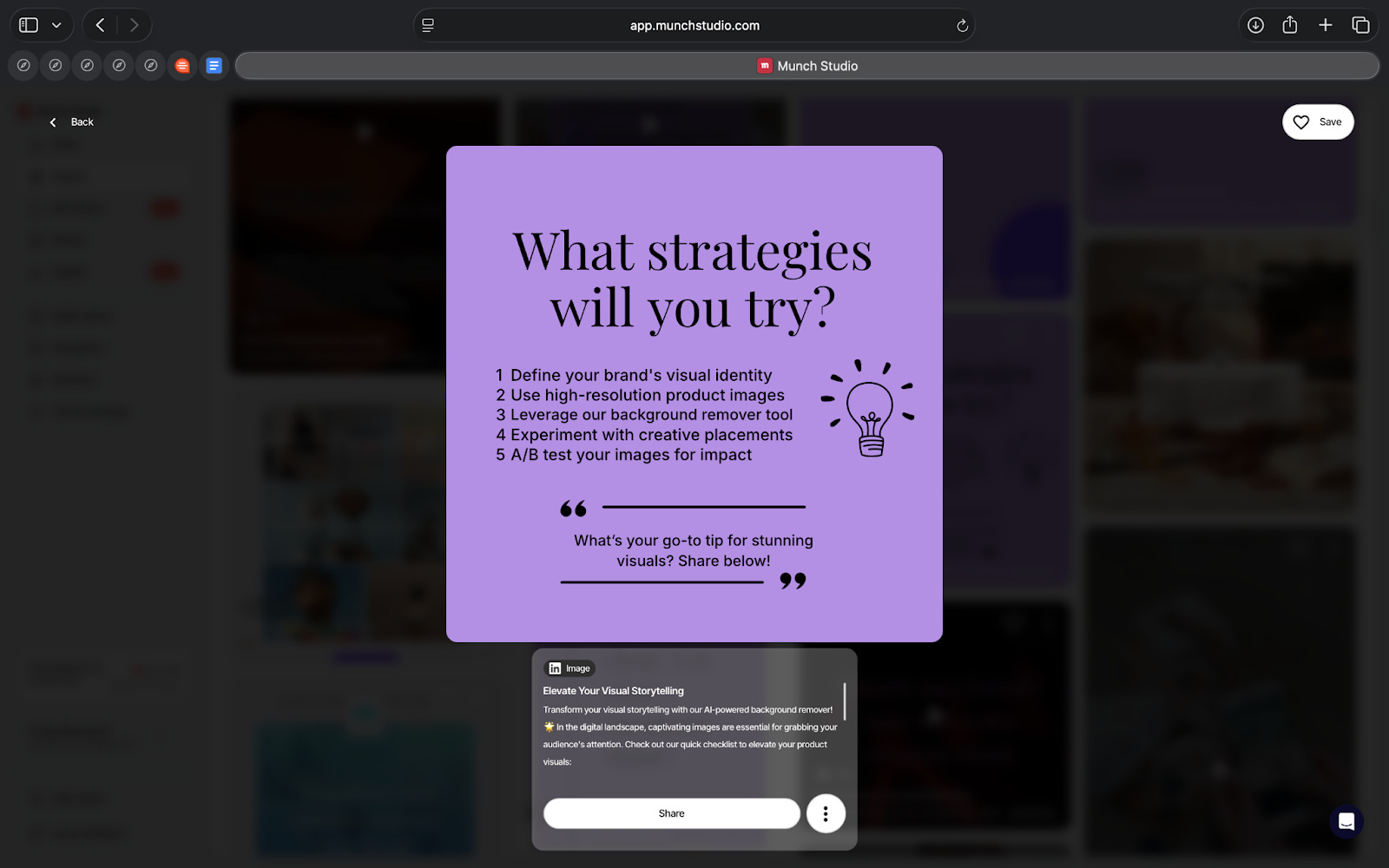
Even with brand inputs in place, the nuance can get lost. A distinct voice doesn’t always come through, especially if the brand relies on tone or personality more than visuals.
The performance data is also limited. I can see basic numbers, but there’s no real explanation of what’s working and why. It tells me what happened, not what to do next.
For me, this means Munch reduces effort, but it doesn’t remove responsibility. I’d still want someone involved to review, adjust, and course-correct.
The bigger risk isn’t bad content, but content that’s just good enough to go unnoticed.
What makes it different
Most AI social media tools fall into three buckets.
Some tools focus on scheduling. Tools like Buffer or Hootsuite help you publish content once you already know what to post. They don’t help with planning or strategy.
Some tools focus on content creation. Tools like Ocoya help generate captions, creatives, and videos. They speed up creation, but you still decide what goes out and when.
Some tools combine creation and scheduling in one place. They reduce tool switching, but the planning still sits with you.
Munch takes a different approach.
Instead of helping with parts of the workflow, it tries to run the whole thing. It creates a strategy, chooses platforms, plans posting frequency, generates content, and fills the calendar. Planning and execution happen together.
That’s the key difference. Munch is not just helping you post or create faster. It’s taking over the weekly decisions most teams struggle to keep up with.
The tradeoff is control. You give up some flexibility in exchange for consistency.
My Take
After using Munch, my takeaway is simple.
This is not a tool that makes social media better. It makes social media easier to keep running.
If someone expects strong ideas, a clear voice, or thoughtful storytelling, Munch won’t deliver that on its own. The output needs checking and direction.
But if the real problem is that social media keeps slipping because no one has the time or patience to manage it every week, then this kind of system makes sense.
I don’t see Munch as a replacement for a social media manager or a creative team. I see it as a safety net. Something that keeps the channel running.
Whether it’s useful or not depends on what role social media plays for you.
If it’s core to the brand, this isn’t enough.
If it’s important but not central, it probably is.
AI in Product
Final Round AI: Interview Support Across Preparation and Performance
TL;DR
Final Round AI is an interview-focused platform that combines resume building, interview practice, live interview support, and job applications.
Basic details
Pricing: Free plan available; Pro plan required for live interview copilot with prices starting at $90/month
Availability: Web-based with Chrome extension for live interviews
Best for: Job seekers, early- to mid-career professionals, candidates interviewing remotely
Use cases: Resume building, mock interviews, live interview assistance, job applications
You know that moment in an interview when your mind goes blank, not because you don’t know the answer, but because everything hits at once.
You’ve prepared. You know the example. But the question is phrased slightly differently, your attention splits between listening and thinking, and suddenly you’re trying to respond in real time. By the time you find your footing, the conversation has already moved on.
Final Round AI is built for that exact situation. Instead of focusing only on preparation, it supports candidates during the interview itself. Using your resume, role context, and interview setup, it helps structure responses as the conversation unfolds.
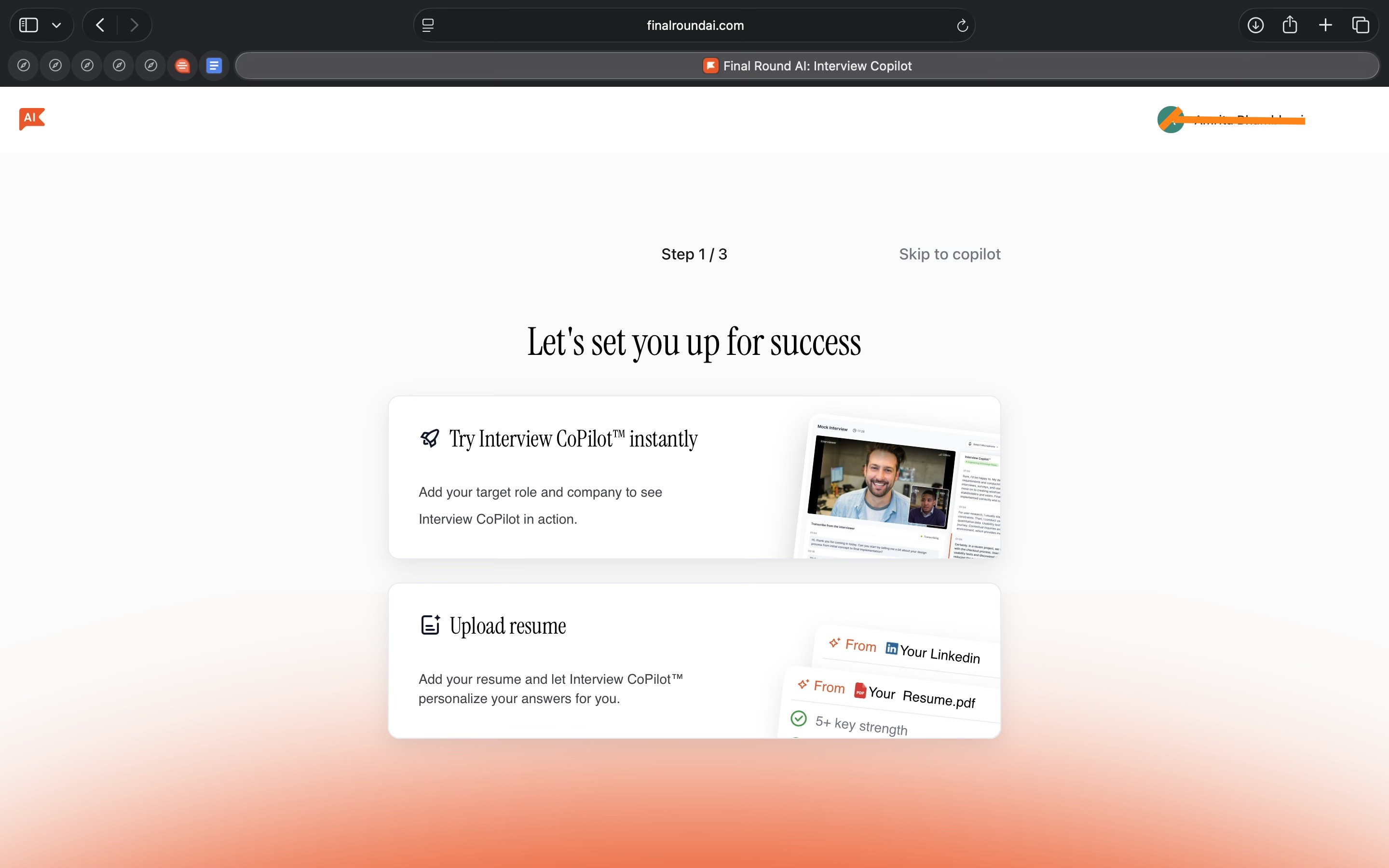
From a product perspective, this is the real shift. The interview is treated as an active workspace, not a moment where tools disappear. That decision defines how the product is built and where it places its value.
What’s interesting
I tried Final Round AI by setting up a mock interview using my resume and role, and then exploring how the interview copilot works once an interview begins.
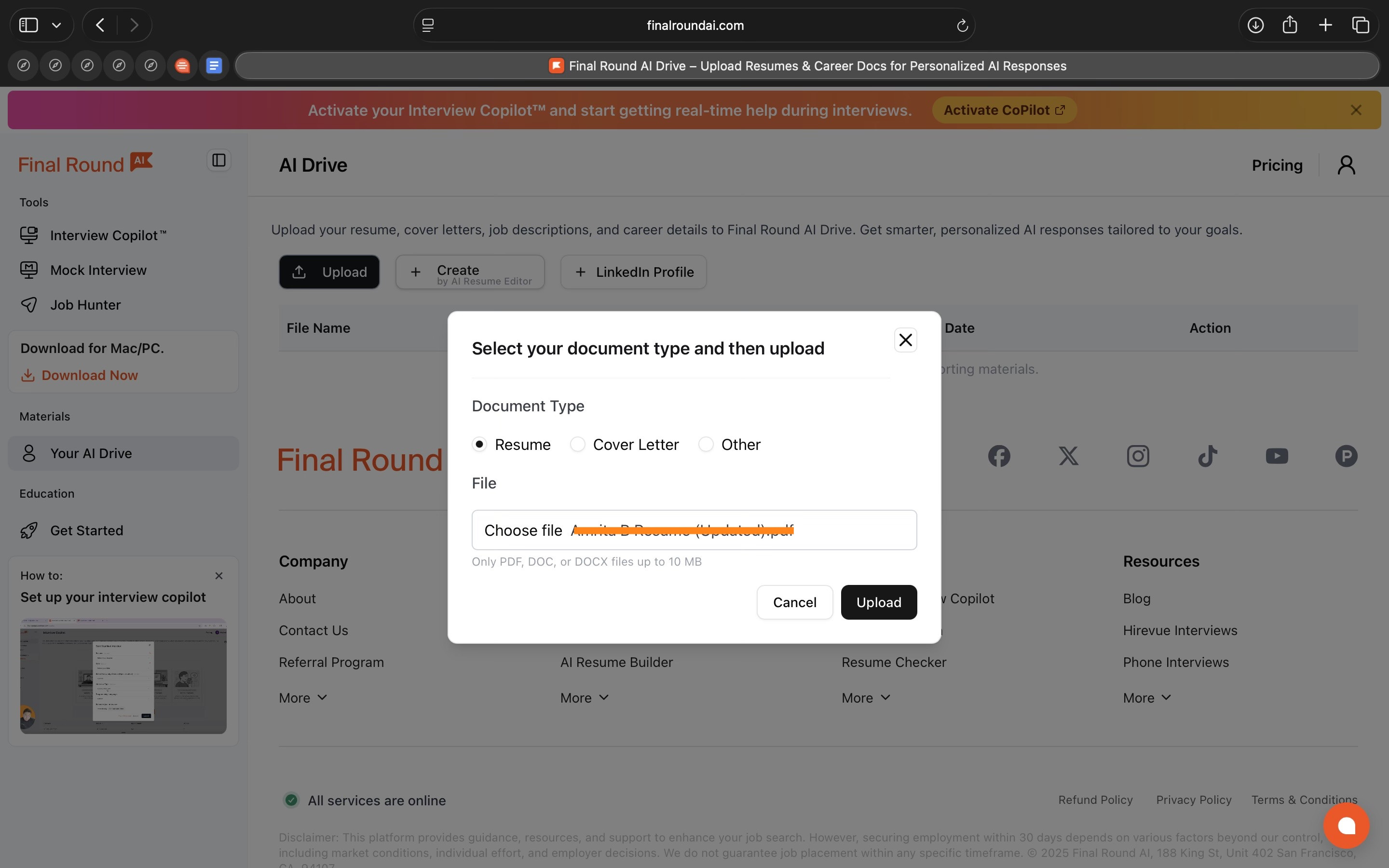
What stood out is how focused the product is on the interview itself. Most of the experience is built around helping you answer questions as they come up, not just preparing you beforehand or summarising things later.
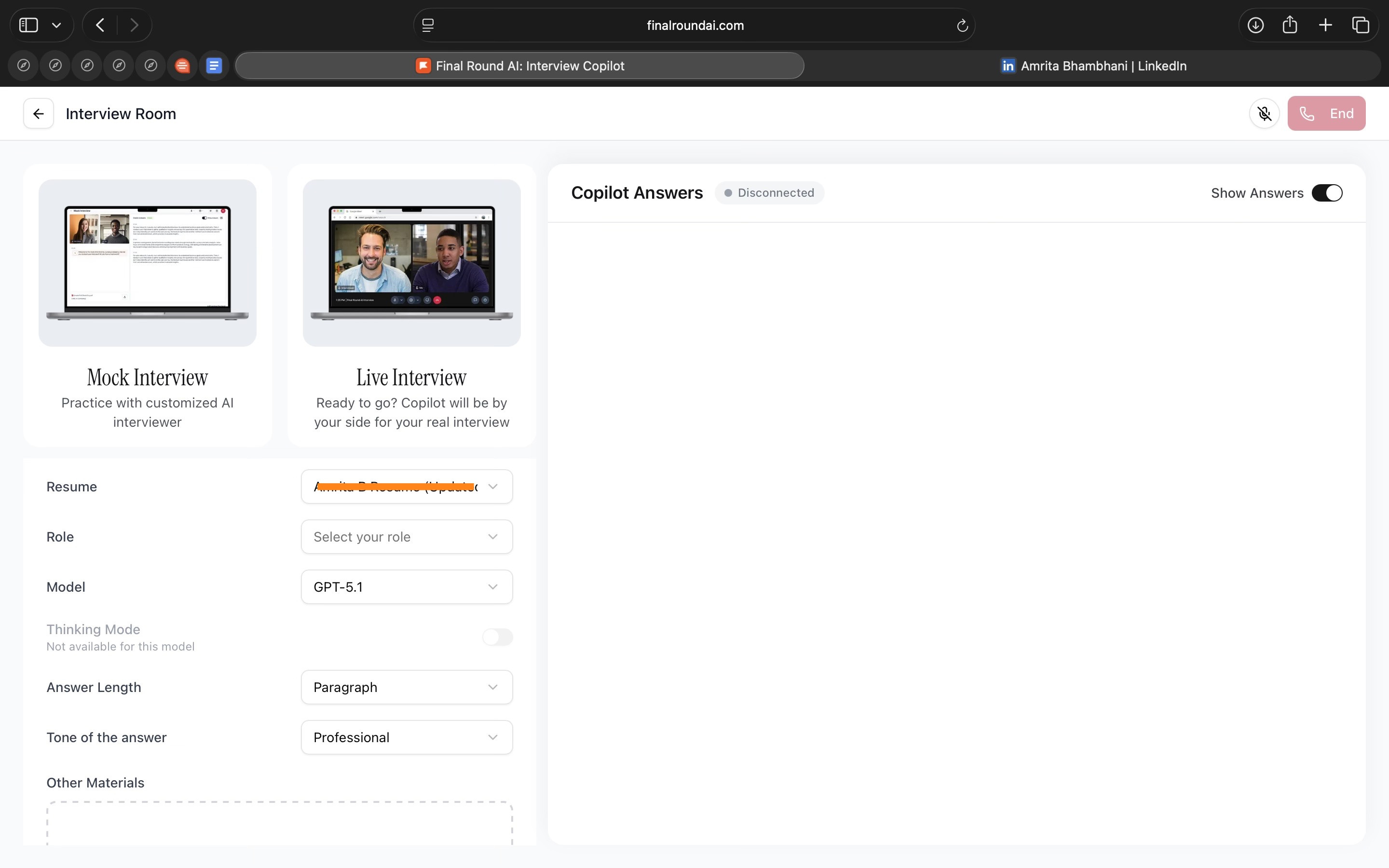
You can control how the AI responds while the interview is happening. You can change how detailed the answers are, which language they’re in, and how structured they feel. You can also choose formats like Default, STAR, or SOAR. These controls are easy to access and actually change how the answers sound.
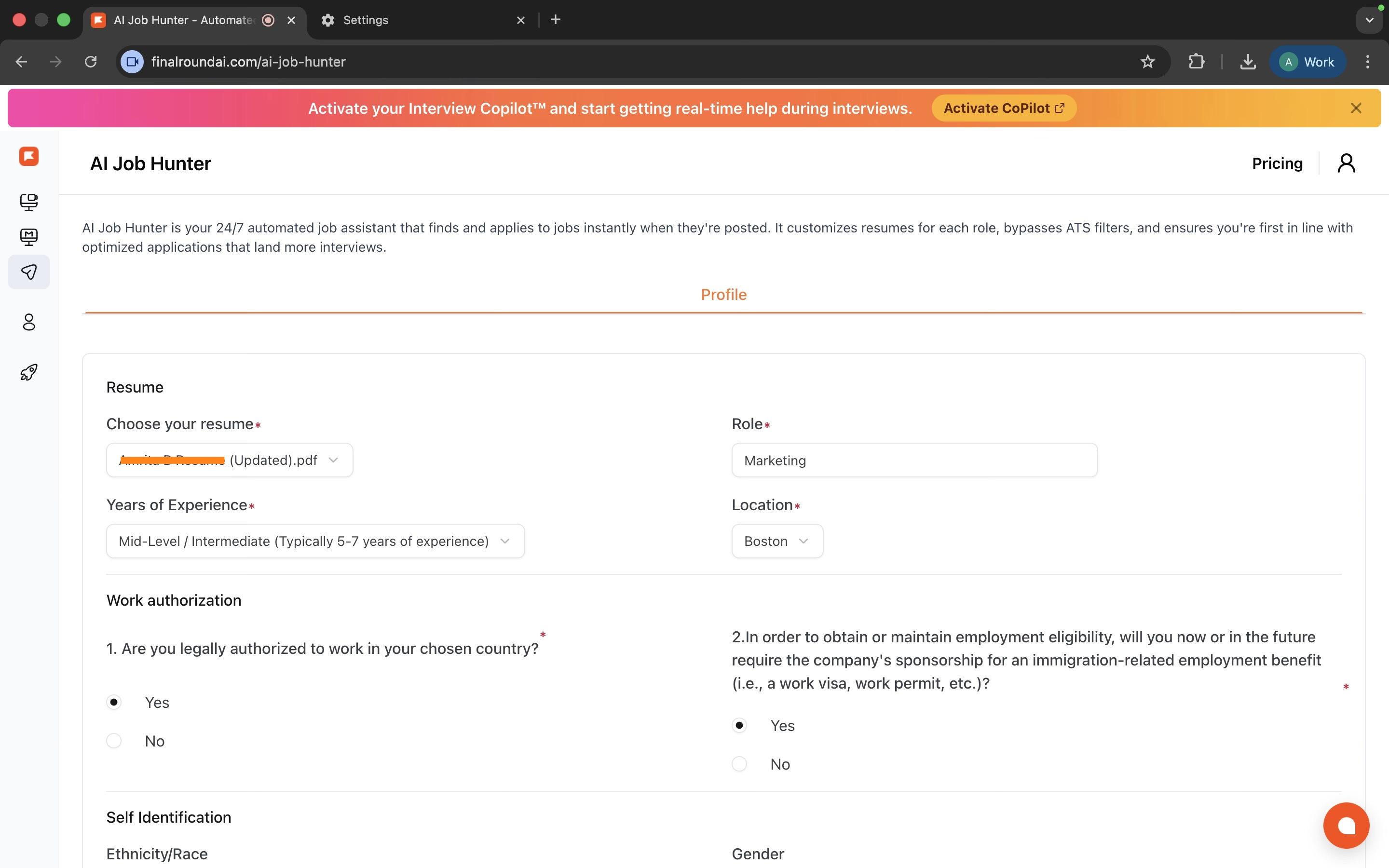
Your resume stays active throughout the product. It’s used during mock interviews, live interview answers, and even when applying for jobs. You don’t have to keep re-explaining your background. The system carries that context forward.
Even the mock interviews are simulated very close to the real interview experience. The settings are the same for both.
There’s also the AI Job Hunter feature, which lets you set preferences, see matched roles, and apply quickly or in bulk. For now, it’s a little limited in terms of locations and roles but I hope to see it expand soon.
Where it works well
From what I saw, Final Round AI works best when interviews feel harder to handle than to prepare for.
Suppose you’ve been asked to walk through your work experience. You know the answer but might struggle to explain it clearly on the spot. In such a case, Final Round AI goes through your experience and gives your answer a simple structure. It helps shape responses while you’re speaking, instead of leaving you to figure that out mid-answer.
This is especially useful in behavioural interviews. These interviews care more about clarity than speed. Final Round AI helps keep answers focused, so they don’t trail off or miss key points.
It also works well if you’re interviewing with multiple companies at the same time. When interviews pile up, it’s easy to repeat the same examples badly or mix things up. Because the tool always pulls from the same resume and role context, answers stay consistent across interviews.
I also think this is helpful for early- and mid-career candidates. These are people who may have the experience but aren’t yet confident talking about it. The tool supports how answers are framed without taking over the conversation.
Finally, it works for people who want everything in one place. Resume building or uploading, practice interviews, live interview support, and job applications all sit inside the same system, which makes the process easier to manage.
Overall, I see Final Round AI working best when interviews feel overwhelming not because of lack of skill, but because there’s too much happening at once.
Where it falls short
Final Round AI is helpful when interviews follow a clear structure. It is less effective when conversations become highly technical, fast-moving, or unstructured. In those situations, the suggestions can lag behind the discussion or feel too generic to be useful.
The live interview copilot also depends on specific setup conditions. You need a Chrome extension and access to the Pro plan.
The job search feature of the product is still limited. It currently supports only a narrow set of job roles and locations, and global job listings are not yet available.
Finally, the tool does not remove the need for human judgement. Responses often need review and adjustment, especially in interviews that require precision, nuance, or strong personal perspective.
What makes it different
If you look at interview tools today, most of them do one thing.
Tools like Google Interview Warmup or Interview Sidekick help you practise answers. They’re useful before the interview, but they stop there.
Tools like Parakeet AI help you improve responses quickly, but they’re still limited to preparation. They don’t stay connected once the interview actually starts.
There are also tools like Cluely that sit slightly differently. It focuses on what happens during meetings and interviews by helping you keep track of conversations, notes, and context in real time. It supports recall and clarity, but it doesn’t shape or structure what you say.
Whereas, Final Round AI tries to handle more of the interview journey in one place. You can work on your resume, practise interviews, get support during the interview, and apply to jobs from the same product. Most tools don’t attempt that range.
Compared to simpler tools, Final Round AI feels heavier. You need more setup, and key features sit behind a paid plan. Compared to tools like LockedIn AI, which focus almost entirely on live interview assistance, Final Round AI feels less specialised.
So Final Round AI isn’t the best at one specific thing. What makes it different is that it tries to connect everything together. Whether that’s a good thing or not depends on what you’re looking for.
If you want a focused tool for one job, there are simpler options.
If you want one system to cover most of the interview process, Final Round AI is trying to do that.
My take
Final Round AI brings several parts of the interview process into one place. Resume building or uploading, interview practice, live interview support, and job applications all sit inside the same product.
From what I’ve seen, the live interview copilot is the most developed part of the experience. Other areas, like job discovery and role coverage, still feel limited in comparison.
I think this works best for people who want a single system to manage interviews end to end, rather than switching between multiple tools. It’s less compelling if you’re looking for depth in one specific area.
Whether it’s useful depends on how much you value having everything connected versus using specialised tools.
AI in Design
SAM 3D: Exploring 3D Through Simple Interaction
TL;DR
SAM 3D is a research demo from Meta that turns selected objects in images into rough 3D models. It lets designers move from a flat image to basic spatial understanding without heavy 3D setup.
Basic details
Pricing: Free research demo
Availability: Web-based demo via Meta’s Segment Anything gallery
Best for: Designers, researchers, and creators exploring 3D and spatial ideas
Use cases: Object segmentation, early 3D exploration, spatial prototyping, research experimentation
Working with visual assets breaks down the moment you move beyond flat images.
Designers can isolate objects in 2D fairly well today, but the moment something needs to exist in 3D, the workflow becomes slow and fragmented. You either need multiple images, specialised tools, or manual modelling. Even simple objects take time to recreate, and the process rarely fits into everyday design work.
SAM 3D extends Meta’s Segment Anything work from 2D selection into 3D reconstruction. Instead of starting with complex 3D pipelines, it begins with a simple interaction designers already understand: selecting an object in an image. From a single image, SAM 3D can generate a rough 3D representation of objects or human bodies that can be inspected and manipulated in space.
The tool is part of Meta’s broader effort to make visual understanding more flexible across images, video, audio, and now 3D. From a design perspective, SAM 3D is not positioned as a replacement for traditional 3D tools, but as a way to make spatial assets easier to create and experiment with earlier in the workflow.
What’s interesting
I tried SAM 3D through Meta’s Segment Anything demos, starting with images and then exploring the other tools in the gallery.
The first thing that stood out was how easy it is to get started. You upload an image and click on the object you care about. SAM highlights it immediately. If the selection isn’t right, you fix it using simple Add and Remove clicks. There’s no setup or tuning.
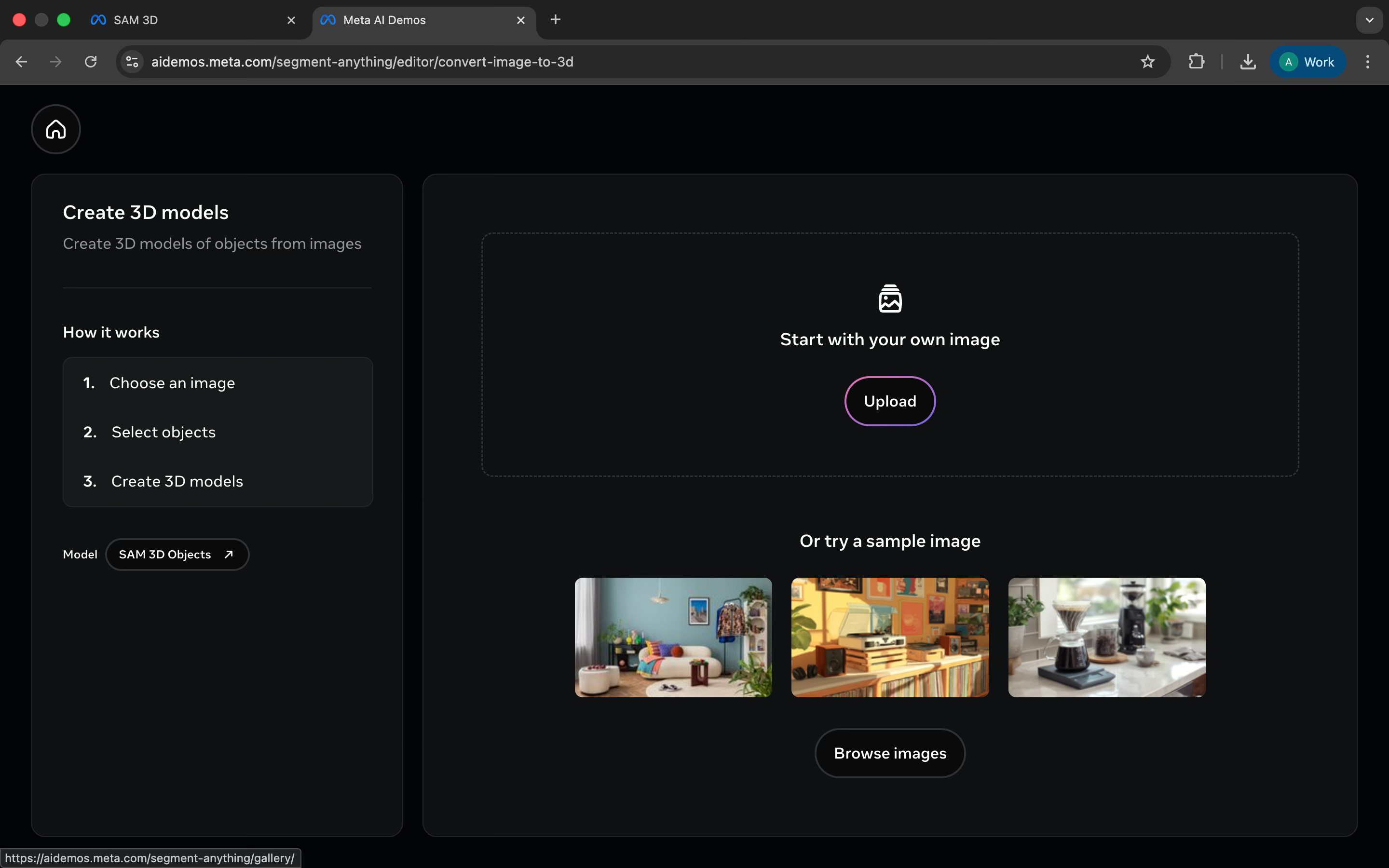
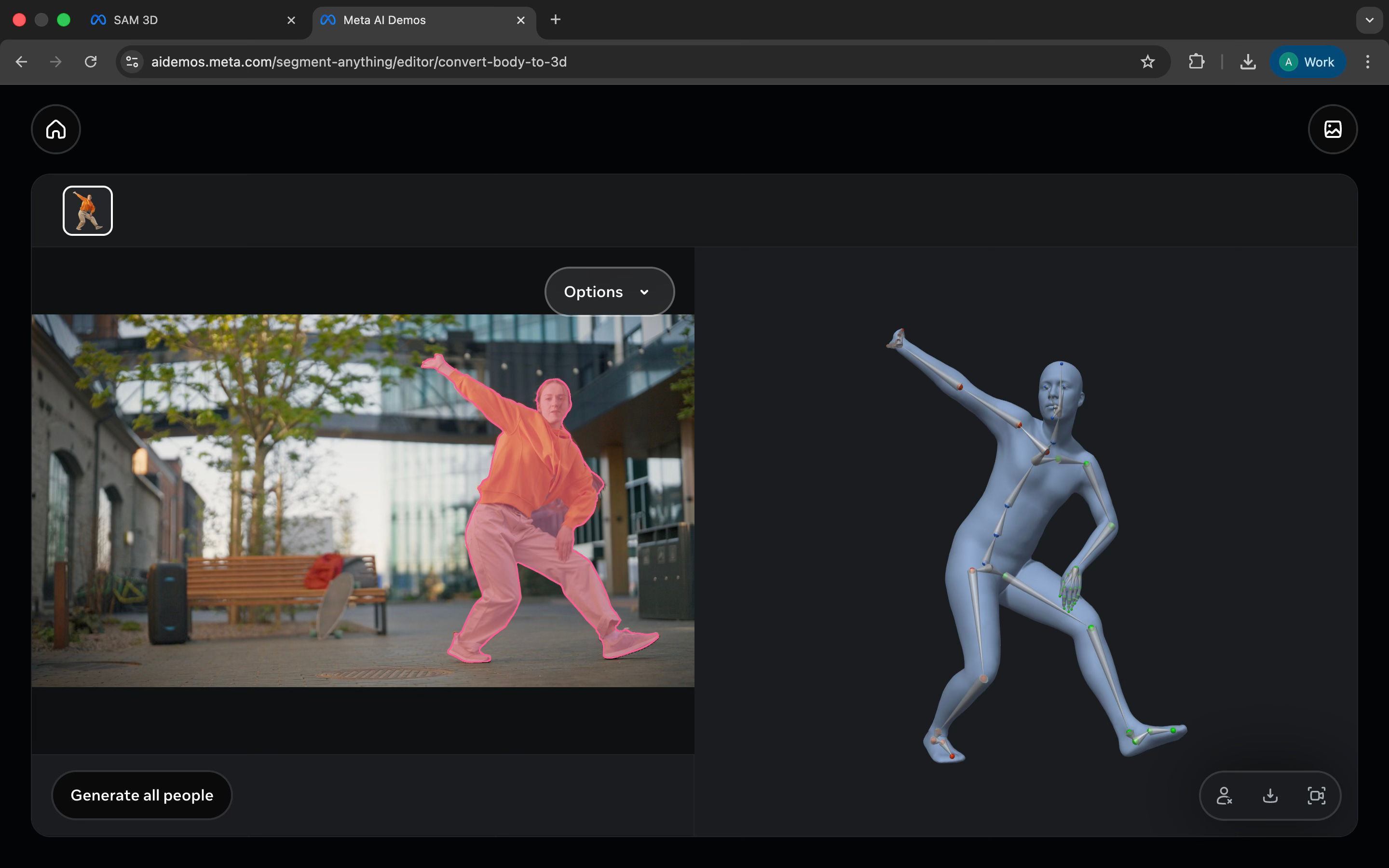
Once the object is selected, you can generate a 3D version of it from that same image. The result isn’t perfect, but you can rotate it, inspect it, and understand its shape in space. It feels more like a quick way to explore an idea than a final output.
What I found interesting is that SAM 3D sits alongside several other tools that use the same basic idea. In the gallery, you can:
search for objects in video and see them tracked across frames
turn a person in an image into a simple 3D body with pose information
isolate or remove specific sounds from audio by describing what you want
Even though these are very different tasks, the interaction stays almost the same. You either point at something or describe it, and the system tries to separate it for you. The interface doesn’t change much across image, video, 3D, or audio.
Taken together, these tools feel less like finished products and more like experiments. Once you can reliably pick out what you want to work with, everything else becomes easier to build on top of it.
Where it works well
SAM 3D works well as an exploration and prototyping tool, not a production one.
It’s useful for designers who want to quickly pull objects out of images and think about them in 3D without setting up complex tools. If you’re sketching ideas, testing layouts, or trying to understand how something might exist in space, this makes that step much faster.
This is especially useful for:
Product and interaction designers experimenting with spatial or 3D ideas
3D designers and artists looking for quick reference shapes before rebuilding assets properly
Researchers and technologists exploring how selection and perception can work across media
Creators working with mixed formats like images, video, and audio
It also works well for early-stage workflows. Instead of spending time cutting, masking, and rebuilding assets, you can get something usable in minutes and decide whether it’s worth taking further.
Where it falls short
The 3D output is rough. You can look at it and rotate it, but it’s not something you can use as-is. Shapes feel incomplete, and details are often missing. Any serious use would still need proper 3D work afterward.
It also struggles with messy and detailed images. When objects overlap or the background is noisy, the segmentation isn’t always clean. Even with Add and Remove clicks, it can take effort to get a usable selection.
There’s very little control beyond the selection itself. You don’t get options to improve mesh quality, fix textures, or guide how the 3D model is built. You mostly need to accept whatever the system produces.
Some of the other demos feel early. Video tracking can break when objects move fast. Audio separation works only in simple cases and with precise prompts. The body-to-3D demo gives you a generic result that’s far from realistic.
What makes it different
Tools that turn images into 3D are mostly based out of a few specific categories.
Some tools use photogrammetry. Software like 3DF Zephyr needs many photos taken from different angles to create a 3D model. The results can be accurate, but the process is slow and requires a lot of setup.
Other tools rely on phone-based scanning. Apps like Qlone let you scan objects using your camera, but you still need the right lighting, positioning, and physical space to get usable results.
There are also newer AI-based approaches that generate depth or multiple views from a single image. These are useful for visualisation, but they often do not produce a clean 3D model you can actually work with.
SAM 3D attempts to go straight from a single image to a 3D object. You select what you want in the image, and the system predicts its shape and texture in 3D. There is no need for multiple photos or special hardware.
This makes SAM 3D much faster and easier to try than traditional 3D tools. At the same time, the results are rougher and less precise. You gain speed and simplicity, but you give up detail and control.
Another difference is how SAM 3D fits into a larger system. It builds on Meta’s Segment Anything work, so selecting an object works the same way across images, video, and even audio. Most 3D tools separate selection, capture, and modelling into different steps and tools.
My take
SAM 3D is not a tool for creating finished 3D assets.
What it does well is help you understand shape and space quickly. You select something in an image and get a rough 3D version almost immediately. That makes it easier to think in 3D without setting up complex tools.
The output is limited and rough, so this isn’t something you’d use for production work. But it’s useful for early exploration, references, or testing ideas.
In the Spotlight
Recommended watch: AI, Algorithms & A Social Media Marketing Playbook
This is worth watching because it explains why marketing feels harder and faster at the same time. We’ve moved from social media to interest media, where algorithms decide what people see based on behaviour, not who they follow. In that world, distribution is fluid and attention shifts quickly. AI becomes essential not for automation, but for keeping up. It helps marketers sense what’s changing, test ideas faster, and stay relevant in feeds that reset every day.
I think we’re fully in interest media now. When I open my app, I get stuff I’m into of the moment. And the second I start to deviate, that starts to show up.”
This Week in AI
A quick roundup of stories shaping how AI and AI agents are evolving across industries:
Elon Musk’s AI chatbot Grok on X has been widely misused to generate non-consensual, sexualised images of women and children, drawing global backlash and regulatory scrutiny over AI safety and content moderation.
Gmail enters the Gemini era, embedding AI directly into the inbox to help users write, summarise, search, and manage email as an ambient layer of everyday work rather than a separate assistant.
OpenAI launches ChatGPT Health, positioning ChatGPT as a clearer, more trustworthy interface for understanding medical information while signalling a careful push into high-stakes, regulated domains.
AI Out of Office
AI Fynds
A curated mix of AI tools that make work more efficient and creativity more accessible.
Music Video Generator → Turn a music track into an AI-generated video by choosing a visual style and letting the model handle the visuals.
Patterned.ai → Create seamless, repeatable patterns with AI for backgrounds, packaging, and brand assets.
AI Background Remover → Instantly remove image backgrounds in the browser for clean product and marketing visuals.
Closing Notes
That’s it for this edition of AI Fyndings. With Munch keeping social media running without constant attention, Final Round AI supporting interviews as they happen, and Meta’s SAM 3D making early 3D exploration easier, this week was about AI stepping into parts of work that usually slow us down.
Thanks for reading! See you next week with more tools, shifts, and ideas that show how AI is quietly changing the way we work.
With love,
Elena Gracia
AI Marketer, Fynd