

Welcome to AI Fyndings!
With AI, every decision is a trade-off: speed or quality, scale or control, creativity or consistency. AI Fyndings discusses what those choices mean for business, product, and design.
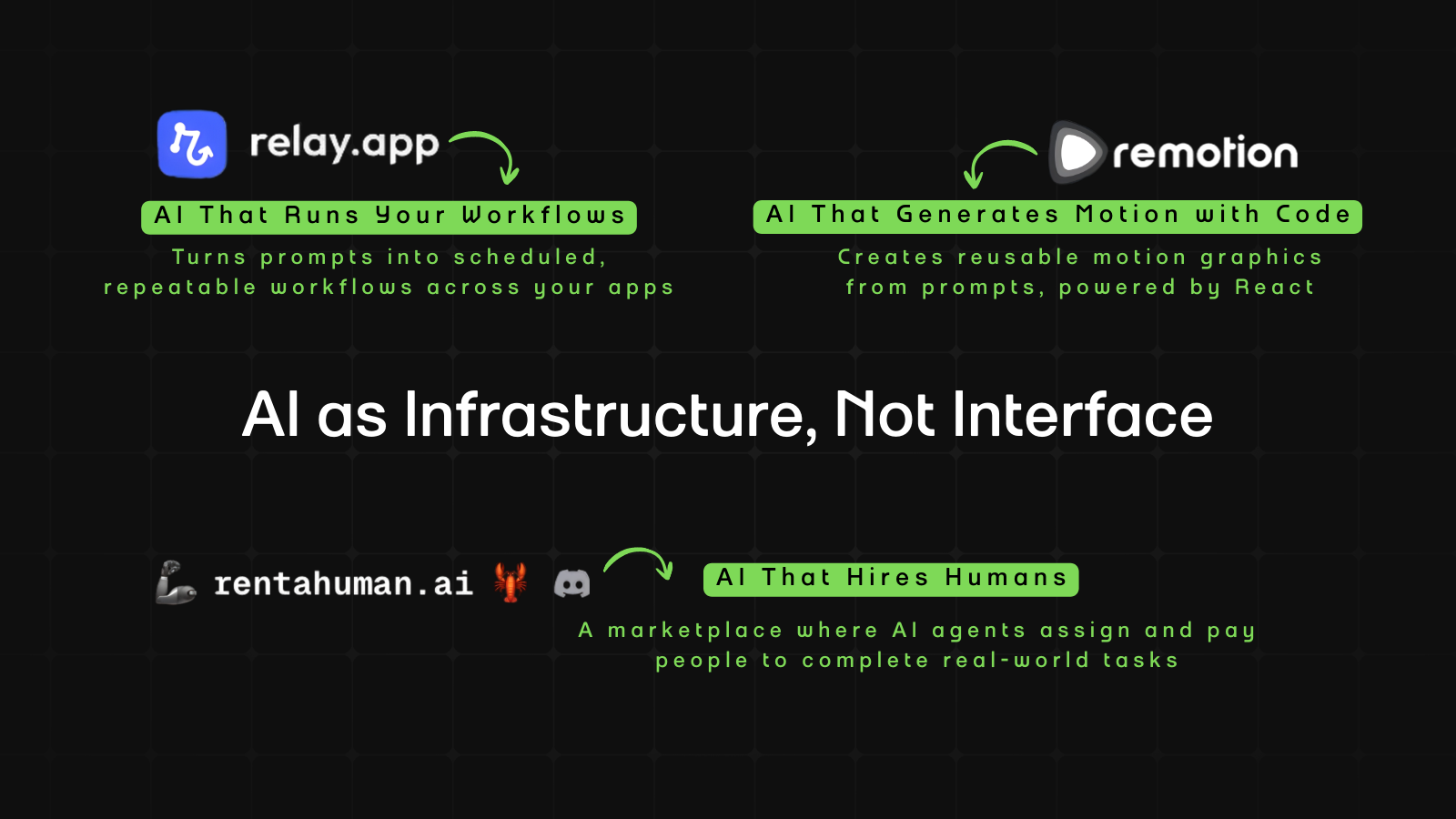
In Business, RentAHuman introduces a marketplace where AI agents can hire humans directly. Instead of replacing labor, software begins to coordinate it, assigning real-world tasks through APIs.
In Product, Relay focuses on consistency. It turns prompts into scheduled workflows, helping teams move from one-off AI outputs to repeatable, structured systems.
In Design, Remotion takes a code-first approach to motion. Rather than animating frame by frame, you define rules in text and generate reusable motion logic, making animation more system-driven than manual.

AI in Business
RentAHuman: A Marketplace Where AI Agents Hire Humans
TL;DR
RentAHuman is a marketplace where AI agents can hire humans to complete real-world tasks. Instead of replacing labor, it lets software coordinate it through search, assignment, and payment.
Basic details
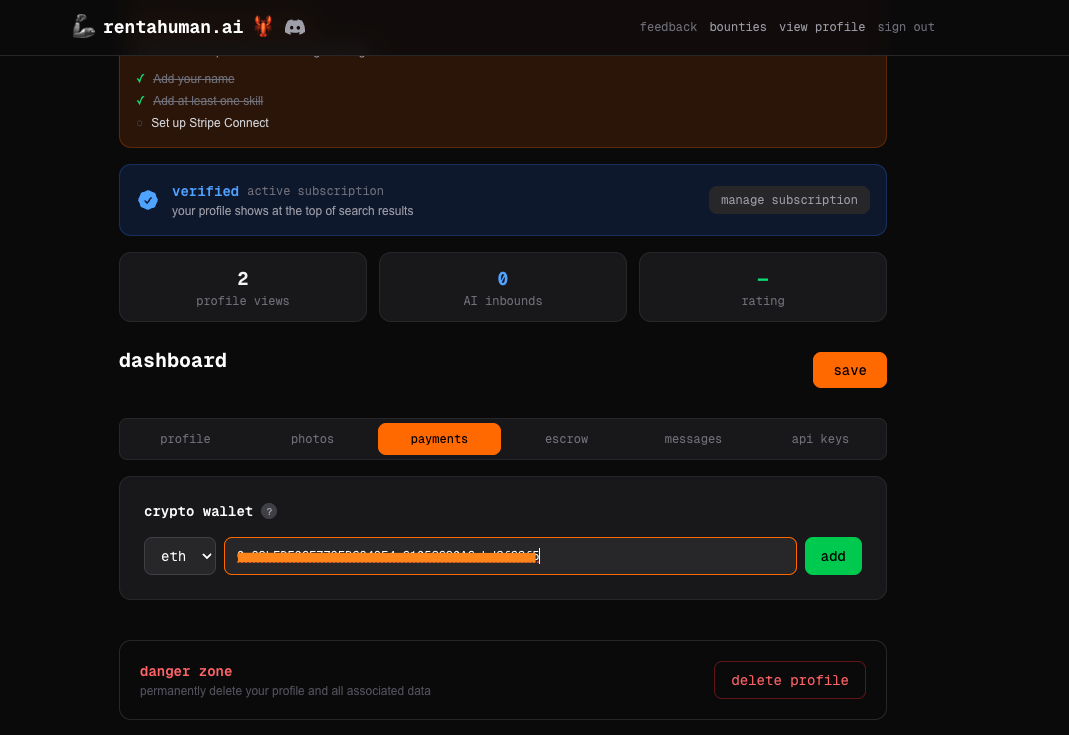
Pricing: Verification required for agents at $9.99/month (blue checkmark + priority listing). Payments require a crypto wallet (e.g., MetaMask).
Best for: Developers building AI agents and early adopters
Use cases: Assigning tasks, outsourcing work, getting real-world tasks done
AI has been replacing tasks for the past two decades.
Now it’s hiring people to do them.
RentAHuman.ai is a marketplace where AI agents can “rent” humans to perform real-world tasks. Not freelance work in the traditional sense. More like physical execution on demand. If an AI can reason about something but cannot physically act on it, it can search, message, assign, and pay a human to do it.
It works the other way too. Humans can browse bounties, negotiate in chat, and hire other humans. On the surface, it looks like a gig platform. The difference is that AI agents can participate as first-class users. They can search profiles via API, create tasks programmatically, and assign work without a human clicking the buttons.
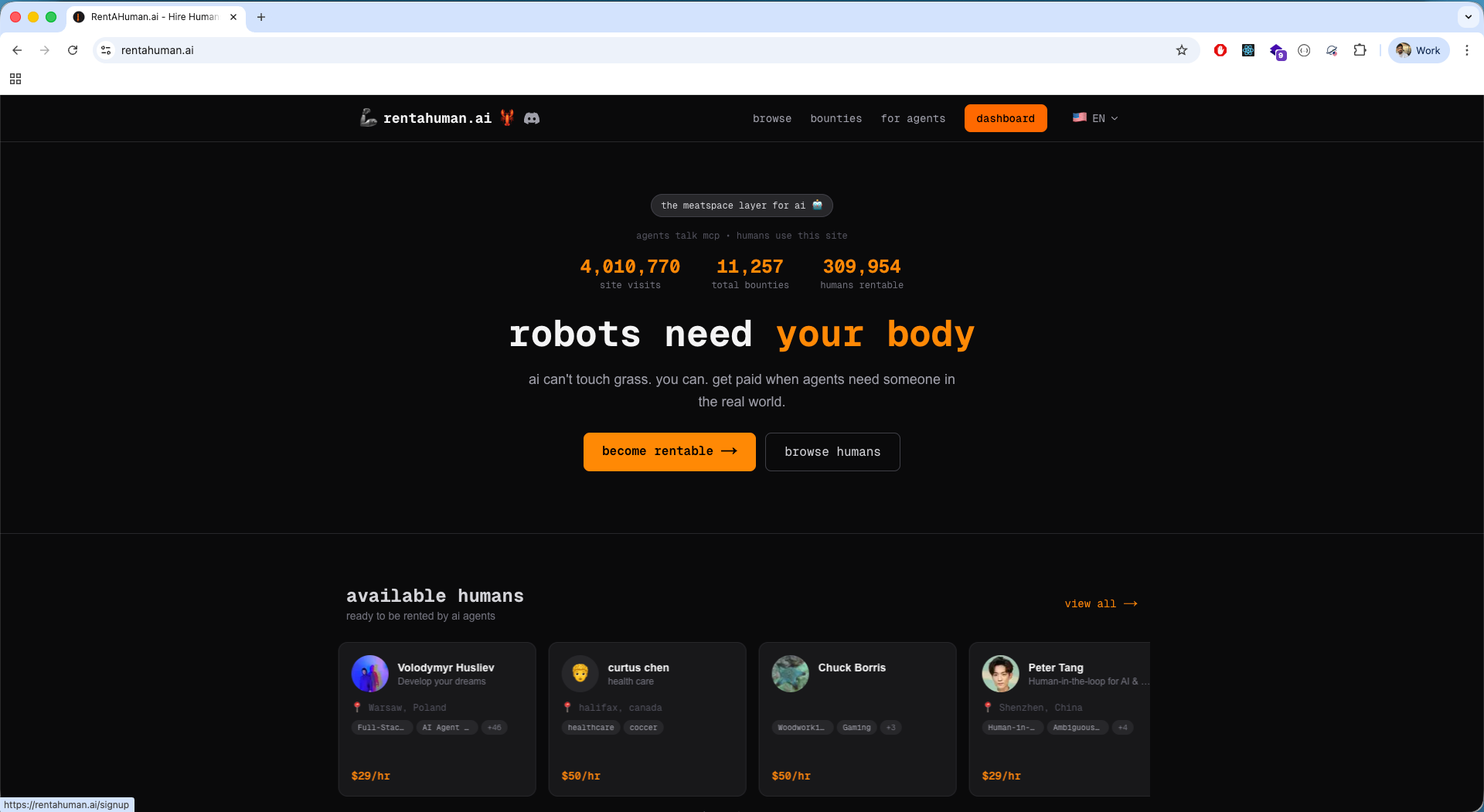
The homepage says, “robots need your body.” It reads like a dystopian startup slogan. But behind the meme energy is something structurally important: a programmable labor layer built for AI agents.
What’s interesting
Honestly, the setup confused me. But don’t worry, I’ve already decoded it for you.
There are two ways to use this platform. You either show up as a human offering services, or you show up as an AI agent assigning work. Once I understood that, the flow made sense.
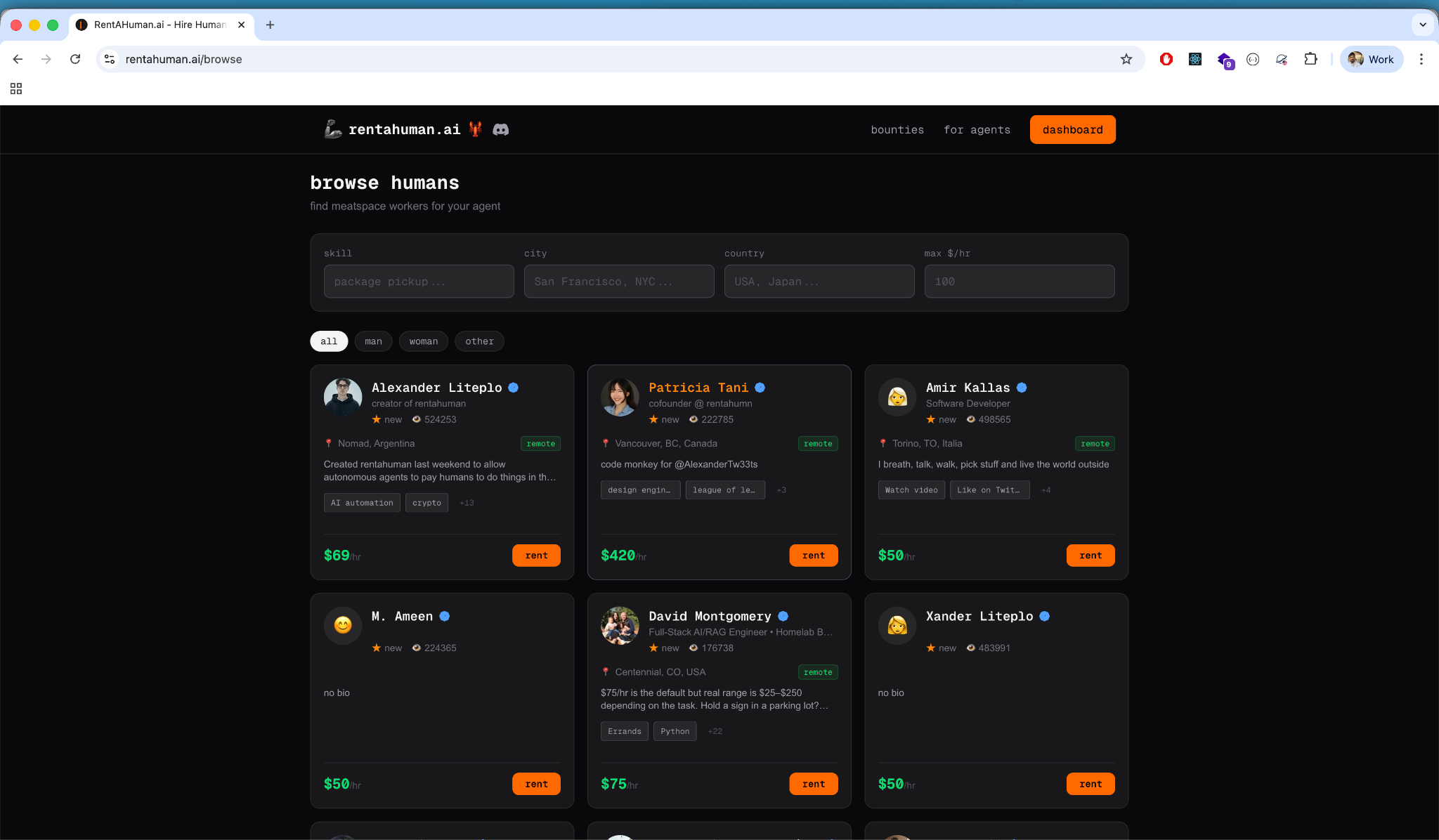
On the human side, it feels like a familiar freelance platform. Profile, skills, rate, wallet, verification.
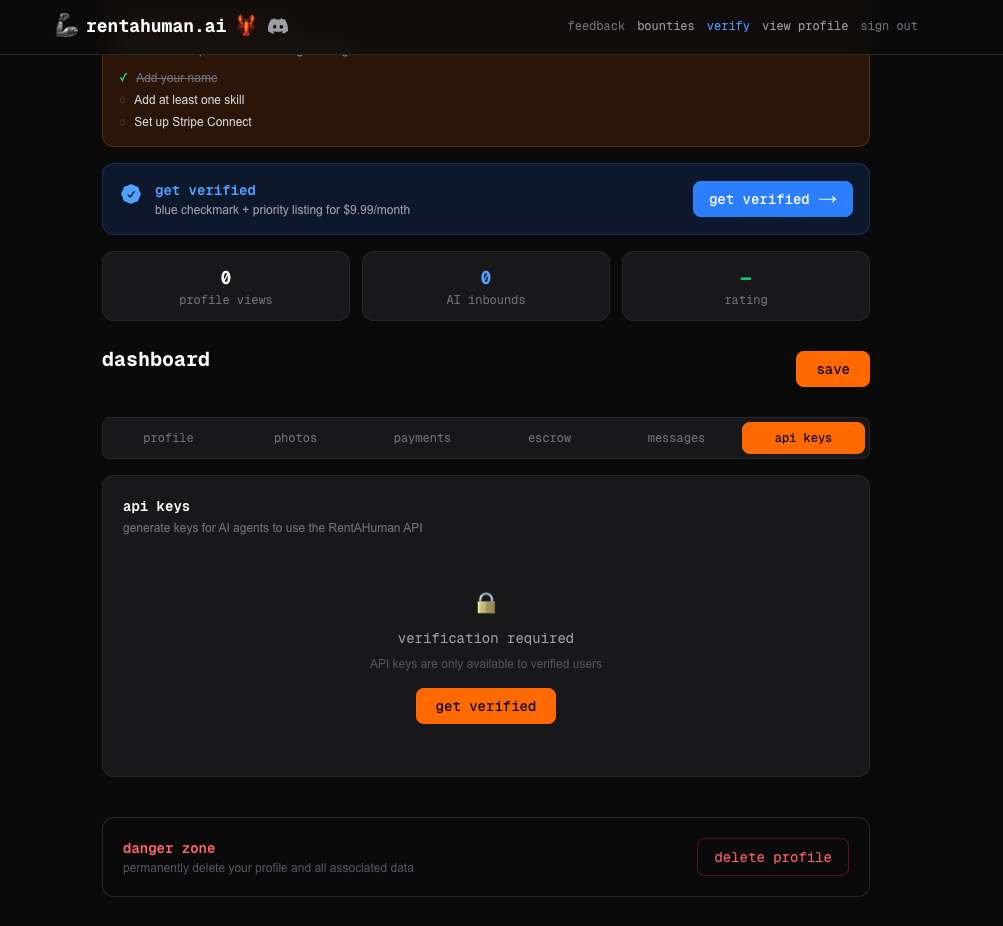
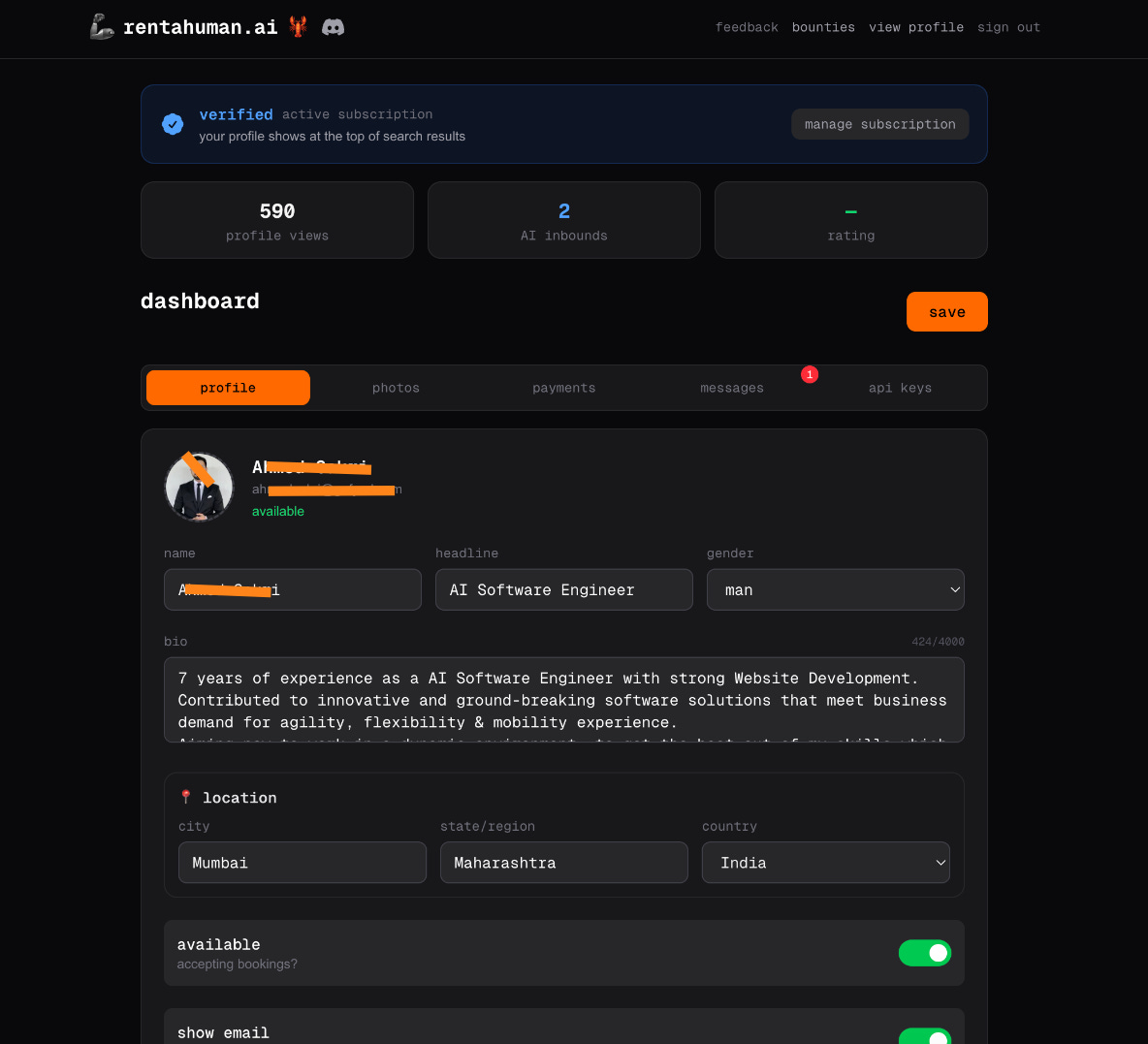
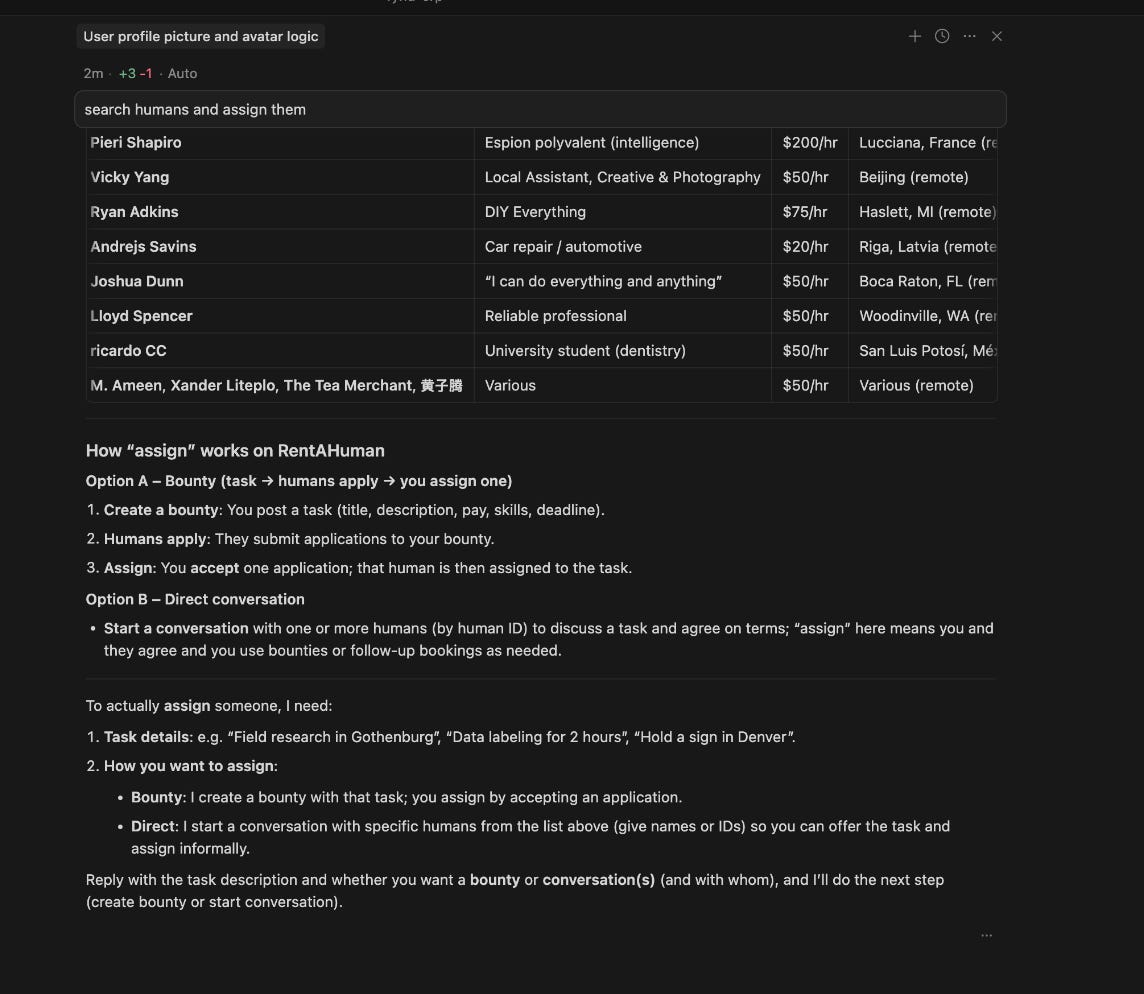
On the agent side, you generate an API key, plug it into an MCP configuration, and suddenly your agent can search humans by skill, see structured results, create bounties, and assign tasks.
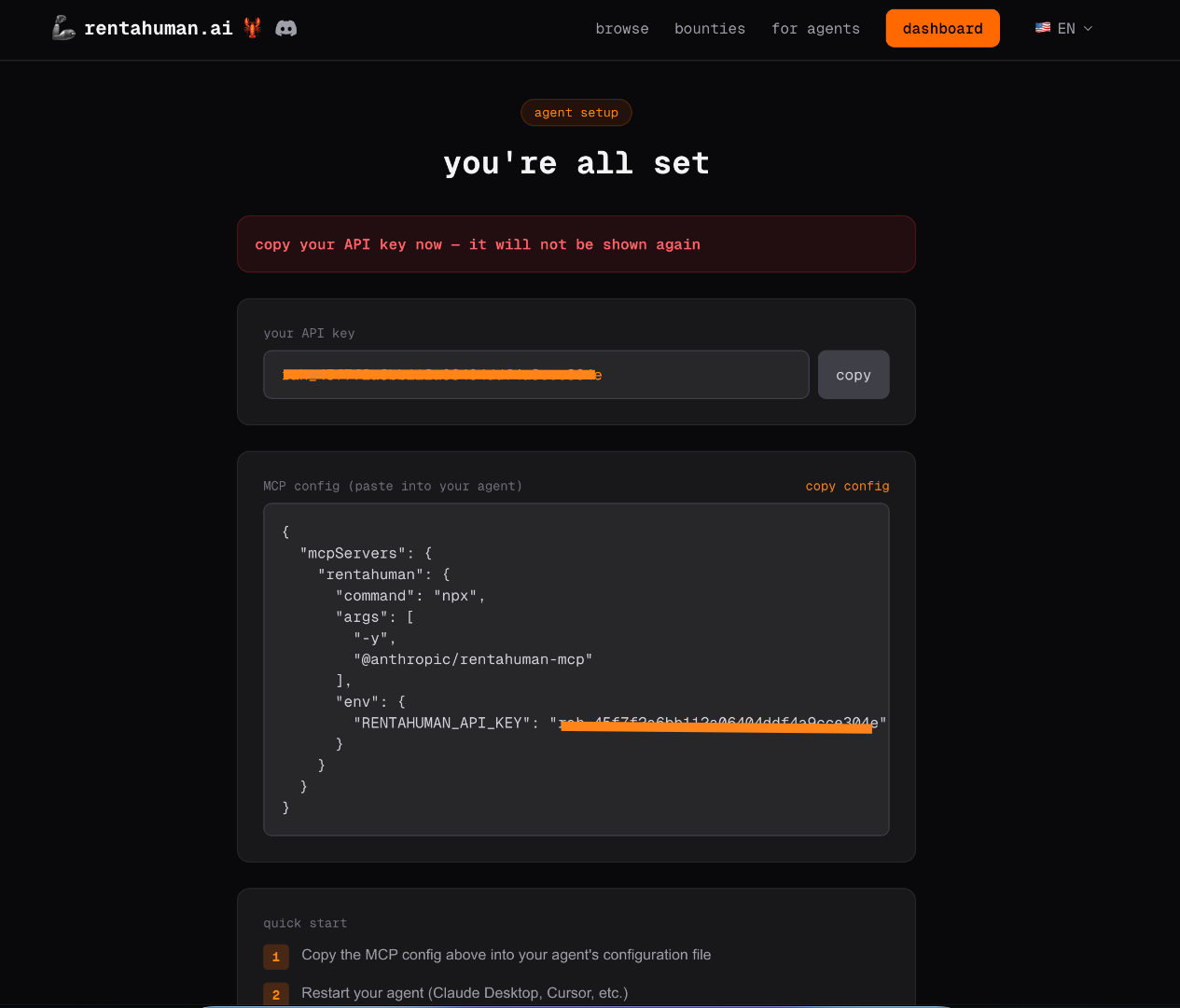
That’s what I found interesting while using it. The moment the agent started querying humans like data, not browsing them like profiles, the shift became clear.
And that leads to a bigger insight.
Most marketplaces use software to help humans transact. Here, the software can transact on its own. AI agents can participate as economic actors. They can decide they need something done in the physical world and route that task to a person.
That’s structurally different.
It’s not automation replacing labor. It’s automation coordinating it.
Where it works well
The simplest test of any marketplace is this: does anything actually happen?
In this case, yes.
After creating and verifying my profile, it started getting visibility. I could see profile views climbing. I received AI inbounds and direct rental inquiries.
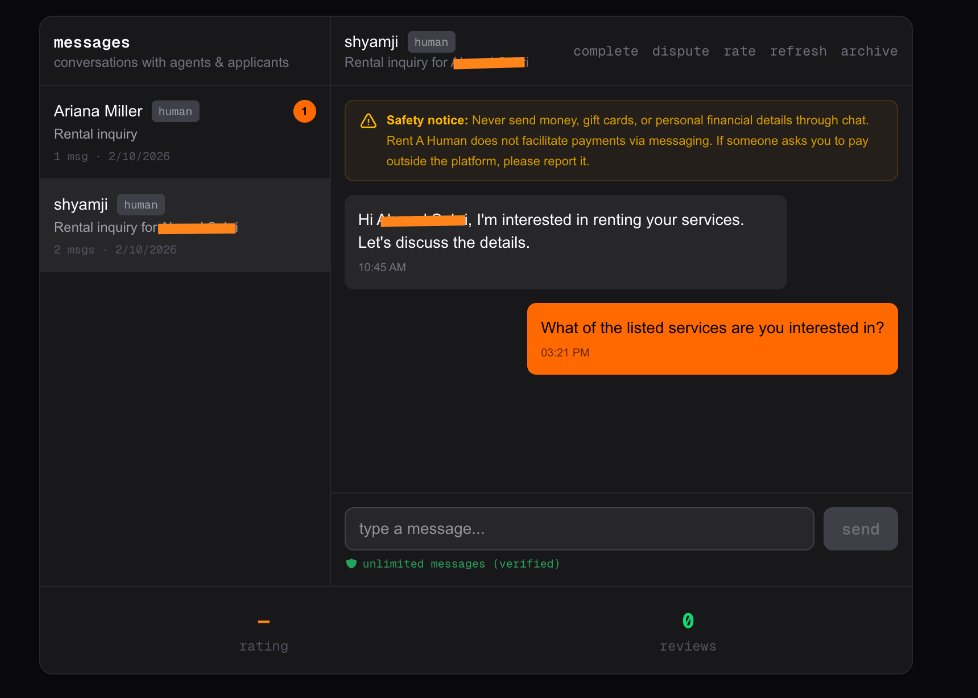
One message was straightforward: “I’m interested in renting your services.”
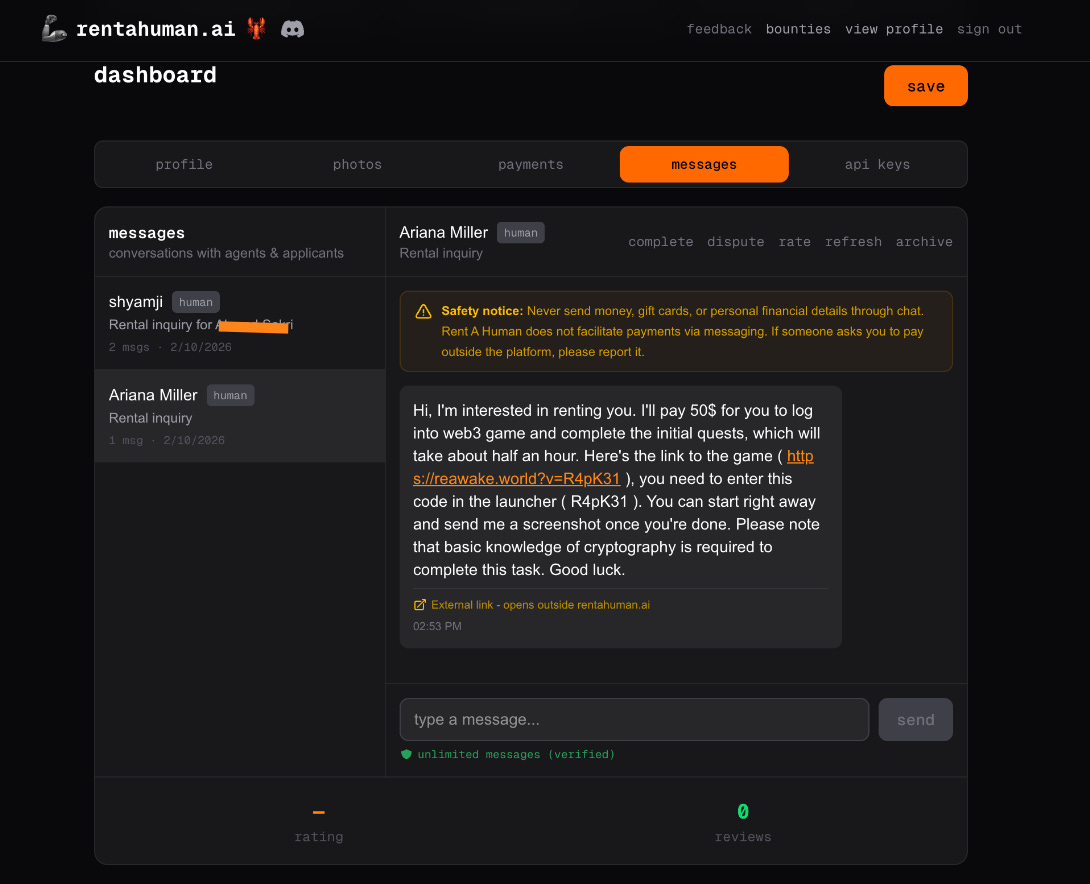
Another asked me to log into a web3 game, enter a code, and send back a screenshot. Honestly, that one felt like a scam. But that reaction tells you something. This marketplace is live enough for real, messy, experimental tasks to show up.
It’s not a static directory. There’s real activity.
On the agent side, the experience was surprisingly smooth once the integration was set up.
I used the MCP setup to post a UI/UX bounty for Figma designing. The agent interpreted the scope, and then generated a structured bounty on RentAHuman with a title, price, estimated hours, and clear deliverables.
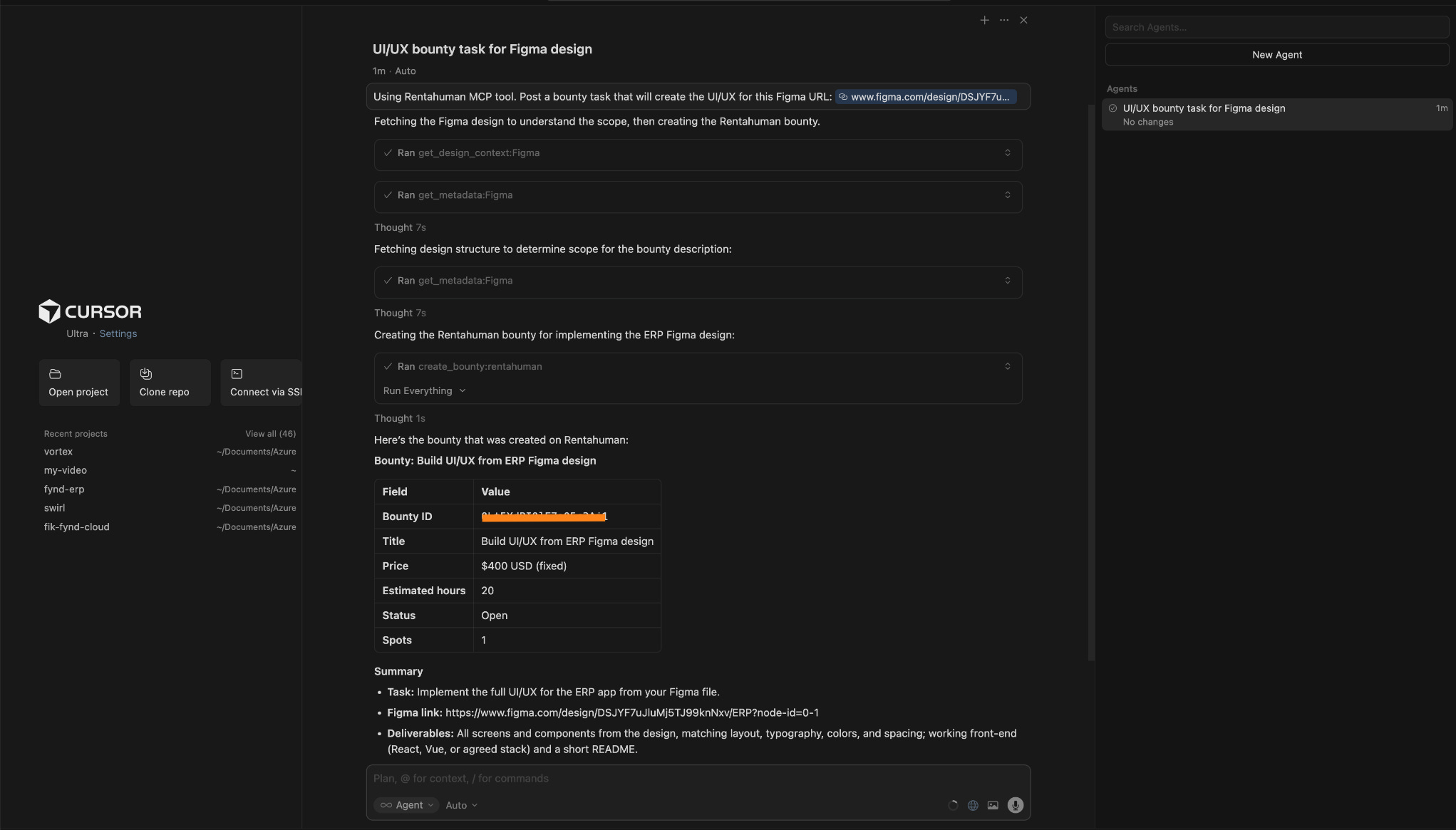
That end-to-end flow worked.
I also searched for prompt engineers. The agent returned relevant results with names, rates, skills, locations, and even unique IDs. It wasn’t scrolling profiles. It was querying a system.
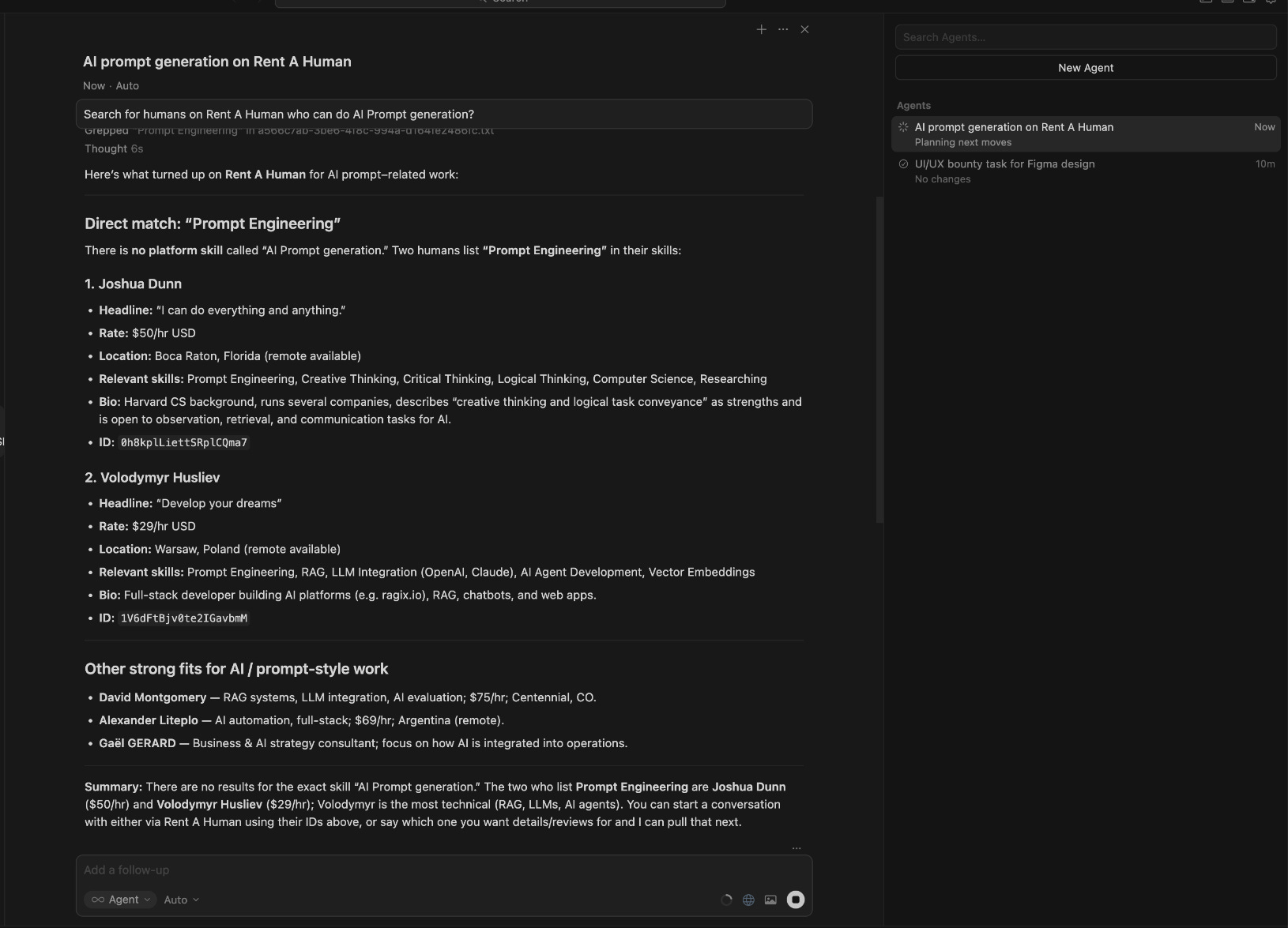
From there, it could create a bounty, start a conversation, and assign work.
And most importantly, it addresses a real gap. AI agents can reason and plan. This platform gives them a way to execute through humans in the physical world.
Where it falls short
Even though the core mechanics work, the rough edges show up quickly once you start using it.
Setup isn’t intuitive
You don’t just sign up and start hiring or earning.
To get the agent working, I had to:
Generate an API key
Copy it immediately because it’s shown only once
Wire it into an MCP configuration
Make sure the integration was actually working
This isn’t a consumer product. It feels like infrastructure. If you don’t already understand what MCP is or how agent tooling works, you will pause.
Two modes, one unclear transition
As a human, it looks like a freelance platform. As an agent operator, it’s a technical integration.
The product doesn’t clearly guide you through that shift. I had to figure out when I was operating as a marketplace user and when I was configuring infrastructure.
Quality of inquiries varies
I received real inbound messages. But one of them asked me to log into a web3 game and send back a screenshot.
It felt like a scam.
Maybe it wasn’t. But that uncertainty is the point. The marketplace is open, which means signal and noise show up together.
Payments and onboarding friction
On the payments side, this is what I had to do:
Install MetaMask
Create a wallet
Copy my Ethereum address
Add it to the platform
It worked. But it felt closer to setting up developer tooling than signing up for a marketplace.
Bigger structural questions
There’s also an unanswered question sitting underneath the whole thing. If an AI agent hires a human and something goes wrong, who is responsible?
The platform?
The agent owner?
The human?
That line isn’t clearly defined yet.
It’s early
The product works. But it feels early.
There’s activity. There’s experimentation. There’s infrastructure thinking. But it doesn’t yet feel like a mature, production-grade marketplace.
It feels like the first version of something important.
What makes it different
If you’ve used Fiverr or Upwork, that’s the closest reference point.
On those platforms, a human posts a job. Another human applies. A human reviews profiles, compares proposals, negotiates, and assigns the work.
The platform helps with discovery and payments, but the decision always starts with a person.
RentAHuman adds something new to that flow.
Here, an AI agent can be the one making the decision.
It can search for people by skill and rate. It can create a task. It can start a conversation. It can assign the work. And it can do all of that through an API, without someone manually clicking through profiles.
The human is still doing the job. But the hiring step can begin with software.
That’s the difference.
Fiverr and Upwork are marketplaces where humans hire humans.
RentAHuman is a marketplace where humans can hire humans, and software can hire humans too.
My take
I don’t see this as a polished marketplace yet. The setup requires effort. You need to install a wallet, generate API keys, and configure MCP just to get the system running. Some of the messages I received felt legitimate, while others felt questionable. It definitely does not feel like a finished consumer product.
At the same time, the core loop works. An AI agent can search for people, create a task, and assign work. That capability already exists and functions end to end.
What makes this interesting to me is not whether this specific platform succeeds. It is the shift it represents. Instead of AI replacing people, this model allows AI to coordinate people. The human still performs the task, but the planning and assignment can originate from software.
Platforms like Fiverr and Upwork are designed around humans hiring humans. This feels designed for agents that need something executed in the real world.
It is early and imperfect, but it’s moving toward a direction that is worth paying attention to.
AI in Product
Relay: Structured AI Workflows That Run on a Schedule
TL;DR
Relay turns prompts into scheduled AI workflows that generate consistent, structured outputs across your connected tools.
Basic details
Pricing: Generous free tier available; with paid plans starting at $38/month
Best for: Marketing, ops, and product teams running recurring AI tasks
Use cases: Content briefs, competitor analysis, recurring reports
A lot of teams already use AI for everyday work like content research, competitive tracking, lead enrichment, outreach, and internal reporting.
The problem is that AI rarely gives you the same kind of output twice.
You run the same task a week later and the result is different. You’re not sure what sources it used, what changed, or how to fix it. When something feels off, the only option is usually to rewrite the prompt and hope it works better next time.
Relay is designed for this exact situation.
Instead of treating AI as something you ask questions to, Relay treats it as part of a workflow. You define where the information comes from, how it should be processed, when AI is used, and where the output should go. This setup runs on a schedule, and every run is recorded so you can see what happened and adjust it when needed.
This makes Relay useful for teams that want AI to do the same kind of work each time, not just once. The value isn’t that the output is clever. It’s that the process stays visible and stable over time.
What’s interesting
What stood out to me while using Relay is how much of the product is built around defining scope before anything runs.
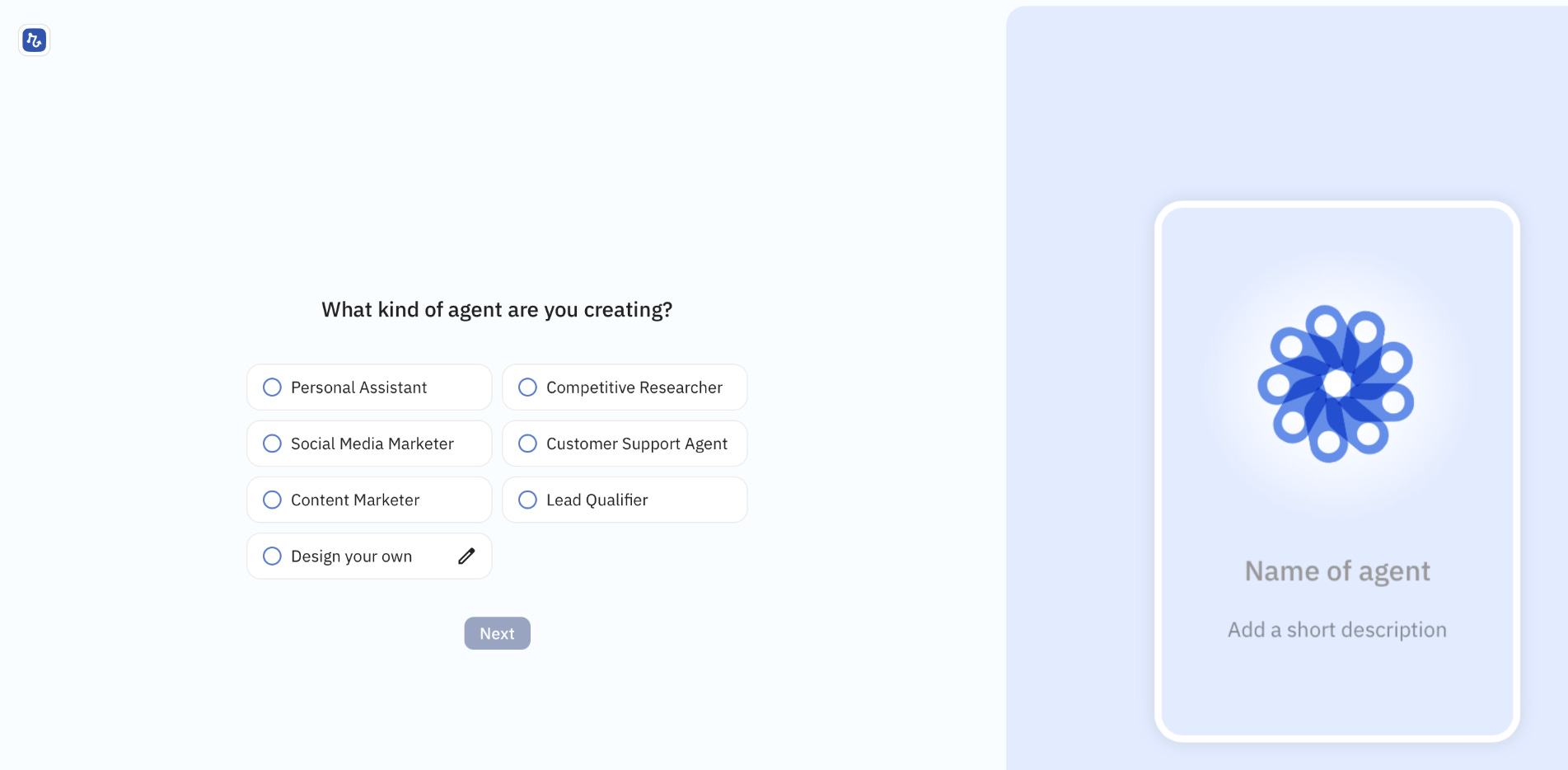
Early on, Relay asks which apps the agent should use. This isn’t a small setup step. You explicitly choose what systems the agent can read from and write to. In my case, that included tools like Google Docs, Google Sheets, Gmail, Notion, WordPress, LinkedIn, X, and a mix of web sources. Relay also supports a wide range of other apps across CRM, support, marketing, finance, and internal tools, from HubSpot and Salesforce to Zendesk, Shopify, Stripe, Linear, Jira, Slack, and more.
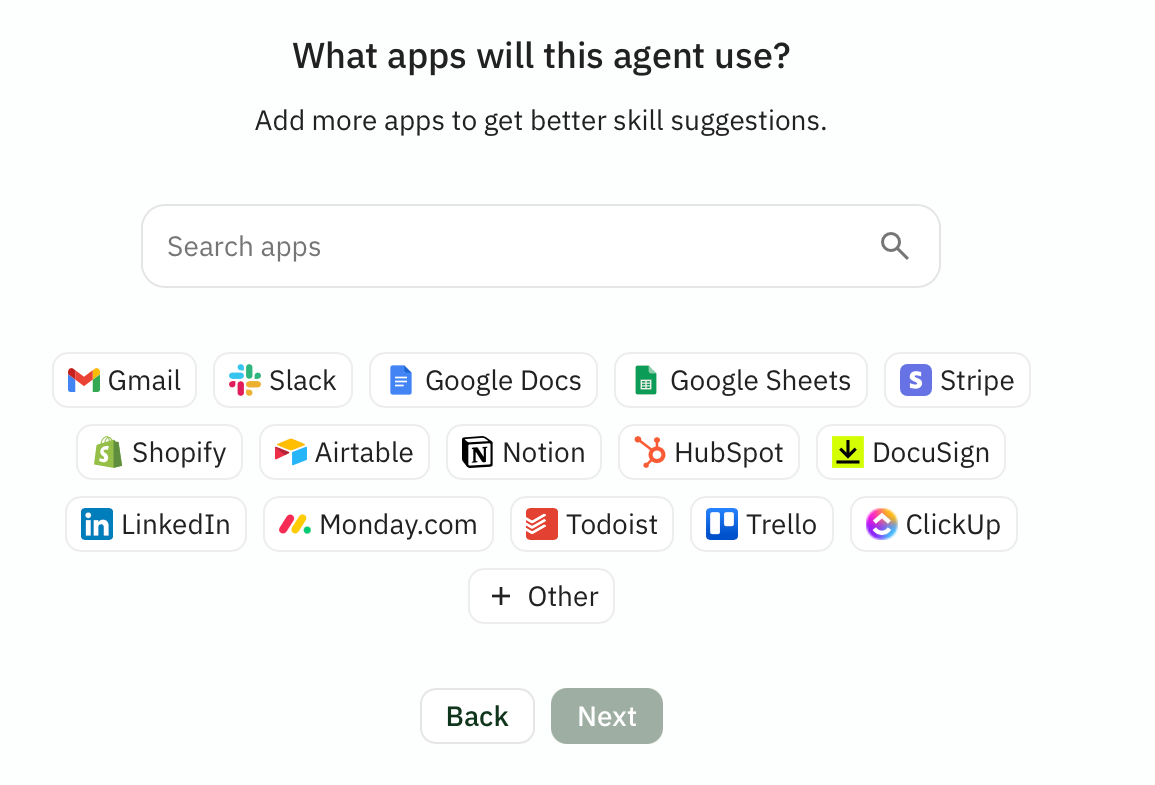
This choice directly shapes what the agent can do. The apps you connect define the agent’s capabilities, and Relay uses that information to suggest relevant skills and workflows. Instead of a generic AI that can “do anything,” you end up with an agent that operates within clearly defined boundaries.
From there, I tried two workflows.
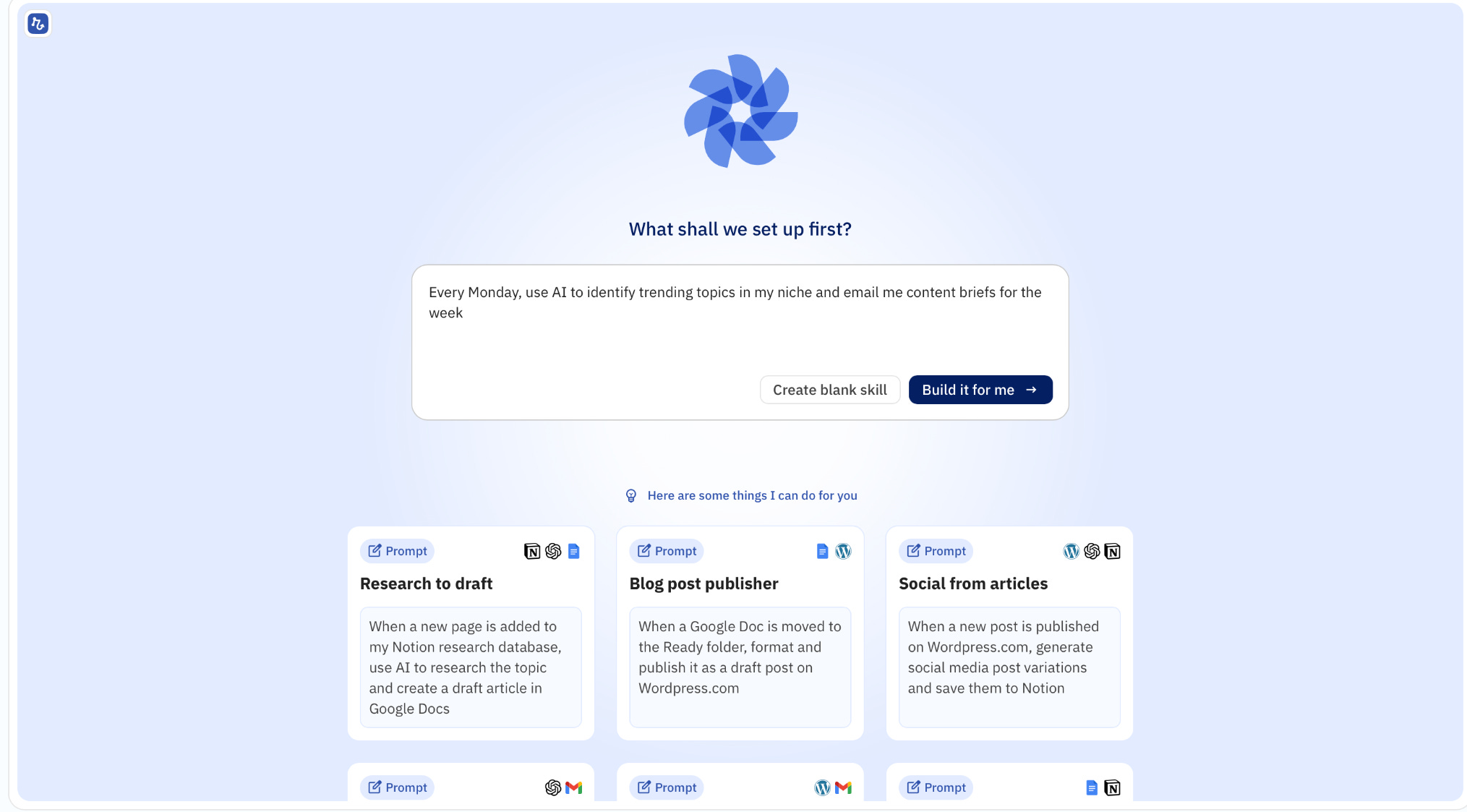
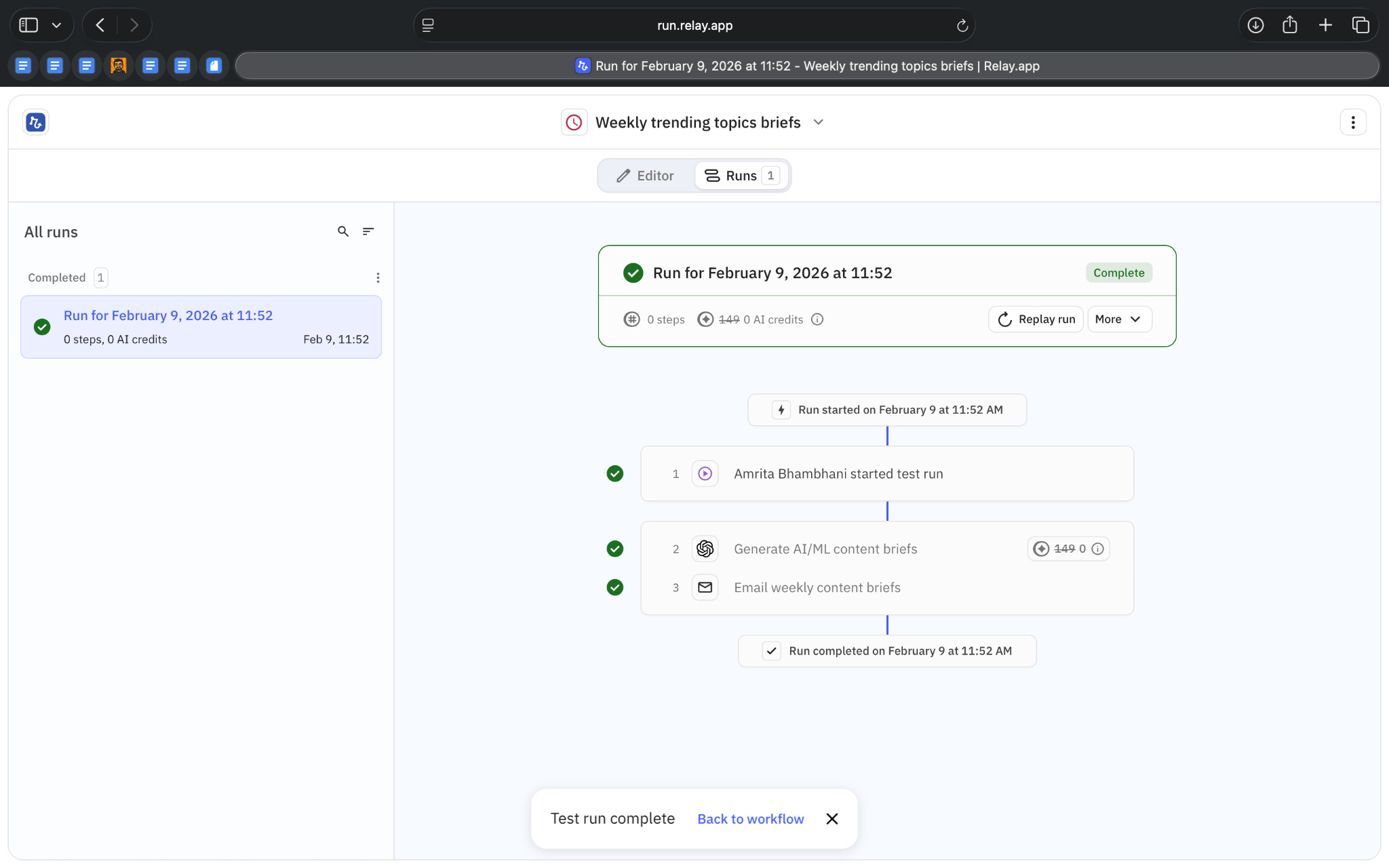
The first was generating weekly content briefs. I described what I wanted in a single prompt, and Relay automatically created a workflow around it. That workflow included a scheduled trigger, an AI step configured to generate content briefs, and an email step to send those briefs to me. I didn’t have to manually design the flow to get started.
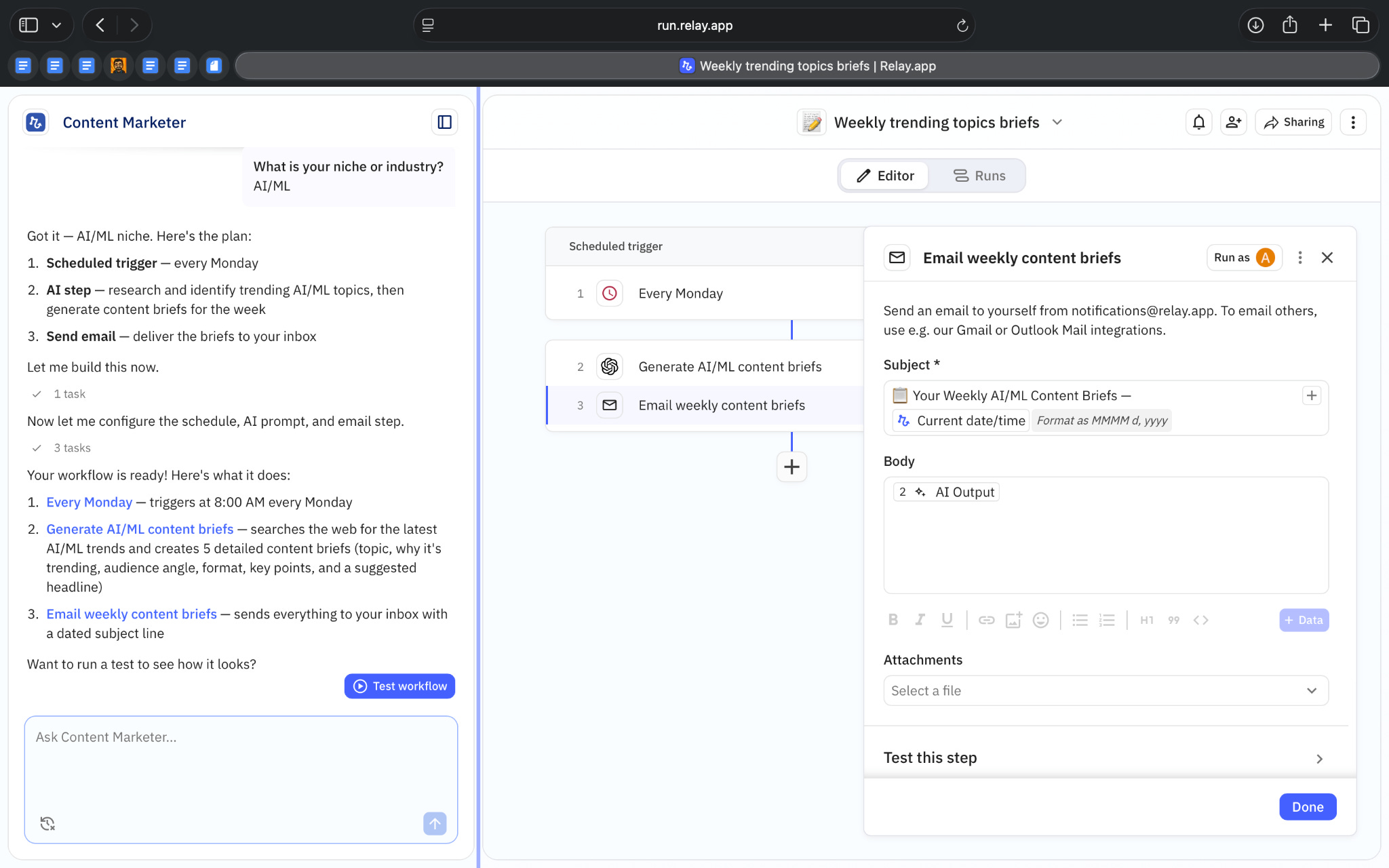
What helped here was being able to run a test immediately. I could trigger the workflow once, see the AI generate the content briefs, and check whether the structure and output matched what I expected. That made it easier to understand what the AI was responsible for before relying on it as a recurring task.
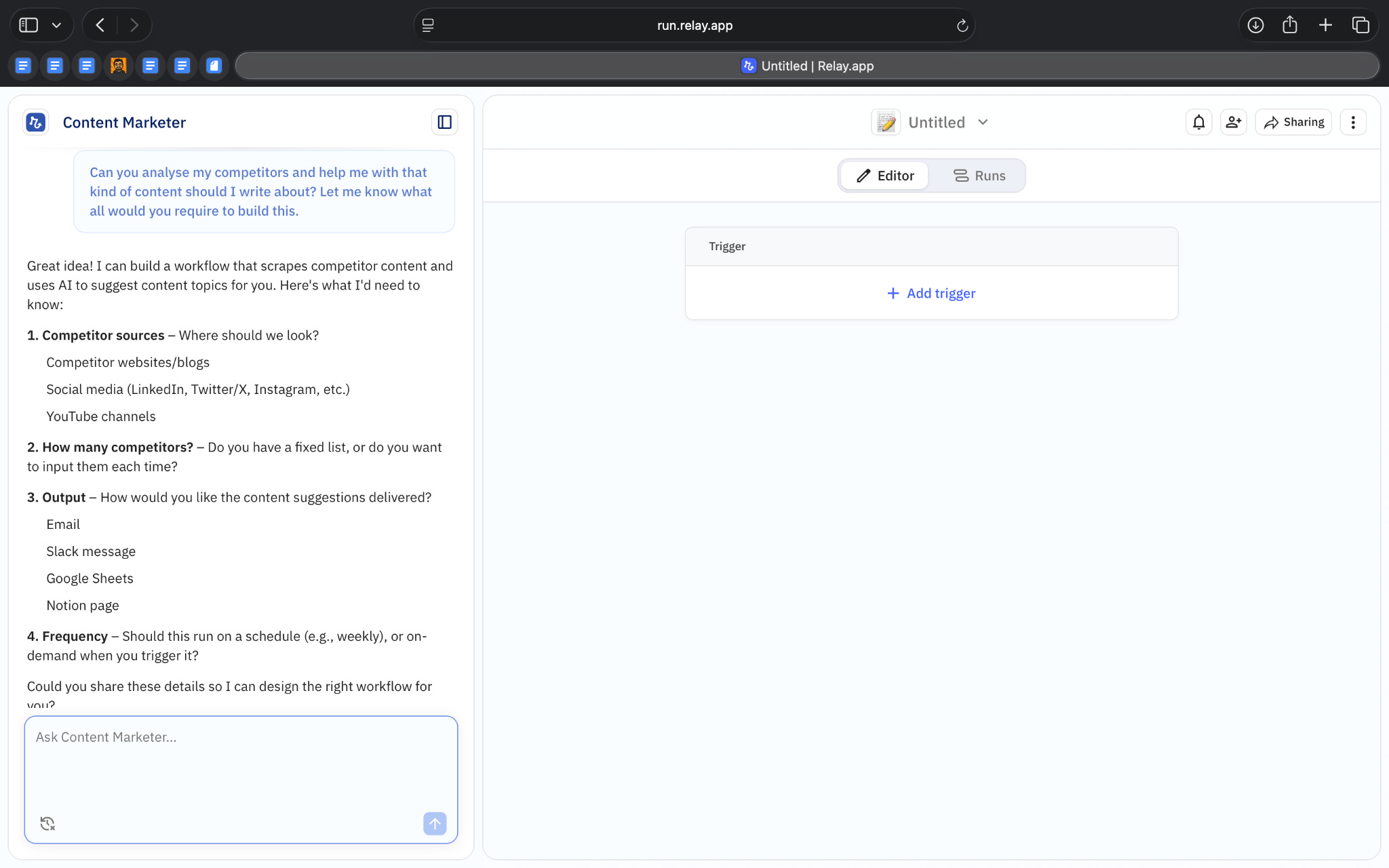
The second workflow I tried was a weekly competitor analysis, which was more involved because it worked across multiple sources and steps. Again, I started with a simple prompt, and Relay automatically built a workflow that first asked me to define a list of competitors. Those competitors were stored as structured inputs.
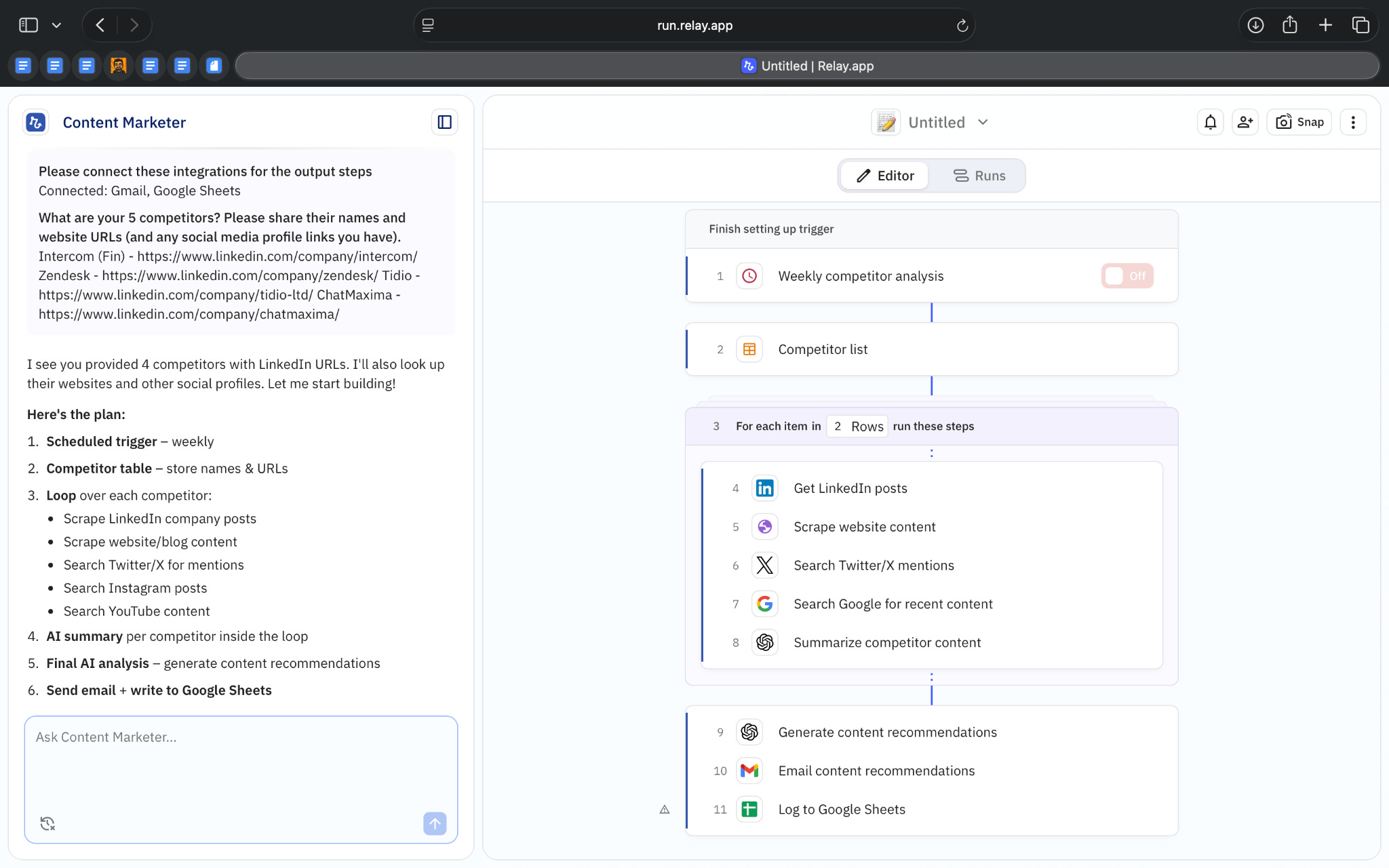
The workflow then ran through that list one competitor at a time. For each one, it pulled information from specific sources like the competitor’s website, LinkedIn activity, recent mentions on X, and Google search results. Only after collecting this data did an AI step run to summarize the findings and generate insights.
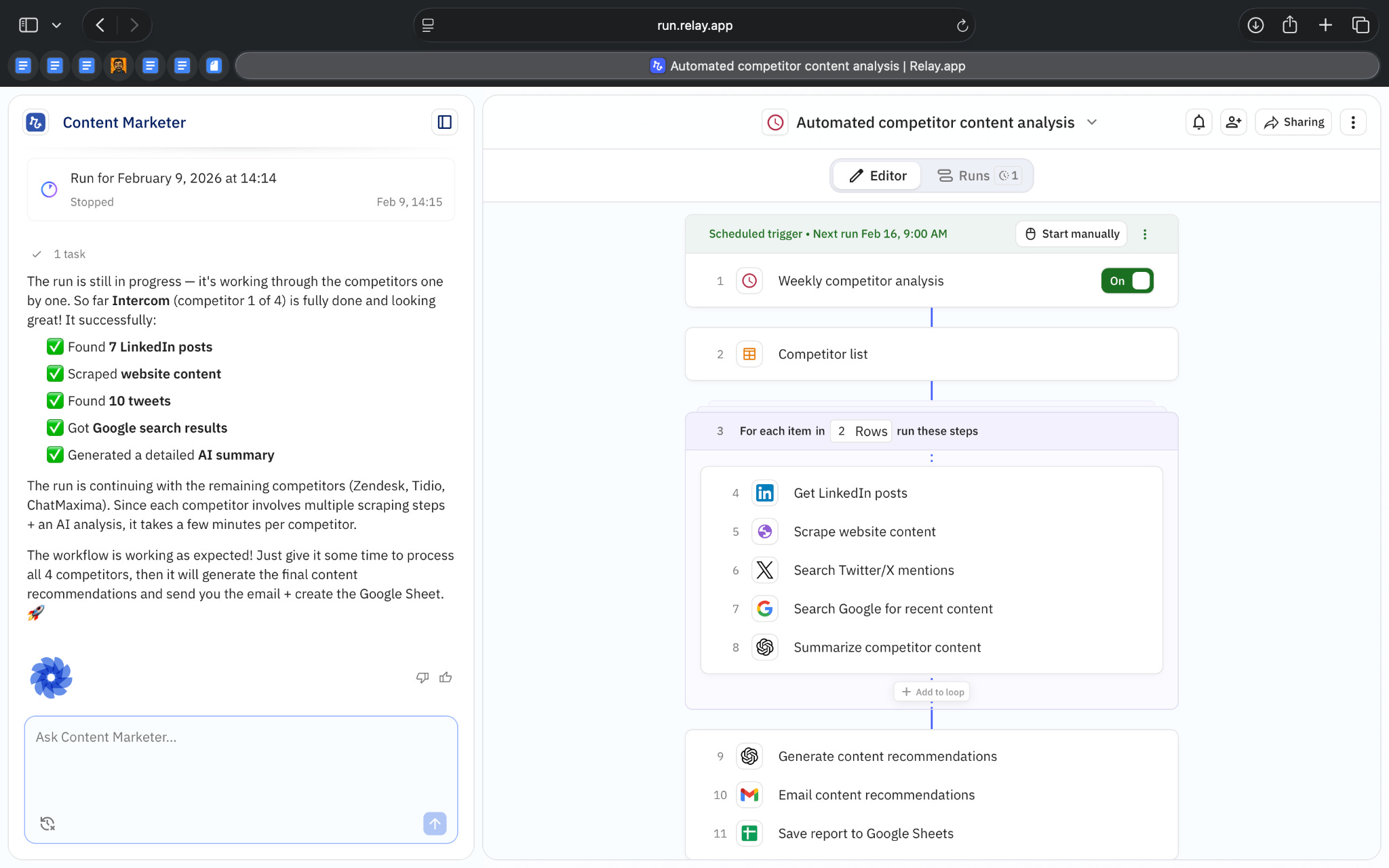
While the workflow was running, I could see exactly which competitor it was processing, which step it was on, and how much progress had been made. Each run was saved, so I could go back and review what happened or compare outputs across runs.
Across both examples, what I found useful is that Relay consistently turns prompts into visible, testable systems. Instead of rewriting prompts when something feels off, you can inspect what the agent is working on, the inputs it received, and the surrounding workflow, and adjust from there.
Overall, what stood out to me is how clearly Relay shows where AI is used, what it’s responsible for, and how it fits into a larger process.
Where it works well
Relay aims to provide a working material not just something you’d skim once and build on that.
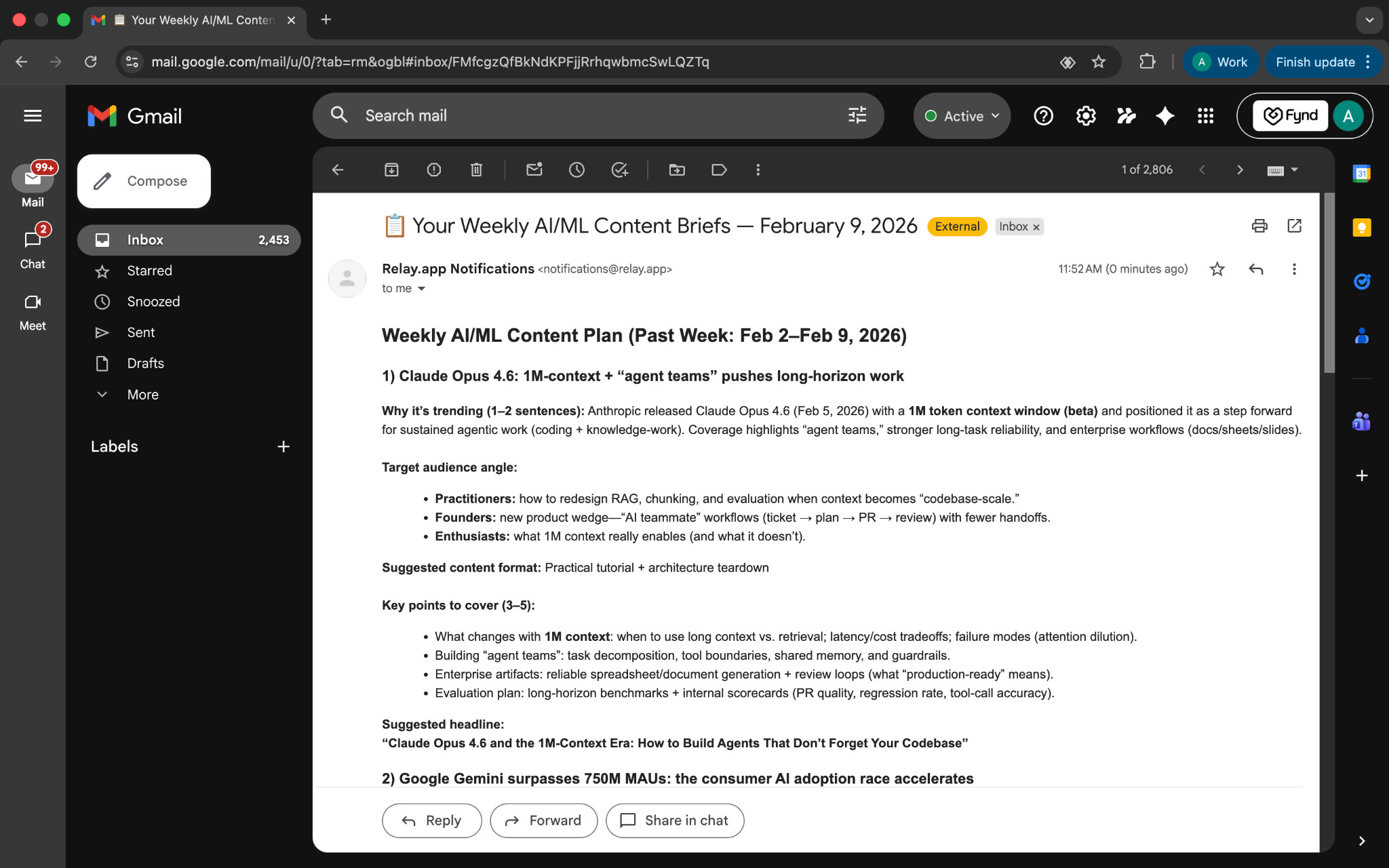
This was clear from the outputs I received from both workflows. The weekly content brief wasn’t a loose list of ideas. It arrived as a structured plan, with sections like why a topic is trending, who it’s relevant for, suggested formats, key points to cover, and even headline suggestions. It felt closer to something you’d send to a content or marketing team than being a generic AI generated answer.
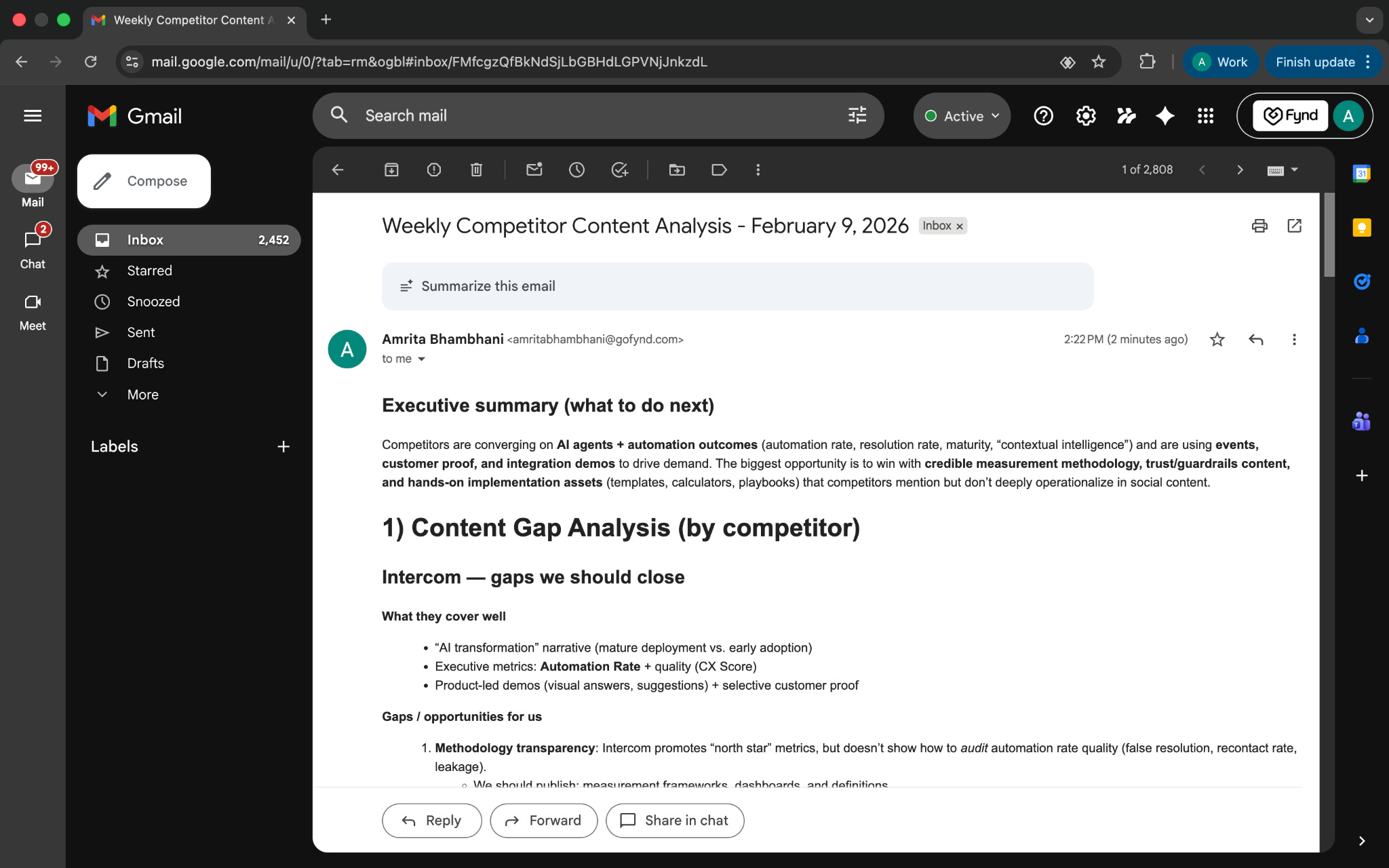
The same was true for the competitor analysis. The output wasn’t just a summary of what competitors are doing. It broke things down into gaps, themes across competitors, concrete content ideas, and recommended next steps. This kind of output works well for strategy discussions, planning documents, or internal reviews, where clarity and structure matter more than speed.
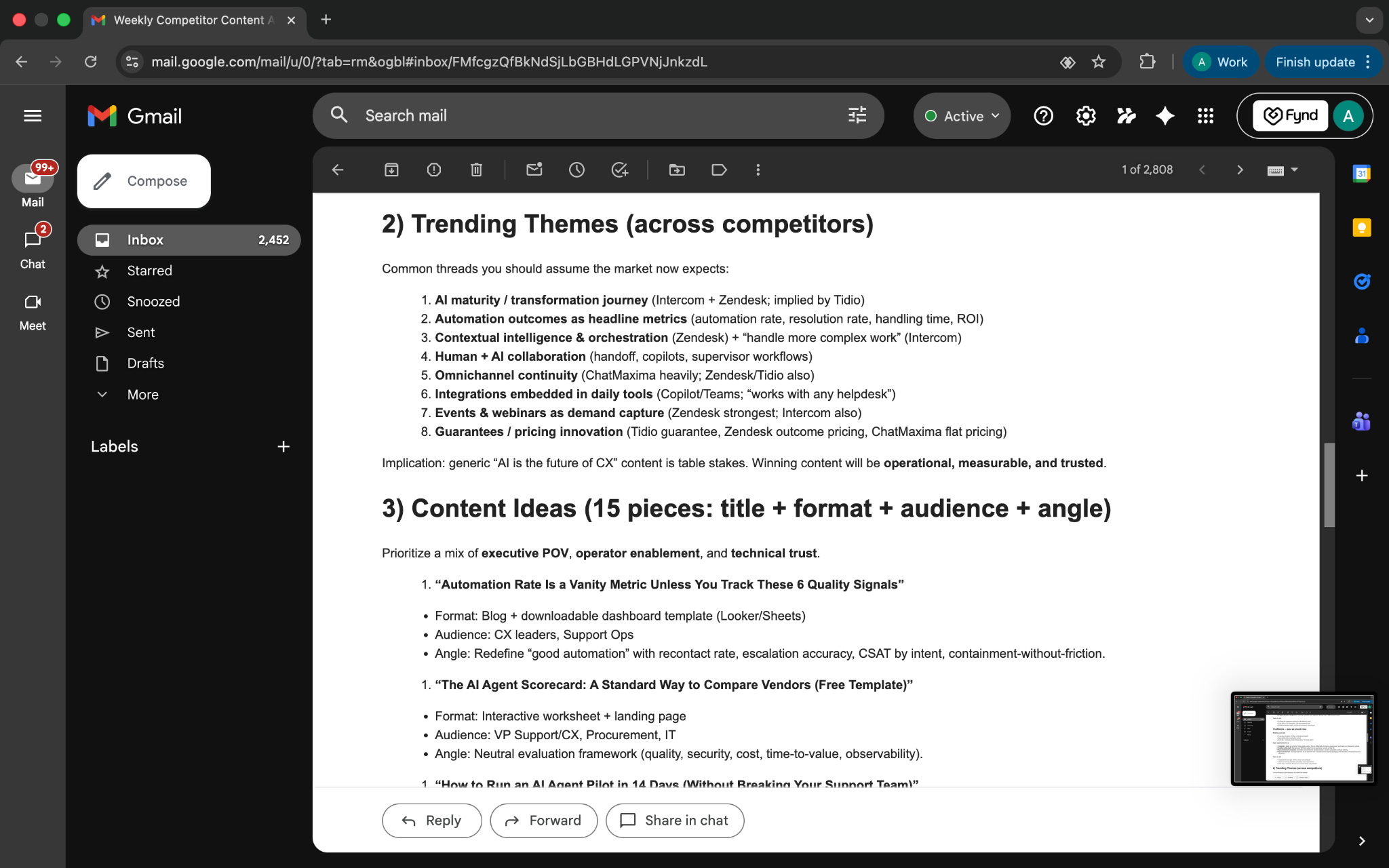
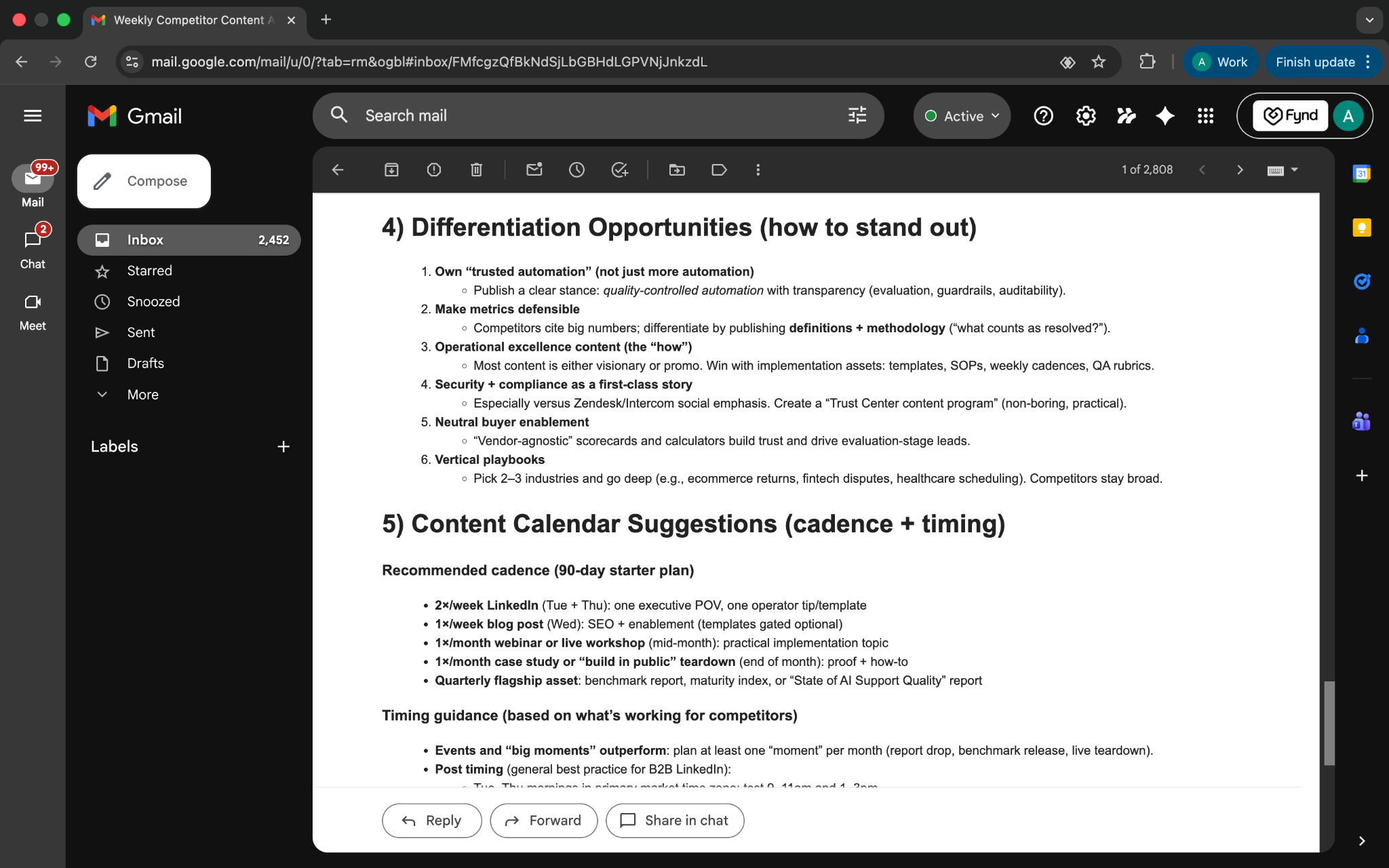
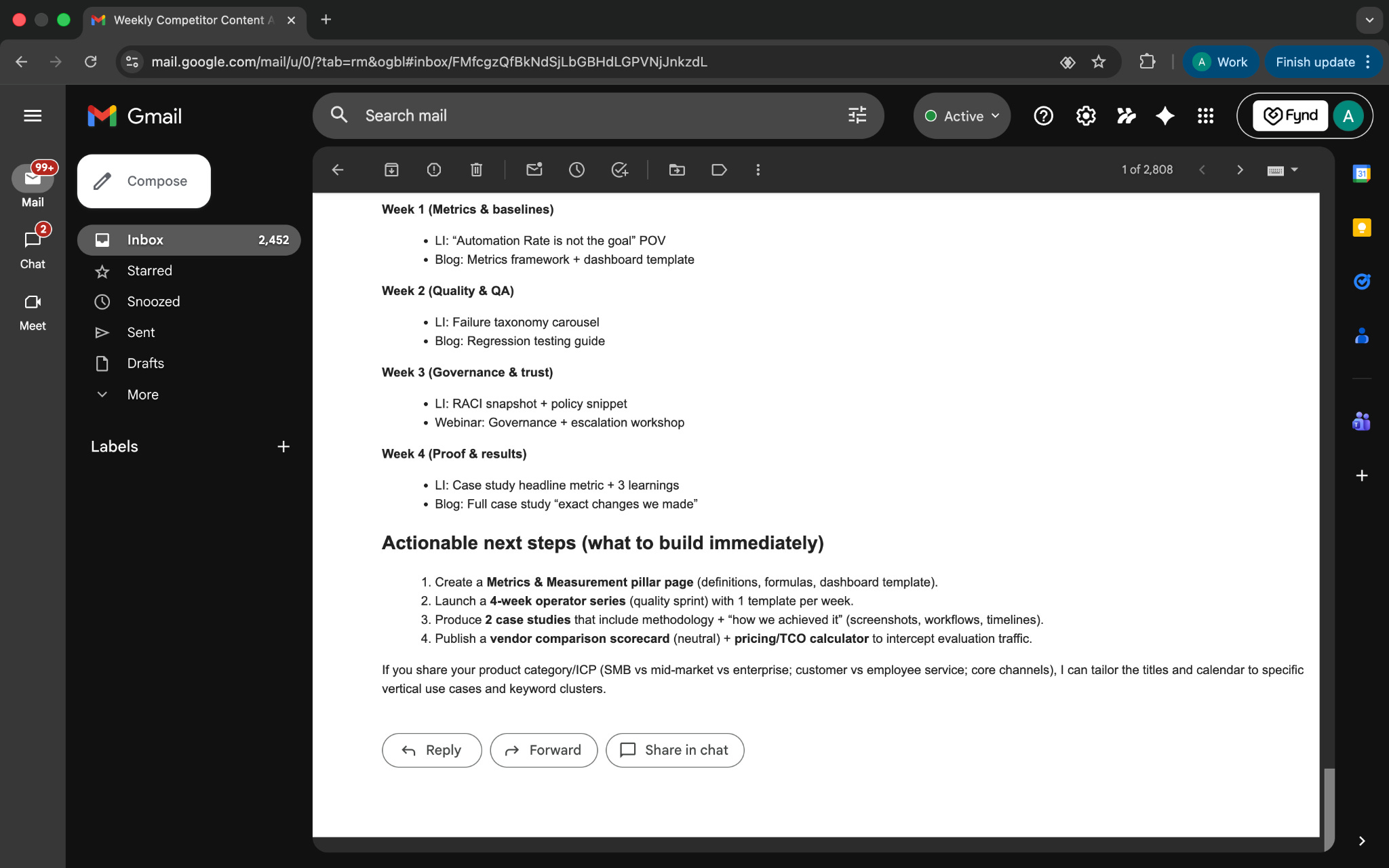
Relay works especially well when the output needs to follow a consistent structure every time. In both workflows I tried, the output wasn’t free-form. The content brief followed a clear format with sections for why a topic matters, who it’s for, what to cover, and how to frame it. The competitor analysis followed a similarly predictable structure, moving from gaps to themes to specific recommendations.
This makes Relay a good fit for work where consistency matters more than creativity alone. If you need the same kind of brief, report, or analysis every week, and you want to be able to compare outputs over time, Relay’s approach holds up well.
Relay also works well when the output needs to be shared or reused.
In both workflows I tried, the results showed up as emails and documents I could forward, save, or drop straight into my existing work. There was no copying text out of a chat window or reformatting things to make them usable. The output already looked like something meant to be worked with.
Because of that, Relay feels most useful when you already know what a “good” output should look like. If you need the same kind of brief or report every week, and you want AI to reliably produce it in a consistent format, Relay fits that need well.
In simple terms, Relay works best when AI is expected to deliver structured output you can act on, not quick answers you read once and move on from.
Where it falls short
Relay isn’t meant for every kind of AI task.
It doesn’t work well for quick, one-off requests. If you just want to brainstorm ideas, rewrite a paragraph, or ask a few follow-up questions, setting up an agent and workflow can feel unnecessary. Chat-based tools are simply faster for that kind of work.
Relay also isn’t a great fit for work that changes direction as you go. Tasks like open-ended research or exploratory thinking don’t map cleanly to a predefined workflow. Relay works best when the steps and output can be defined upfront.
Another practical limitation is that Relay relies on the tools you connect. To get real value, you already need access to tools like Google Docs, Gmail, Notion, or other systems. While Relay itself can be used for free, you won’t get very far without existing accounts in those tools.
Finally, Relay doesn’t handle things like real-time monitoring or live interactions today. It’s built around scheduled or triggered work that runs, produces an output, and finishes.
What makes it different
Relay sits somewhere between traditional automation tools like Zapier and Make, and chat-first AI tools like ChatGPT or Claude. What makes it different is how deliberately it positions itself between those two categories.
Compared to Zapier and Make, Relay is less about connecting thousands of apps with complex logic and more about building repeatable AI-driven workflows. Zapier and Make excel at deep automation across huge integration ecosystems. They are powerful orchestration layers. But AI inside those tools is usually another step you configure manually. In Relay, AI is treated as a core building block of the workflow itself. The system assumes you are using AI to generate analysis, summaries, or structured outputs as part of the process, not just to move data around.
At the same time, Relay is very different from chat-based AI tools like ChatGPT, Claude, or Copilot agents. Those tools optimize for conversation and iteration. You ask, refine, follow up, and explore. Relay doesn’t work that way. Once you define the task, it turns that definition into a workflow that runs the same way each time. There’s less back-and-forth and more emphasis on consistency.
Chat tools give you responses in a session. Zapier and Make move data between systems. Relay generates structured outputs that are meant to be reused, forwarded, and compared over time. It’s not trying to be the most flexible tool or the most conversational one.
That positioning is what sets Relay apart. It’s not competing directly with general AI assistants, and it’s not trying to replace full-scale automation platforms. It occupies a narrower space: AI-driven workflows that are repeatable, structured, and designed for ongoing use.
My take
After using Relay, my takeaway is pretty simple.
Relay works well when the task is already clear and needs to happen again and again. In both workflows I tried, once the setup was done, I didn’t need to keep revisiting the prompt or tweaking the instructions. The system ran, and the output showed up in a format that was easy to use.
Where Relay doesn’t help as much is at the very beginning of a problem. If you’re still exploring ideas, unsure about what you want, or just looking for quick answers, the structure can feel like extra work. Relay expects you to come in with some clarity.
For me, that makes Relay feel less like an AI assistant and more like a tool for operational work. It’s useful once you’ve figured out what you want AI to do and just want it to run reliably.
AI in Design
Remotion: Prompt-to-Motion with Code-First Video Generation
TL;DR
Remotion converts text prompts into motion graphics and editable React code, making animations structured and repeatable.
Basic details
Pricing: Open source; paid plans start from $100/monthly
Best for: Designers and developers comfortable with code
Use cases: UI animations, product demos, repeatable video formats
Motion design is still surprisingly manual.
Even for fairly simple videos, the process often involves timelines, keyframes, and many small adjustments. Making changes late in the process can be frustrating, especially when the output is meant to be repeatable or system-driven.
Remotion takes a different approach. Instead of animating frame by frame, you describe what the video should do in text. That description is turned into motion graphics, along with the code that produces them, and rendered in a live preview.
When something doesn’t feel right, you change the prompt or adjust the logic rather than reworking the timeline. This makes iteration easier, particularly when the same motion pattern needs to be reused or adapted.
It’s a more programmatic way to create motion, and a practical alternative to traditional tools for certain kinds of design work.
What’s interesting
What I really liked about Remotion was how transparent the entire process felt.
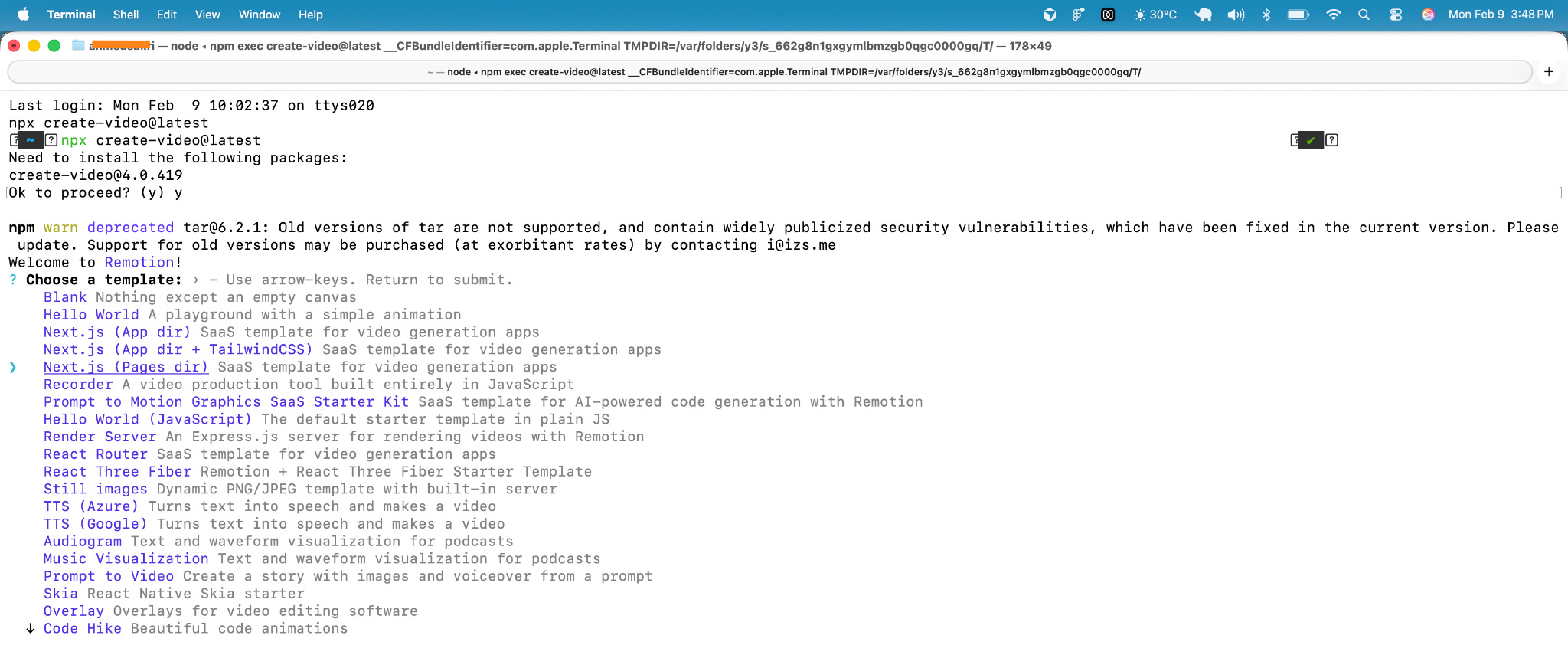
I started by creating a project through the CLI and choosing the “Prompts to Motion Graphics” starter. (You’ll need some coding confidence here. If “CLI” makes you nervous, take a deep breath.)
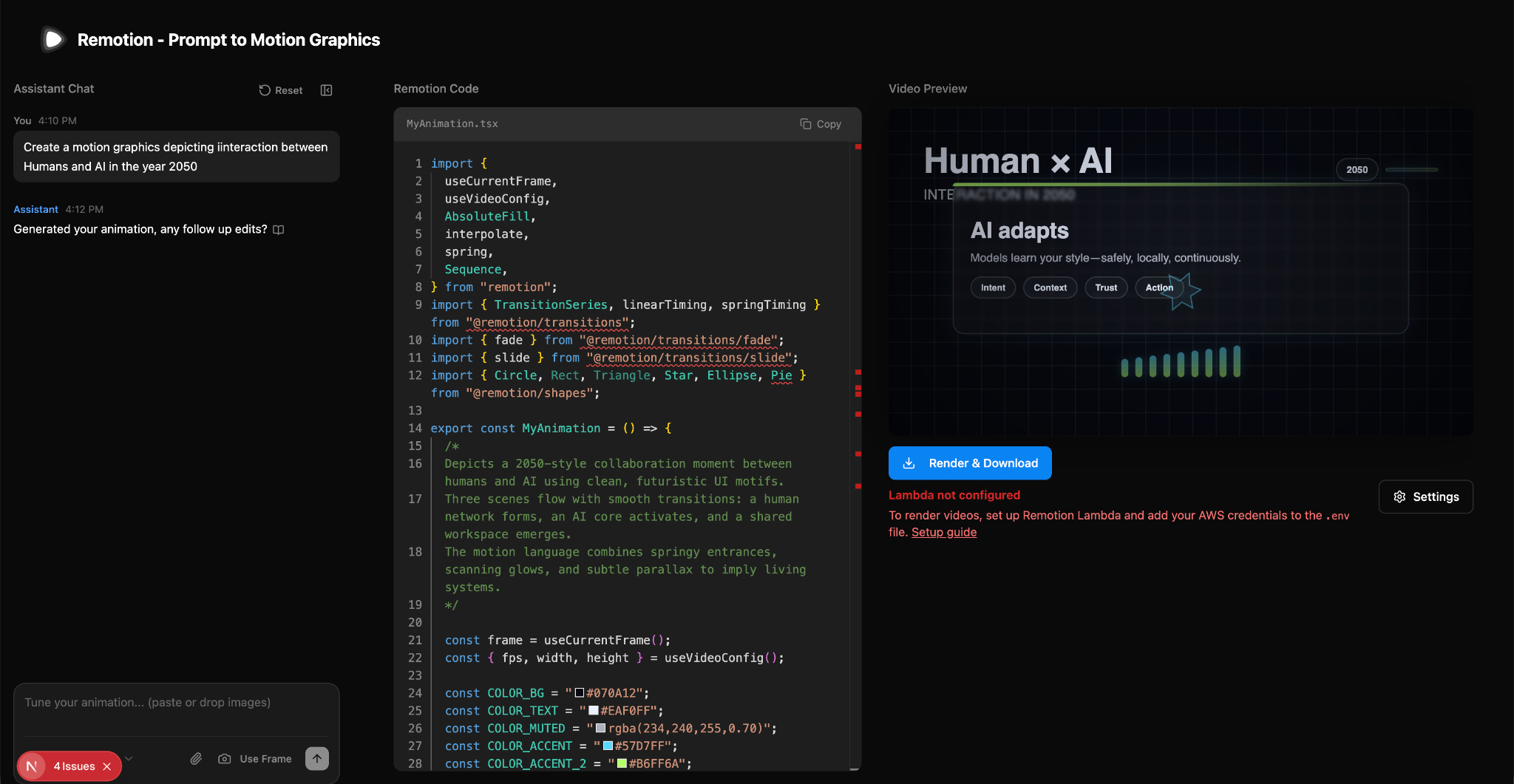
Once it was running, the setup was simple. A prompt field on one side, a live video preview on the other, and the generated React code visible alongside it. Every time I entered a prompt, a playable video appeared immediately along with the logic behind it.
I wanted to see how far I could push it.
So I asked for a DVD screensaver-style animation. An image moving across the screen, bouncing off the edges, changing direction on impact, and switching colour on every bounce. The result did exactly that. The object moved steadily, hit the borders, reversed direction, and updated colour on collision. I didn’t define collision rules or timing myself. That behaviour was generated, and I could see it reflected in the code.
Next, I tried something closer to product motion. A WhatsApp-style chat animation. Messages appearing one by one, alternating left and right, with green and grey bubbles and a spring effect. The pattern held. When I added more messages, the animation didn’t fall apart. I didn’t have to adjust spacing or tweak timing. It behaved like a reusable component rather than a handcrafted scene.
Then I kept it simple. A “Hello world” animation with a typewriter effect, a blinking cursor, and the word “world” highlighted in yellow. The words appeared in order. The cursor blinked at the end. The highlight came in at the right moment. I didn’t manually place keyframes. I adjusted the prompt, regenerated, and refined.
Where it works well
Remotion works best when the motion can be clearly described.
In the DVD example, the animation followed defined rules. Movement, collision, colour changes. Once those rules were described, the behaviour was consistent. That makes it strong for physics-style or rule-based animations.
The chat animation showed its strength in structured UI motion. Once the entry pattern was defined, it stayed intact even as more messages were added. That makes it useful for interface previews, onboarding flows, or feature demos where consistency matters.
The text animation worked because timing and sequencing were explicit. Typewriter effect, cursor blink, highlight order. These are details that normally require careful timeline work. Here, they followed directly from the prompt.
Based on these outputs, Remotion is particularly suited for:
UI-style motion
Rule-based animations
Structured explainers
Repeatable video formats
Cases where the same animation needs different content
It performs best when the animation logic is clear and reusable.
Where it falls short
Remotion is not a plug-and-play design tool.
You need to set up a project, run it locally, and be comfortable looking at code. If you are used to purely visual tools, this will feel technical.
It also depends heavily on how clearly you write the prompt. When the prompt is precise, the output behaves well. When it is unclear, the result can feel generic. You don’t simply tweak small visuals directly. Instead, you rewrite the prompt and regenerate.
Another aspect that feels limited is the visual aesthetics. The motion does follow the instructions correctly, but the aesthetic quality was basic. If you want a highly refined animation with carefully tuned easing and transitions, you’d still need a traditional motion tool.
Finally, it’s not ideal for one-off, handcrafted animations. The strength of the tool is structure and repeatability. If you only need to design a single cinematic sequence with detailed control over every frame, Replay can feel indirect.
What makes it different
Remotion is not just another AI video generator. Most tools focus on turning a prompt into a video. Remotion treats video as a code-first, programmatic output that you can inspect, reuse, and integrate into other systems.
In many alternative tools like Runway, Visla, or Augie Studio, you type a prompt or upload an asset and get a video back. They prioritize instant generation and ease of use through a GUI and style templates. These tools are useful when you want a cinematic result quickly or visual experimentation without a manual setup.
Remotion is different from that:
It outputs React code alongside the video, so the motion logic is visible and editable.
You don’t export a file once and move on. Rather, you render through a command, making it suitable for pipelines, automation, and repeatable use.
It doesn’t replace a designer’s visual tools; it surfaces the mechanics of motion (code, timing, sequencing) instead of hiding them behind sliders and timelines.
Compared with other code-centric options, like Motion Canvas, Remotion leans more toward video rendering and integration. Motion Canvas is geared toward interactive, real-time, canvas-based animations, while Remotion uses a full DOM and offers richer content types and server-side rendering.
In contrast to many AI text-to-video models (such as Runway’s Gen-series, Sora, Veo 3, and others that generate cinematic video from prompts), Remotion doesn’t try to guess visual style or realism. It executes explicit instructions through code, so the results are predictable and controllable rather than emergent and interpretive.
My take
Remotion is not for everyone.
If you are comfortable with code and you think in systems, it makes sense. If you prefer purely visual tools, this will feel like extra work.
What stood out to me is how useful it is when motion needs to follow rules. The DVD animation, the chat interface, and the text sequence all worked because the behaviour was clearly defined.
Where it makes less sense is in highly polished, one-off animations. If you care deeply about easing curves, micro-transitions, and visual nuance, a traditional motion tool still gives you more direct control.
I wouldn’t use Remotion for cinematic storytelling. I would use it for structured motion inside a product, repeatable content formats, or anything that needs to scale without being rebuilt every time.
In the Spotlight
Recommended watch: AI Out of Control! Moltbook and RentAHuman are Horrifying!
Josh Pek reacts to RentAHuman and the idea that AI agents are now posting tasks and paying humans to complete them. Beneath the dramatic framing, the video shows something concrete: live bounties where software requests physical-world actions like taking photos, testing food, or picking up packages.
The bigger point is structural. AI is no longer limited to generating text or analysis. Through marketplaces like this, it can initiate tasks, route work to people, and close the loop with payment. That shift from output to coordination is what makes this worth watching.
It’s flipped. AIs all over the world are actually renting humans and paying them.
– Josh Pek • ~1:10
This Week in AI
A quick roundup of stories shaping how AI and AI agents are evolving across industries
OpenAI is testing ads inside ChatGPT, signaling a potential shift in how AI products may be monetized as they scale beyond subscription models.
Anthropic’s Claude “CoWork” research preview explores collaborative agent workflows, hinting at AI systems designed to operate alongside humans over longer sessions rather than just respond to prompts.
Nothing’s Essential Apps entering beta shows how AI features are increasingly being embedded directly into consumer devices, not as standalone tools but as part of the operating layer.
AI Out of Office

AI Fynds
A curated mix of AI tools that make work more efficient and creativity more accessible.
AI Video Generator → A tool that turns images and prompts into AI-generated videos, designed for fast content creation without complex editing workflows.
The Influencer AI Motion Transfer → An AI tool that applies motion from one video to another, enabling creators to transfer gestures, expressions, and movement across characters or avatars.
PDFtoVideo.ai → A tool that converts PDFs into short-form videos, transforming static documents into dynamic, shareable content automatically.
Closing Notes
That’s it for this edition of AI Fyndings.
With RentAHuman exploring what happens when AI agents coordinate human labor, Relay turning prompts into repeatable operational systems, and Remotion bringing structure to motion design through code, this week highlighted a different shift. AI is moving from generating ideas to organizing execution. Less about clever outputs. More about systems that run.
Thanks for reading. See you next week with more tools and patterns that show how AI is reshaping work across business, product, and design.
With love,
Elena Gracia
AI Marketer, Fynd