

Welcome to AI Fyndings!
With AI, every decision is a trade-off: speed or quality, scale or control, creativity or consistency. AI Fyndings discusses what those choices mean for business, product, and design.
In Business, HoneyBook shows how AI can help small businesses stay on top of their everyday work without extra effort.
In Product, Bubble and Lovable reveal two different interpretations of what an AI builder should be. One careful and flexible, the other confident and opinionated.
In Design, Marble pushes past images and into full spatial environments, giving you a sense of a place rather than a frame.

AI in Business
HoneyBook: A System For The Space Between Tasks
Running a service business never feels as simple as it looks from the outside. People imagine a clean sequence where a client reaches out, you agree on the work, and everything moves along neatly. But the real effort lives in the spaces between those steps. A half-written proposal waiting for the right moment. A call you meant to schedule. A contract that should have gone out yesterday. A payment reminder that keeps slipping to the bottom of the list. None of it is overwhelming on its own, yet together they create a constant pull that follows you through the week.
HoneyBook is built for freelancers, independent professionals, and small teams. These are the people who feel that pull the most, because they manage every part of the client journey themselves. The tool is currently available only in the United States and Canada.
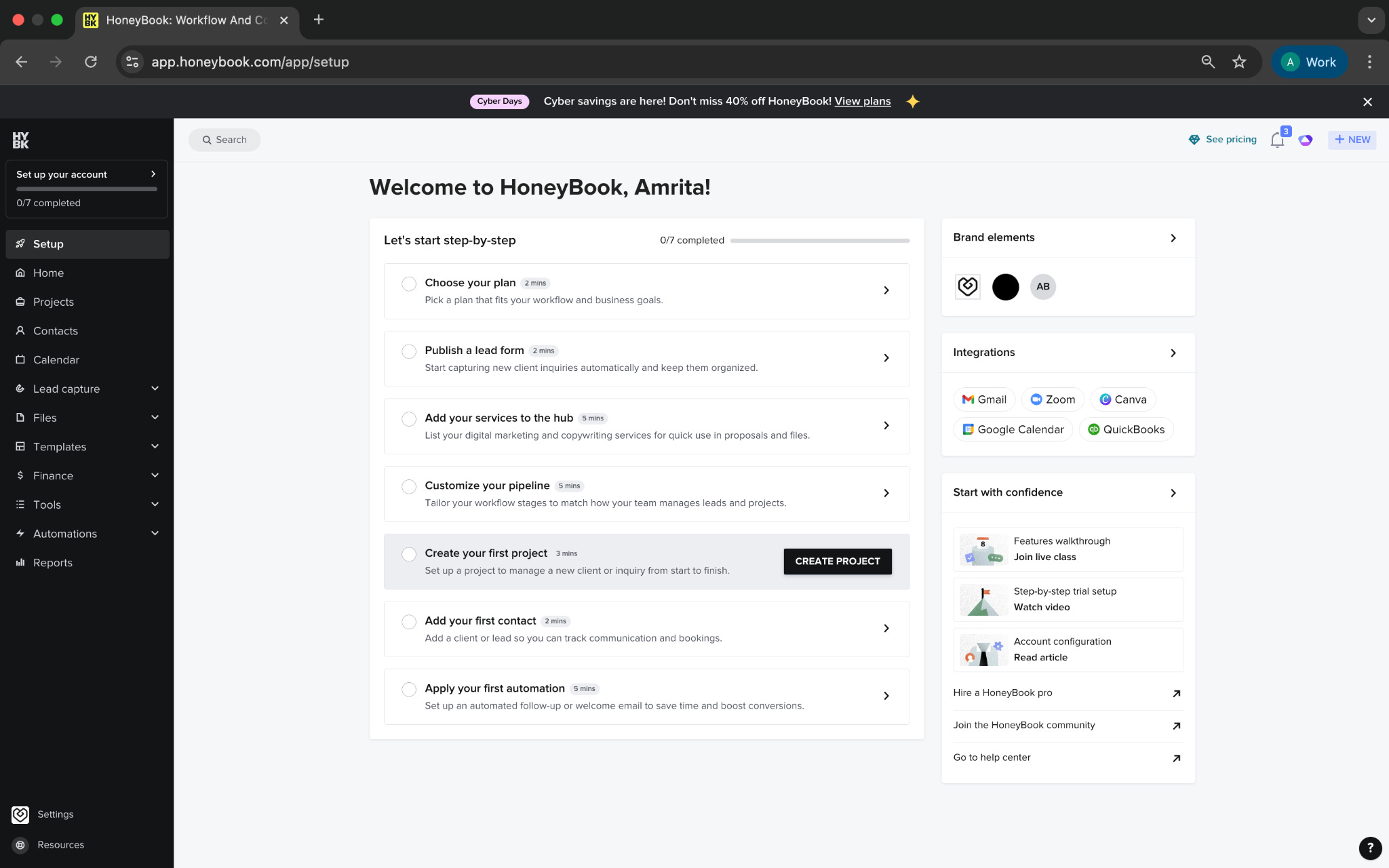
When I tried HoneyBook, the first thing that stood out was how it eased me into the setup. It didn’t burden me with menus or features. It simply asked what my business is about, how it runs, and what I want to fix first. Based on that, it built a starting point that felt familiar. It was practical and direct, and it made the rest of the platform easier to engage with.
What’s interesting
HoneyBook takes a process that is usually scattered across emails, spreadsheets, DMs, and calendars and turns it into one steady flow. When a new inquiry comes in, you don’t lose it under everything else happening that day. You open it and instantly see where it came from, what the person needs, and what should happen next. It is one of the few tools where the workflow feels followable even on a busy day.
The AI plays a quiet, supportive role. It does not try to take over your work or predict your decisions. Instead, it helps at the moments where people often slow down. A draft when you cannot find the right words. A reminder when a lead starts to fade. A quick outline before a call so you walk in with clarity. None of it feels like automation happening in the background. It feels like the small support you need to keep moving.
Where it works well
HoneyBook works especially well for service businesses that follow a steady process. Someone reaches out, you talk, you share details, they sign, you begin the work. The platform supports this flow without asking you to redesign it.
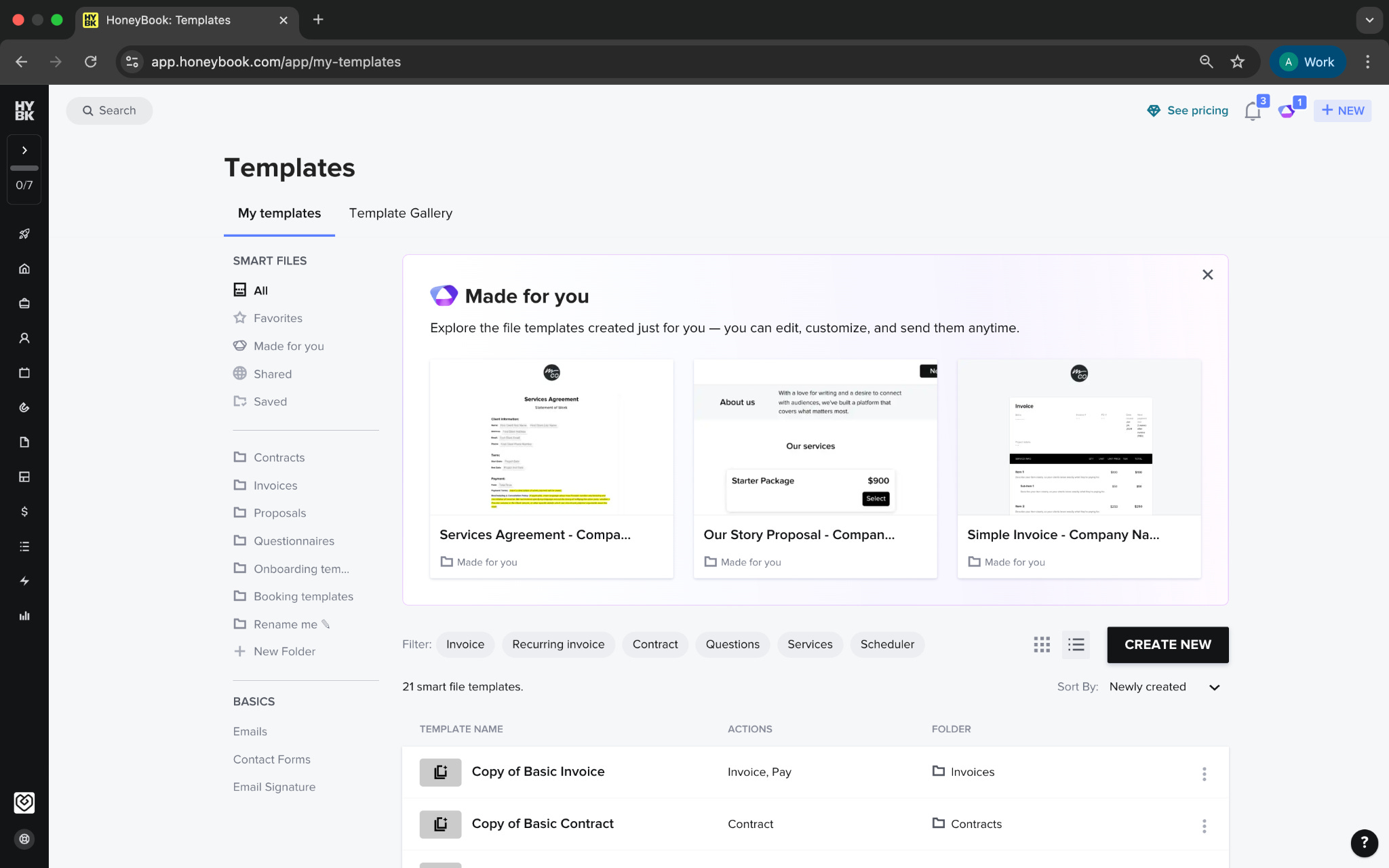
The lead forms are flexible and easy to create. Once a lead enters the system, HoneyBook organizes it and moves it through your pipeline. The Smart Files system stands out. Proposals, contracts, invoices, and questionnaires all use the same editor, which keeps the experience cohesive. Even small teams can deliver a polished client experience with very little effort.
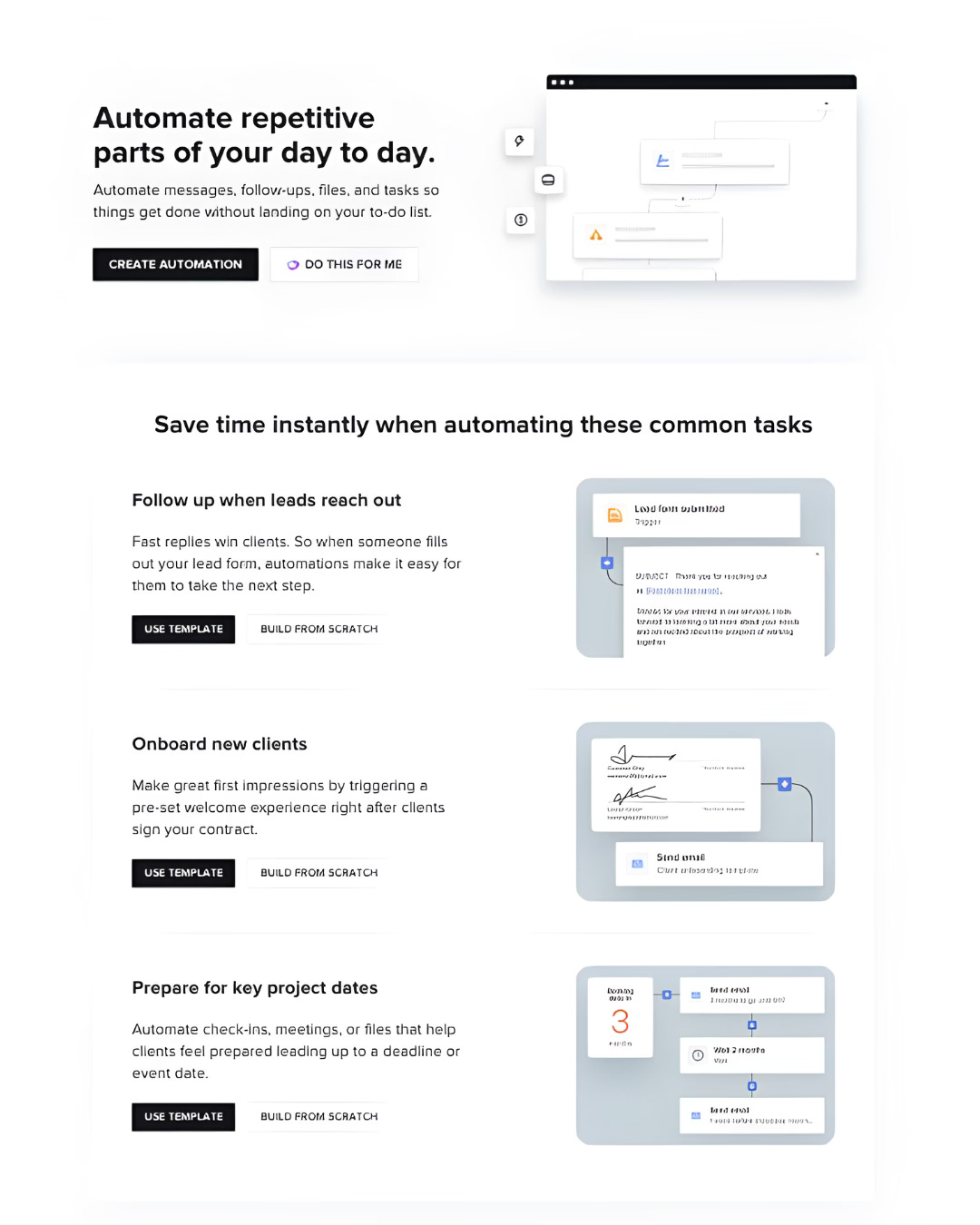
Automation ties everything together. You can describe your process and let the AI build a draft workflow, start from a template, or assemble your own. The system feels approachable even if you have never created automations before.
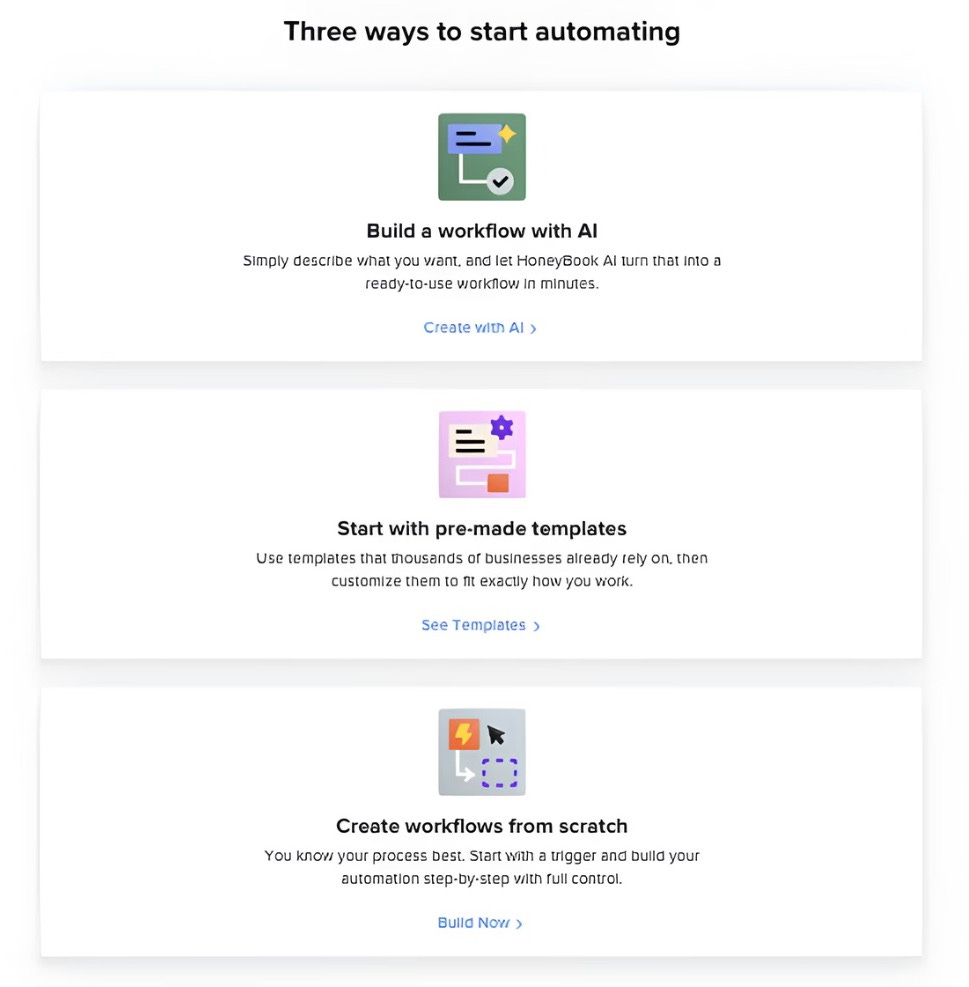
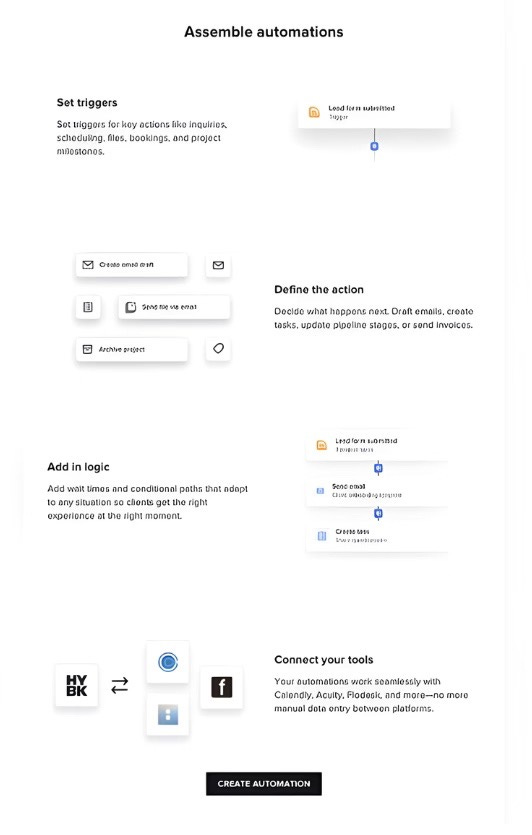
Beyond that, HoneyBook folds in scheduling, tasks, time tracking, expenses, batch emails, contact management, and financial summaries. Integrations with Gmail, Google Calendar, Zoom, Canva, Slack, QuickBooks, Asana, and Zapier help reduce the number of tools you rely on daily.

Where it falls short
HoneyBook is designed for simplicity but the platform is yet not ideal for businesses with complex workflows. If your process branches in multiple directions or requires detailed internal routing, you may run into limits. Tools like Dubsado are more flexible for people who need deep customization.
The AI is helpful but not analytical. It supports communication and preparation but does not offer forecasting, strategic insight, or advanced reporting. If you want guidance on bigger business decisions, HoneyBook does not stretch that far.
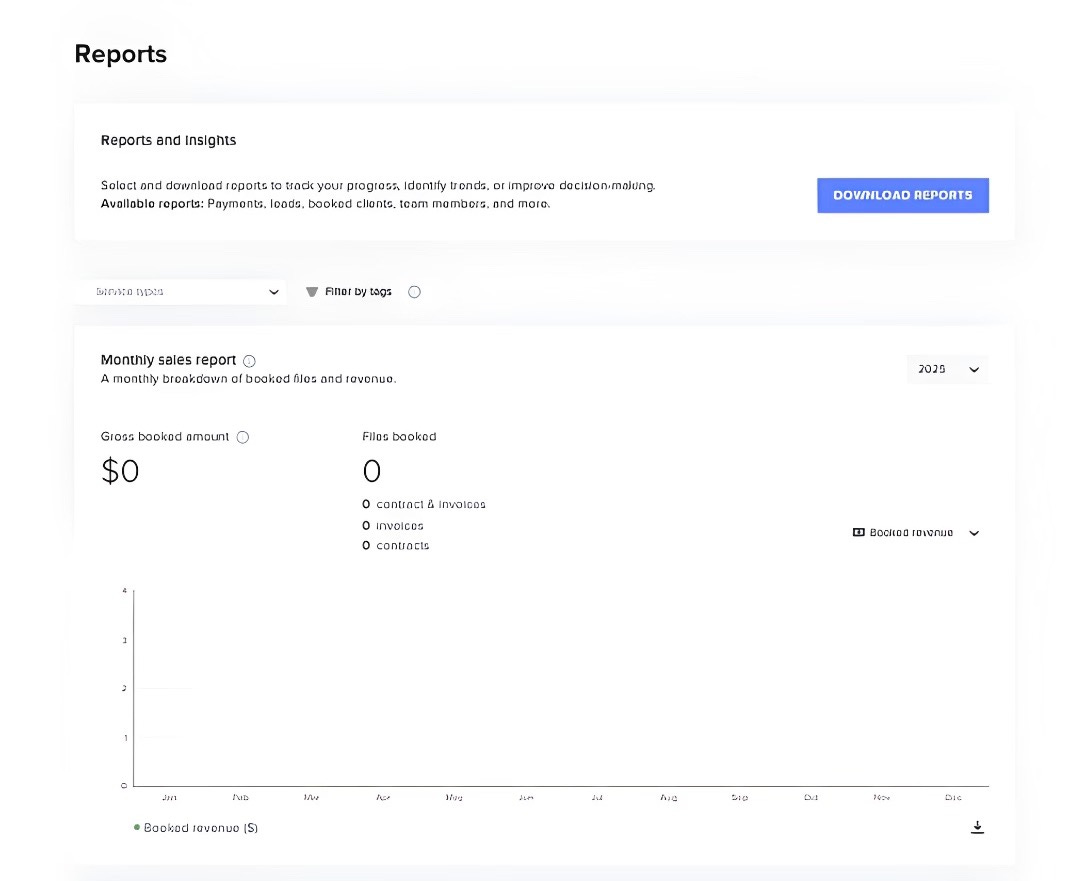
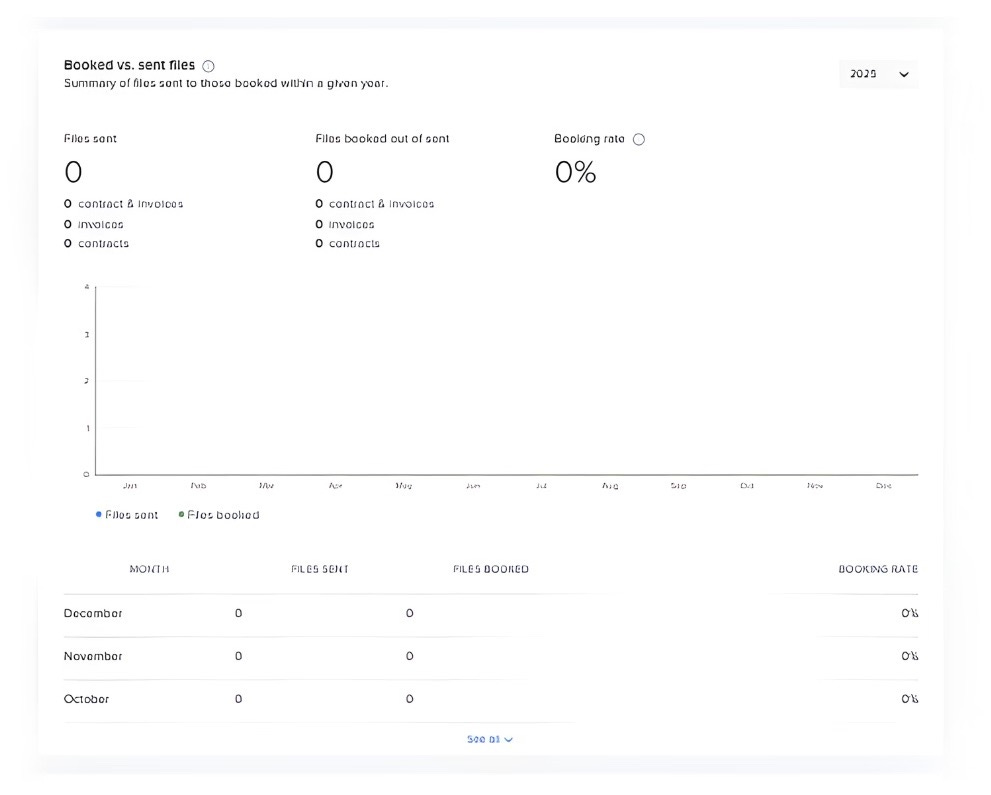
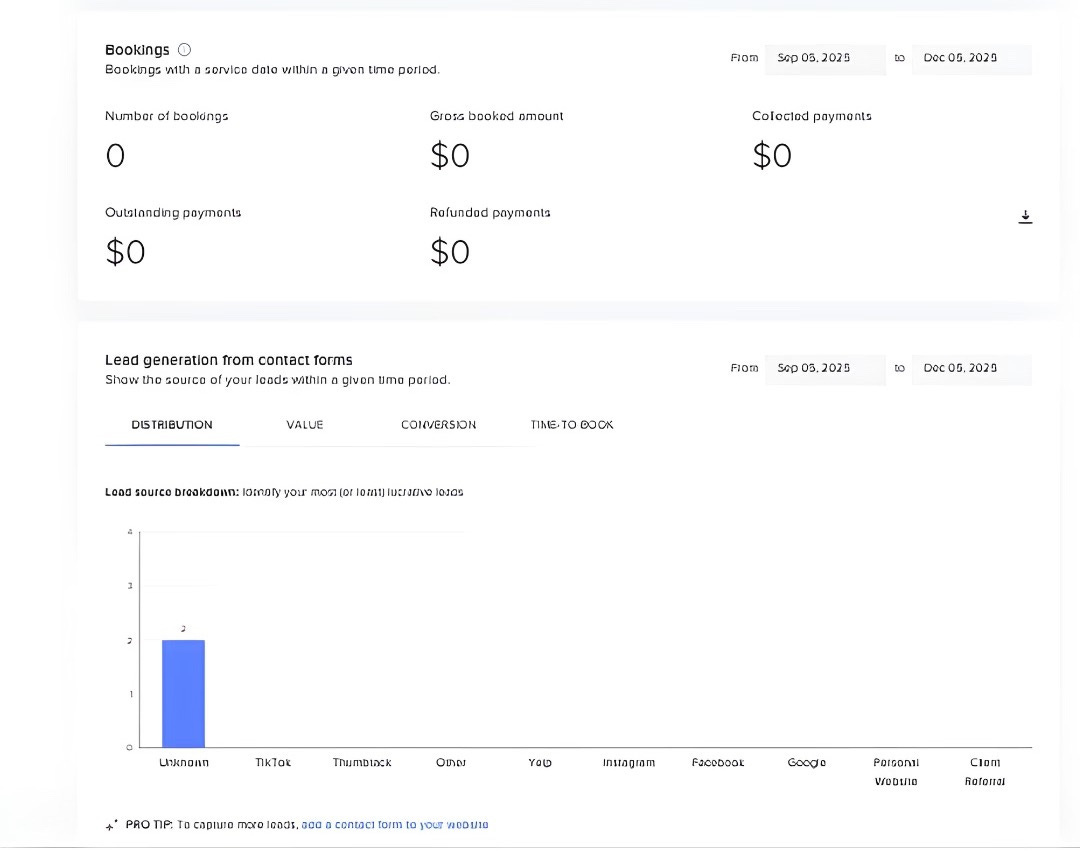
The reporting tools focus on essentials. They show revenue, bookings, and lead performance but do not provide multilayered insights. And while HoneyBook supports small teams well, larger teams may find the structure too narrow for their needs.
What makes it different
What sets HoneyBook apart is the way it treats operations as something that should feel manageable rather than mechanical. Many business tools try to prove how powerful they are by giving you endless options. HoneyBook takes a different approach. It trims what is unnecessary and focuses on the parts of your day that actually shape how your business feels.
Instead of trying to trouble you with complexity, it focuses on consistency. The tool does not make your decisions for you, but it creates an environment where decisions are easier to make. Projects stay on your radar without demanding your attention. Clients move forward without needing constant reminders. The system gives shape to your work in a way that feels supportive rather than strict.
HoneyBook’s AI reflects the same restraint as the rest of the platform. It is not trying to run the business on your behalf. Instead, it pays attention to the moments where people often get stuck and adds just enough support to keep things moving. A quick draft to break the pause before replying. A meeting summary so you do not go hunting for notes. A gentle nudge when an inquiry is going quiet. These small interventions make the work feel lighter without changing how you work.
My take
HoneyBook understands the invisible weight of running a service business. It does not try to transform your workflow. Instead, it steadies it. It catches the tasks that usually slip through. It gives you a cleaner view of your week. It helps you stay consistent without requiring extra energy.
It is not for every business. Larger teams or operations with complex processes will likely outgrow it. But for freelancers, consultants, creatives, and small service teams, HoneyBook offers something rare. It brings clarity to the part of your business that often feels scattered.
And when the moving pieces finally sit in place, you realise how much easier the work becomes. HoneyBook helps you get there.
AI in Product
How Far Can Bubble’s AI Builder Really Take You?
I’ve been seeing more people talk about AI app builders lately, so I wanted to see how they hold up in day-to-day use. Bubble has been part of the no-code space for years, and people use it to build everything from simple tools to fully fledged web applications. It gives you a lot of freedom, but it also expects you to learn how the editor works before you can build anything meaningful.
The new AI builder is meant to soften that learning curve. You describe your idea, and Bubble puts together the first draft so you’re not starting from nothing. In theory, it should take you from an idea to something you can click through much faster.
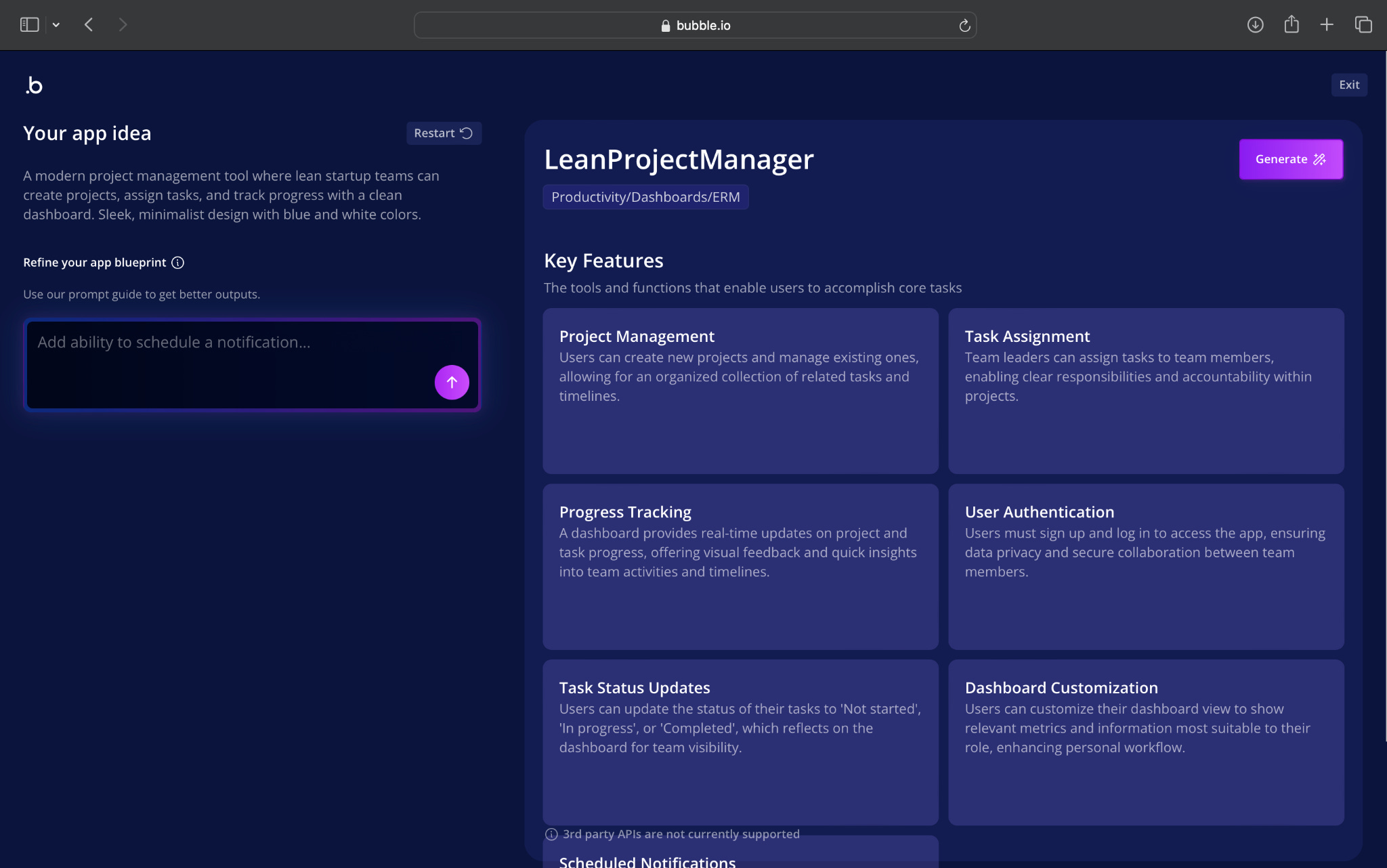
To see how well that works in practice, I gave it a basic product idea that should be easy enough to translate into screens and workflows: a simple project management app with a clean dashboard and a few straightforward interactions.
What’s interesting
Bubble understood the brief and broke it down into features in a clear, structured way. The initial blueprint felt organised, and it captured the broad shape of the app I had in mind. It suggested pages, user flows and basic functionality that made sense for the concept.
The real insight came once Bubble started building the app inside the editor. You can actually see the AI working: adding elements, adjusting layouts and filling in placeholder content. It shows exactly what it’s doing, step by step.

That transparency makes it easy to understand how Bubble thinks about the task. But it also highlights the limitations. The AI follows the process, but it doesn’t always take initiative. It arranges components correctly, yet the output sometimes feels more like a draft of a draft rather than a near-ready interface.
This contrast becomes clearer once you compare it with Lovable later, which takes the same idea and produces something that feels more polished from the start.
Where it works well
Bubble’s AI builder is helpful when you want to avoid the blank-canvas problem. It gets you to the first version of your app quickly, especially if your idea has a straightforward structure. For example, a dashboard page, a tasks page and a project view all came together without much trouble.

It works best for:
teams that plan to customise heavily
people who already understand Bubble and want a head start
early explorations where rough screens are good enough
Bubble also gives you full control once the AI step is done. You can adjust anything: spacing, components, workflows, data structure. For builders who like that level of control, Bubble’s flexibility is still its biggest strength.
Even so, some generations require cleanup. A few screens look tight and organised; others feel like they need alignment, spacing fixes or layout tweaks. The AI gets you moving, but you often need to refine what it produces.
Where it falls short
The gaps show up in consistency. Some elements sit too close together, others are spaced unevenly, and certain screens feel disconnected from the rest.
The AI also tends to assemble pieces rather than design a unified product. It places components correctly but doesn’t always think about flow, hierarchy or visual balance.
Another limitation is speed. The “building key features” phase can take longer than expected, and the output still feels early-stage.
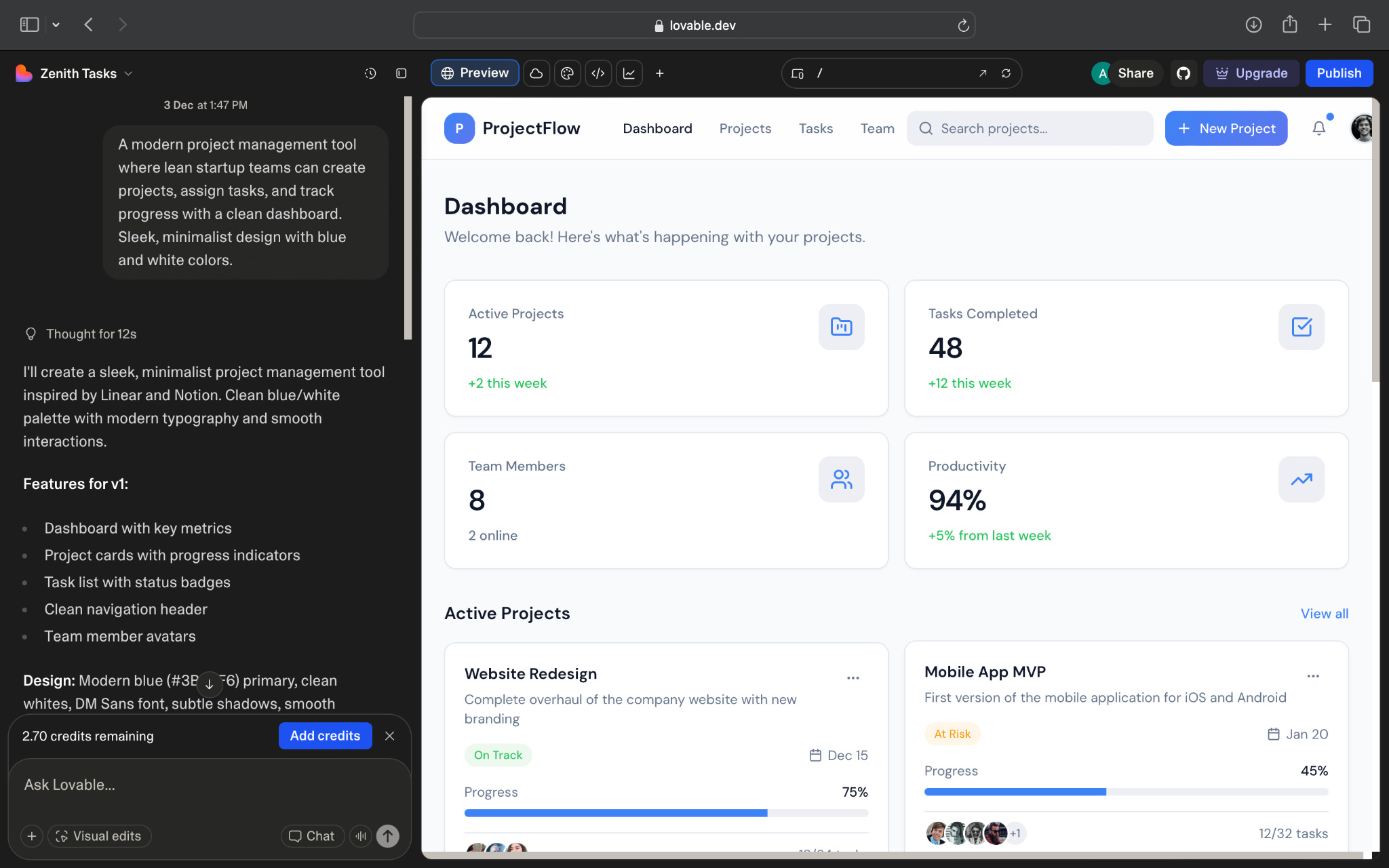
Lovable, by contrast, approaches the same problem with more confidence. It commits to a design system, uses consistent spacing and produces layouts that look thought-through from the start.

Bubble’s AI helps, but it still expects you to be involved. Lovable helps by shaping the product more decisively.
What makes it different
Bubble’s AI layer sits on top of a mature editor. It doesn’t replace the tool; it works within it. That gives you transparency and full control, which is helpful if you like adjusting details or plan to extend the app deeply.
This also means Bubble’s AI behaves more like someone using the editor than someone designing the product. It doesn’t skip steps or make big decisions. It builds steadily, piece by piece, the way any user would.
Lovable, on the other hand, starts from intention. It decides on patterns, structure and layout before generating screens. It behaves more like a product designer than an editor operator.
My take
Bubble’s AI builder is useful, but it still feels early. It moves you past the blank screen and gives you a workable first version, but it doesn’t remove the need for refinement. If you like Bubble and prefer having control over every detail, the AI helps you get started faster without changing the way the tool works.
Lovable, though, feels like it understands the product itself. It creates layouts that already look like something you could put in front of someone, which makes the experience feel more complete.
If I wanted full control and expected to spend time editing, I’d use Bubble.
If I wanted to go from idea to a convincing prototype quickly, I’d use Lovable.
Bubble builds the draft.
Lovable builds the direction.
And depending on what you need, one may fit far better than the other.
AI in Design
Exploring 3D Worlds With Marble
A lot of early design work depends on understanding how a space feels. Static images can give direction, but they often miss how a room opens up, how lighting travels across it, or how elements relate when you look around. This is where 3D scenes become useful. They give you more context than a flat visual and make it easier to judge whether an idea holds together as an environment rather than a single frame.
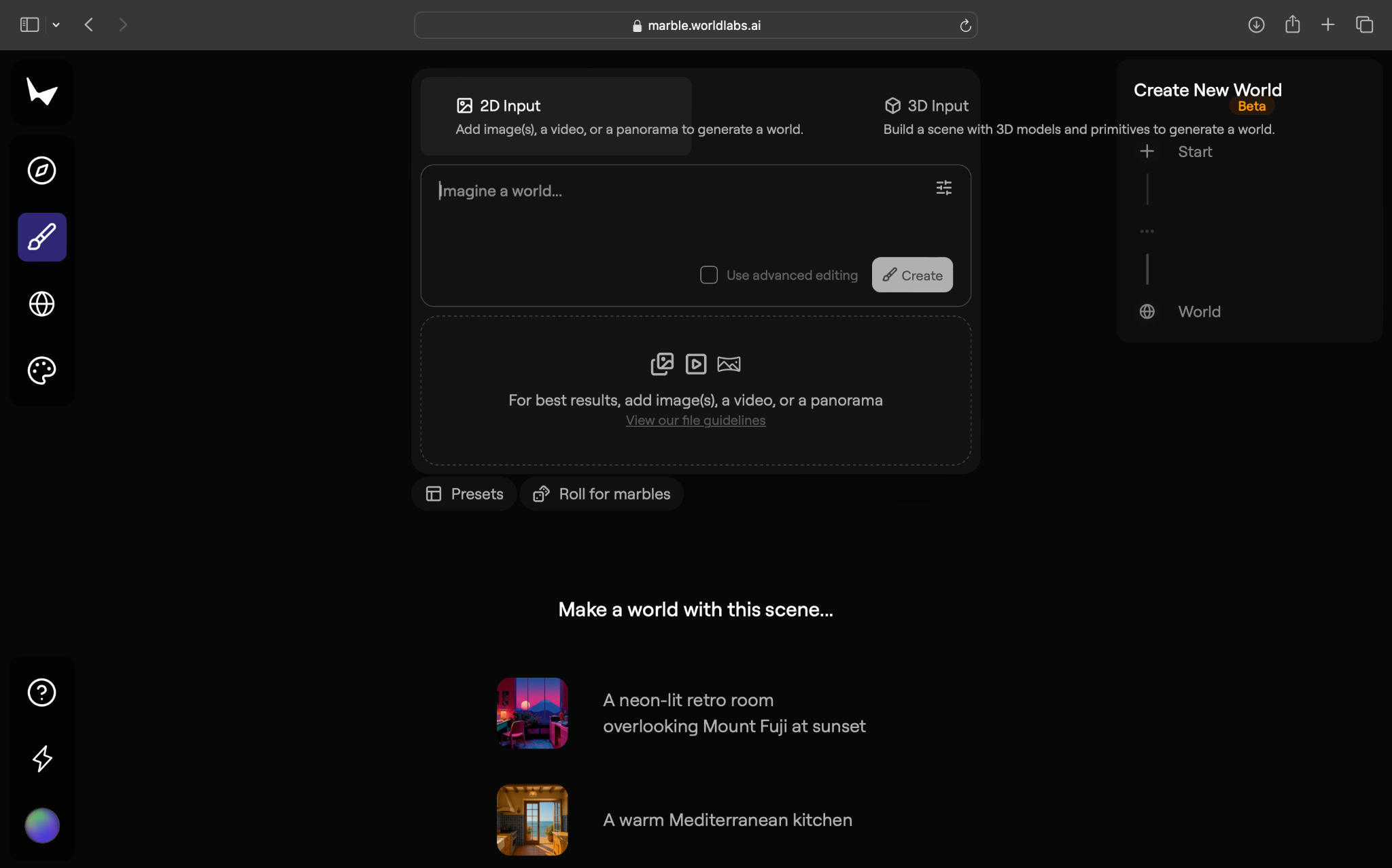
Marble is part of this shift. You write a prompt or upload a reference image and it generates a scene you can rotate through. The output is closer to a quick spatial sketch than a finished environment, but it still shows how the tool reads depth, material and atmosphere. I could not test the 3D model upload because it is only available in the paid plan, but even with image inputs, Marble gives a clear sense of what it is trying to do. Its interface also helps. The Explore tab surfaces worlds created by other users, which makes it easier to understand what the tool handles well. The studio view lets you save, edit and organise scenes without switching tools. These small additions make the experience feel more guided.
What’s interesting
What stood out about Marble is how often it manages to produce scenes that feel surprisingly believable. In the greenhouse example, the lighting and plant textures carried through the full 360-degree view in a way that felt consistent with the photo I uploaded. You could rotate the scene and the mood stayed intact.
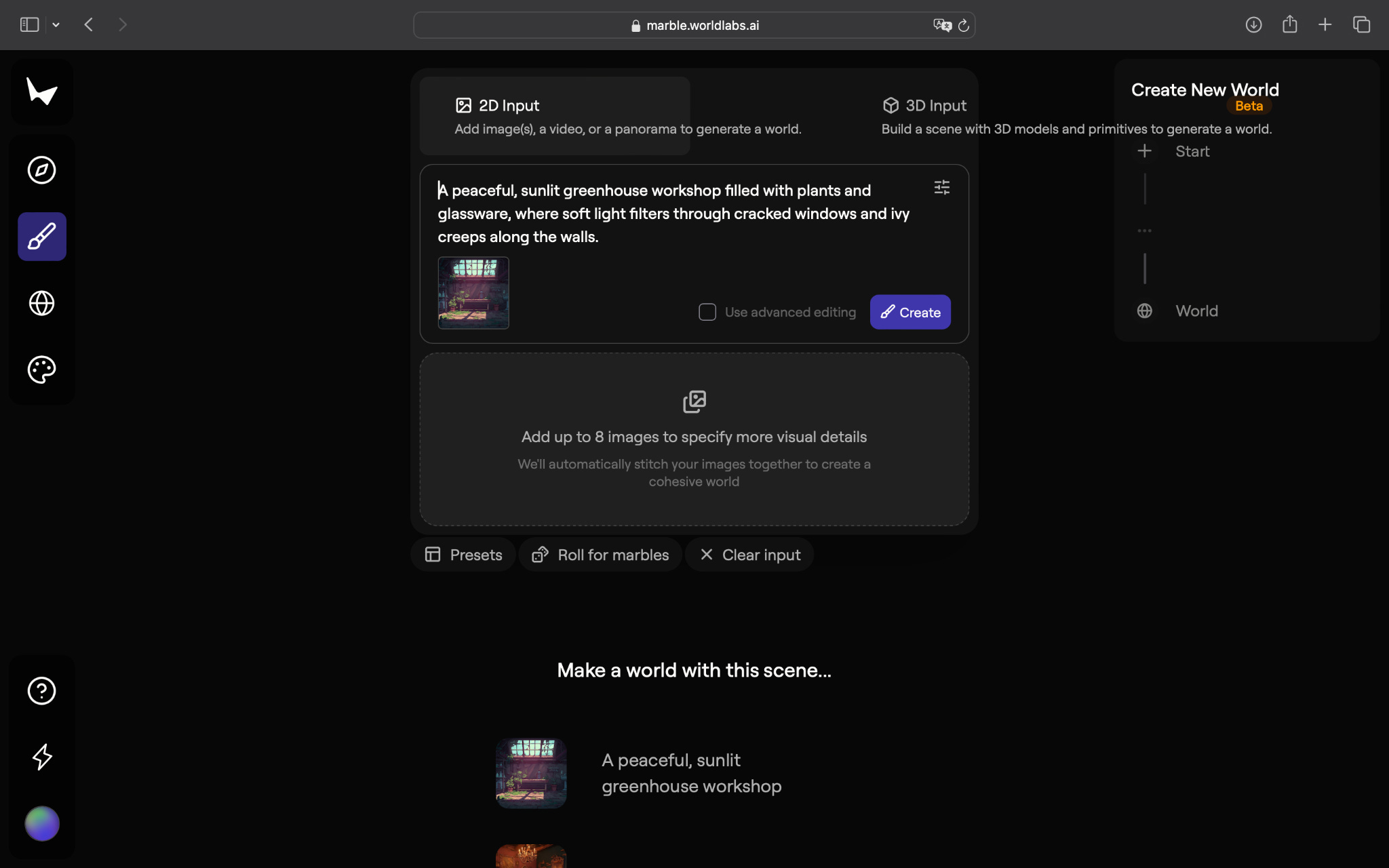

The Bohemian room example showed this even more clearly. The warm tones, the textiles and the overall layout translated well into a space that looked lived in. It was not perfectly stitched together, but the realism of the materials and the way the scene held its atmosphere made it easy to imagine someone standing inside it.


Marble’s presets also help. You can switch between realism, stylised and interior modes depending on what you want to explore. Each preset affects lighting and texture choices without breaking the overall feel of the scene. This flexibility, paired with the ability to browse community creations in the Explore tab, helps you understand what direction might work best for your own reference.
This level of realism sets Marble apart from tools that lean heavily into stylisation. Tools like Skybox (by Blockade Labs) often produce scenes that look artistic or abstract. Marble feels more grounded. It aims for spaces that resemble real interiors, which makes it more useful when you want something practical rather than playful.
The style controls help too. Switching between realism and stylised modes changes the mood without breaking the sense of space. This makes it easier to test different directions before choosing one.
Where it works well
Marble works well when you need to get a feel for a space without committing time to proper 3D modelling. It helps interior designers, art directors, illustrators and game concept teams gather ideas quickly. The scenes are not precise, but the realism is good enough to judge whether a direction feels appropriate.
The tool is also helpful for moodboards. Instead of stitching images together, you can generate a single environment that defines the mood more clearly. The panoramic view gives enough information about lighting, layout and textures to move conversations forward inside a team.
Marble suits people who enjoy exploring visual ideas and want a quick way to test environments. It asks very little upfront and gives you something concrete to react to.
Where it falls short
The limitations show up quickly. Without access to 3D model uploads, you cannot test how Marble performs with structured geometry. This is likely where the tool is strongest, but the free version does not let you explore that.
Even within 2D input, some scenes feel cohesive while others show stretched textures or repeated details when you rotate. The transitions between walls and objects are not always clean. If you need precision, Marble will not give you that. It gives you a direction, not a usable asset.
This is where tools like Meshy or Luma take the lead. They offer more control and produce output that is closer to real 3D work, but they also demand more from the user. Marble sits in a different spot. It is lighter, faster and more accessible, but less reliable when it comes to detail.
For teams that need consistency, Marble’s variability might be a challenge. Some scenes work immediately. Others need a few iterations before you find something usable.
What makes it different
Marble’s scenes look convincing at a distance, but they do not always hold up when you rotate through them. Some textures stretch, certain edges blur and a few surfaces repeat in ways that break the sense of geometry. These are expected limitations of tools that generate 360 degree environments from 2D inputs.
The free plan makes this more noticeable. Without 3D model upload, Marble has to infer the structure of the room from the prompt or image, which means the results depend heavily on the quality of the reference. Simple, well lit photos usually work better than complex compositions.
Other tools, like Meshy or Luma, produce more accurate structure because they rely on 3D reconstruction rather than panoramic generation. They offer cleaner depth and geometry, but they also require more steps and are not as quick for early exploration. Marble sits in a simpler category. It focuses on speed and accessibility, but that comes with tradeoffs in consistency.
My take
Marble is a helpful tool for early exploration, especially when you want to think in spaces without opening heavy software. It gives you something simple but useful: a draft you can rotate through, a sense of depth and mood, and enough information to decide whether an idea is worth developing.
It is not for technical 3D artists who need precision. It is not for people who want polished scenes. It is for designers who want to see how an idea translates into a space before they invest more time.
Marble will not replace 3D tools, but it fills a gap between imagining a room and building one. For early ideation, that is often the part that matters most.
In the Spotlight
Recommended watch: Marble — The First Controllable 3D World Model You Can Try Today
This walkthrough of Marble shows what controllable 3D generation looks like when it is actually usable. The video moves past abstract claims and shows Marble turning a single photo, a short prompt or a set of images into a navigable scene. Rooms, hallways, kitchens and even imagined interiors are reconstructed with enough realism to feel believable, and the editing tools make it possible to adjust the scene without breaking its consistency. The output still has limits and the edges show, but the overall experience feels closer to a real design tool than a tech demo. It is an early look at how world models might fit into everyday creative work once they mature.
“We now have the first multimodal frontier world model, fully controllable. A world model you can actually move around in.”
This Week in AI
A quick roundup of stories shaping how AI and AI agents are evolving across industries:
DeepSeek goes head-to-head with GPT-5 - Chinese AI startup DeepSeek released new models (V3.2 and V3.2-Speciale) that claim performance on par with or better than top-tier models like GPT‑5 and Gemini 3 Pro on coding, reasoning and math benchmarks – all under an open-source licence.
Alibaba’s Qwen app becomes the world’s fastest-growing AI app - Qwen reportedly surged to over 149 million monthly active users (MAUs), making it the fastest-growing AI consumer app globally. Its rapid growth underscores growing user demand for accessible AI tools integrated into broader consumer ecosystems.
Google Workspace Studio brings AI agents to your everyday apps - Google’s new Workspace Studio surfaces agents inside Gmail, Docs, Drive and Chat – letting users build automations and workflows without code. It marks a shift: AI agents are moving from isolated assistants to integrated tools inside software many already use.
AI Fynds
A curated mix of AI tools that make work more efficient and creativity more accessible.
Fooocus → A simplified image-generation tool that lets you create high-quality visuals with clean prompts and minimal setup.
Meshy → A 3D creation platform that turns text or images into textured models, ready for design, gaming or product workflows.
AI Video Generator → A quick, browser-based tool for generating short AI videos, ideal for fast product clips or mood visuals.
AI Out of Office
Closing Notes
That’s it for this edition of AI Fyndings. From HoneyBook’s take on simple, supportive AI for freelancers and solopreneurs, to Bubble showing how an AI builder behaves inside a familiar product, to Marble turning simple inputs into explorable scenes, this week was about AI stepping closer to the starting point of how ideas become tangible.
Thanks for reading. See you next week with more stories, tools and perspectives shaping how intelligence continues to evolve across business, product and design.
With love,
Elena Gracia
AI Marketer, Fynd
Great insights!
Good read